Solution 1 - Free File Converter Software
Supported OS: macOS (12 Monterey supported)
Let's begin with the world-renowned MacX Video Converter Free which is especially designed for you to free convert FLV to MP4 and transfer F4V to MP4, as well. It offers superb fast conversion speed and outstanding audio/video quality. Like its name, it is totally free. With it, everyone can become the master to do the FLV video to MP4 conversion job.
Furthermore, it can also free convert FLV to iPhone, FLV to MP3, FLV to QuickTime MOV, AVI to MP4 as well as convert video files between other mainstream formats, including AVI, MP4, WMV, MPEG, M2TS, H.264, etc.
How to Free Convert Flash Video to MP4
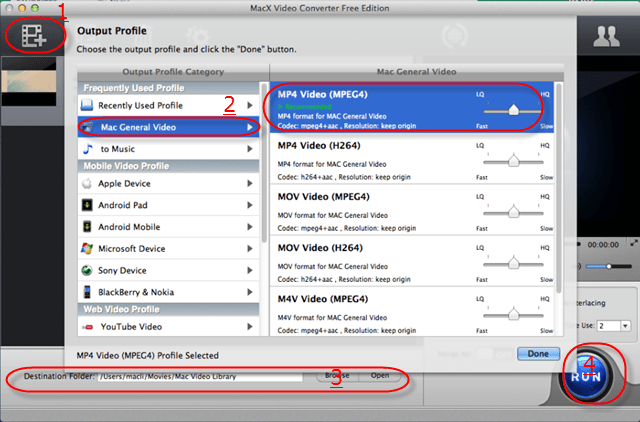
Step 1: Free download this free FLV video transcoder, run it, and then import source video by clicking "Add File" button. It accepts all popular used video formats like FLV, MKV, AVCHD, M2TS, AVI, MPEG, MP4, MOV, etc.
Step 2: Select the output format. In the output format area, there are much more output video format to be chosen, such as MOV, MP4, AVI, YouTube, iPad, iPod, iPhone etc.
Step 3: Click "Browse" button in output setting area and select a destination folder to save your converted video.
Step 4: Click "RUN" button to start the FLV to MP4 conversion. You can view the conversion progress and are able to cancel the converting process at anytime. (It's the same procedure to convert F4V to MP4 on Mac.)
Solution 2 - Best Online Free Converter
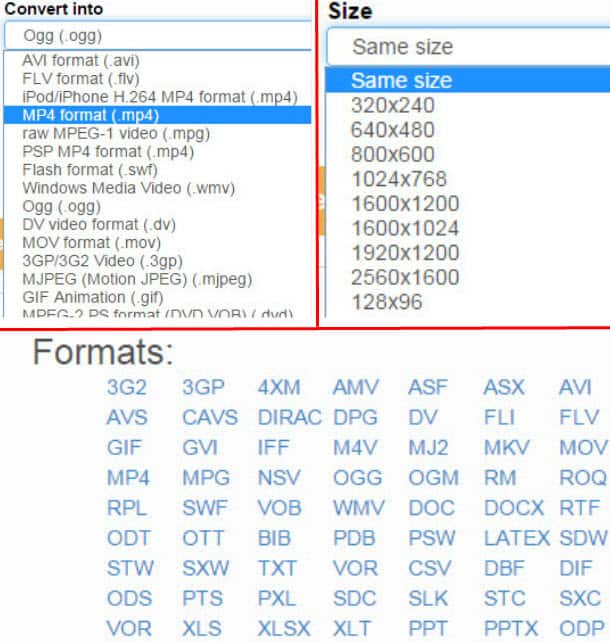
On top of the free FLV converter for MP4, you can also accomplish FLV to MP4 conversion task like a cork. That is utilizing free online video converter to convert flash video to MP4 video format. Here, in particular, worth recommending is the online video converter called files-conversion.com, on which you are allowed to import your FLV files and convert FLV to MP4 with purely 3 steps: import FLV; output MP4 format selection and convert button click. And if you also wanna change the output MP4 file size and quality, this free online converter leaves the option upon you.
What I should remind you is that this free video converter online is dead easy for you to convert FLV to MP4, as well as convert among other video formats, like convert FLV to AVI, FLV to MP3, MP4 to FLV, MP4 to SWF, etc., but its video loading speed and converting speed is far from satisfactory. See, I load in a 30 seconds length FLV video with 25MB and it costs me almost 8 mins to complete the loading task. If you care much about the effeciency, might be better to look somewhere else.
Solution 3 - VLC Media Player
Still think that VLC player is the one concentrating on video music playback? Sorry to tell you that you are out of trend. VLC media player, the most widely used free meida player also has the mighty power to free convert FLV files to MP4 video format with high quality reserved. Can't believe this? Follow me to see how this happens.
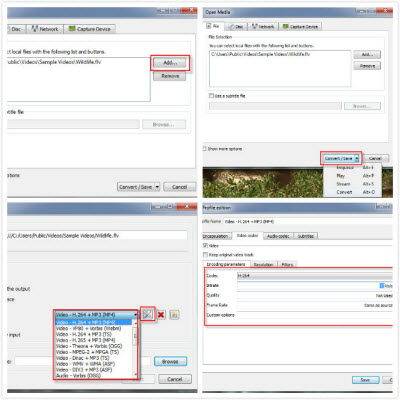
- Import FLV files. Free download and lauch VLC media player. Then click "Media" > "Convert/Save" > "Add" to load in flash video files you wanna convert.
- Convert to MP4. Ensure the "Convert" button is selected on the pop-up windows, then choose the type of MP4 video format you wanna get: Video H.264+ MP3 or Video H.265 +MP3; it depends on your own needs.
- Destination folder. Pick out the destination folder to save your converted MP3 file and then press "Start" button to begain change FLV to MP4.
You can also adjust the output MP4 file parameter settings like Bit rate, frame rate, codec, etc. like the 4th picture shown on the right side.
Solution 4 - Handbrake
Handbrake, as we all know, is the world famous DVD ripper for you to rip DVD to digital MP4 or MKV format. But don't forget, this free DVD ripper is also a solid FLV converter for MP4, allowing you to free convert any FLV video to MP4 format with solely 4 mouse clicks. Not buying this? Read on to see the Handbrake FLV to MP4 conversion process.
- Free download and install handbrake. Then fire Handbrake up and proceed with the following steps.
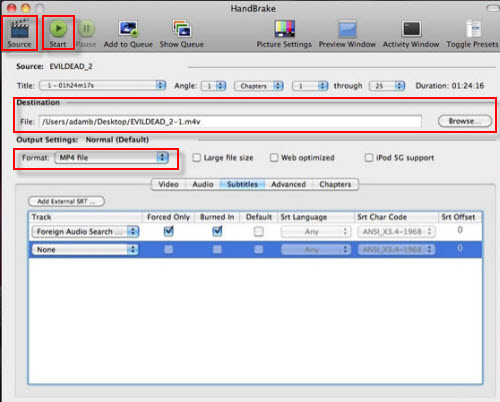
- Load FLV files. On the top side of Handbrake, click "Source" button to import FLV or F4V video files you wanna convert to MP4.
- Select MP4 as output format. In the output settings area, opt for "MP4" as output format. Make sure you have chosen a compatible one and MP4 suits selection in this situation.
- FLV conversion begin. Choose a proper destination folder to save the output files and then press "Start" button to call FLV to MP4 transcoding task begin.
PS: Handbrake can not only decode flash video FLV to MP4, but also convert MP4 to AVI, FLV to MKV, VOB to MP4 if you need. And supposing you still feel puzzled about the process of converting video on Mac with Handbrake, you can refer to Handbrake detailed tutorial of video converting on Mac.
Solution 5 - Android Mobile Free
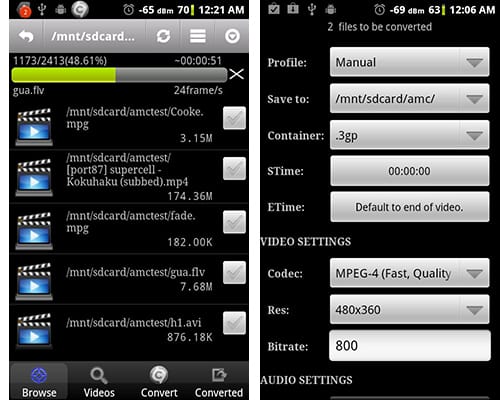
If you wanna convert FLV to MP4 on Android phone or tablet directly, you can consider the Video Converter Android app, which supports you to convert almost any video formats to MP4, H264 on Android (Google Play official description), like FLV to MP4, F4V to MP4, MKV to MP4, etc. And irrespective of a newbie or an expert, you can easily learn how to make video transcoding accomplished without any reference.
- Free download and install Video Converter Android app. Launch it.
- Choose the FLV files needed to be converted. It supports FLV files batch convert. And select the profiles, save folder, start time and end time.
- Opt for MP4 as container. Followed by the video settings, including codec, resolution, Bit rate selection.
- Press "Start" button. A light tap on Start button and then this free Android FLV video converter app will begin to transcode FLV to MP4 format with splitting speed.
Summary: Top 5 solutions to convert FLV to MP4 are presented here. Objectively speaking, each solution has its own pros and cons. And I am not going to say which one is the best, since the discourse power belongs to you. You have the right to decide what on earth is the best to you. Just pick out the most suitable one to free decode FLV format to MP4 and I hope you could enjoy yourself.
Detailed Comparison on FLV and F4V
FLV |
F4V |
|
|---|---|---|
Definition |
FLV is short for Flash Video. It contains material encoded with codecs following the Sorenson Spark or VP 6 video compression formats. |
F4V is a new type of FLV file. A F4V file is encoded based on the ISO base media file format ( MPEG-4 PART 2) and is supported starting with Flash Player 9 update 3. |
Description |
Flash Video |
Video for Adobe Flash Player |
Supported media types |
Video: On2 VP6, Sorenson Spark (Sorenson H.263), Screen video, H.264 |
Video: H.264
Images (still frame of video data): GIF, PNG, JPEG |


Candice's particularly skilled in writing and sharing video-related contents. Her guides cover from deep-seated video/audio parameters, to media entertainment on different platforms. She also enjoys shooting and processing videos by herself for a more reliable basis of informative info with her articles, which are never at the expense of eliminating an entertaining read.