HTPC stands for 'home theatre personal computer' or 'home theatre pc', sometimes called a Media PC or Media Center. Essentially it is a PC with a software application that supports video, photo, music playback, and sometimes video recording functionality. It enables DVD movie playback with high quality, giving people a brand new visual experience. Do you have quite a large collection of DVDs that you want to play on your home theatre computer? If so, firstly, you should rip your DVD movie to HTPC compatible format. Here I recommend MPEG 2 as the output format for DVD playback on HTPC with multiple videos, audios.
How to Rip DVD to MPEG2 video for Playback on HTPC
MacX DVD Ripper Pro is specialized in ripping DVD to MPEG 2 for playback on HTPC with all videos/audios. With it, you can easily finish the task of DVD to MPEG 2 conversion with orginal quality unchanged thanks to High Quality Engine. Apart from ripping DVD to the media center readable format MPEG2, it can also convert DVD to MP4, MOV, AVI, H.264, or iPhone, iPad, Apple TV, Samsung, HTC One M10/9, Xbox, PS4, Chromecast, and USB supported videos with the best DVD ripper for Mac. Now let's have a look at how simple it is.
Just follow this DVD to MPEG 2 guide, which will teach you how to rip DVD to MPEG 2. This DVD ripper offers superb fast conversion speed to save your time and enables you to keep your video quality.
Step 1. Load DVD Movies or DVD Folder.
After free download MacX DVD Ripper Pro, click "DVD Disc" button to import the DVD files after you insert the DVD.
Step 2: Choose the Output Video Format.
Select the output video you desire. Here we choose "DVD Backup".
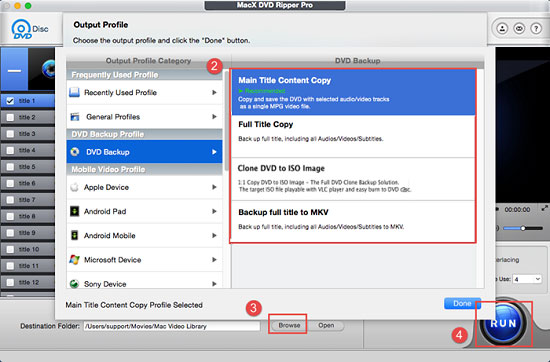
Step 3: Select Output Folder.
Specify output folder on your computer to save the output files. Click the "Browse" button to choose the path where you want to save the output files in.
Step 4: Start Conversion.
After finish the above steps, click the "Start" button to start conversion, it allows you to view the conversion progress and are able to cancel the converting process at anytime.

Notice: We only advocates using this best DVD ripper to rip DVD to HTPC under the concept of Fair Use and does not encourage any illegal reproduction or distribution of copyrighted content. Please abide by the local DVD copyright law before doing it.


Bella has been working with DVD digitization for over 12 years. She writes articles about everything related to DVD, from disc drive, DVD copyright protection, physical structure, burning and backup tips. The unceasing passion of DVD movies helps her build a rich DVD library and ensure a practical solution to address almost all possible DVD issues. Bella is also a crazy fan for Apple products.