Method 1. How to Free Convert YouTube Videos to MP4 on Mac
Here we'd like to recommend the 100% clean Macxvideo AI to help you free download and convert YouTube to MP4 format on macOS Big Sur and lower. This is the safest and quickest solution to do YouTube to MP4.
It enables you to free download MP4 videos from YouTube in any desired resolution, 720P, 1080P, 4K, and even 8K. Besides YouTube, it also supports Facebook, Dailymotion, Metacafe, Myspace and other sites. 1000+ sites are supported in total.
In addition to converting YouTube to MP4, Macxvideo AI can also convert YouTube to audio format, MOV, HEVC, MKV, AVI, Quicktime, iMovie, iTunes, iPhone, iPad, Sony Xperia, Samsung Galaxy, Huawei, and more, thanks to the built-in 420+ output profiles.
Now, let's check the steps to convert YouTube videos to MP4 with Macxvideo AI.
Step 1: Download, install, and launch Macxvideo AI.
Firstly, free download this YouTube to MP4 converter on Mac or Windows version. Then launch it on your Macbook, Macbook Pro/Air, iMac, or Windows PC.
Macxvideo AI is for macOS, while Winxvideo AI (from our WinXDVD brand) is for PC.
Step 2: Add YouTube video URL.
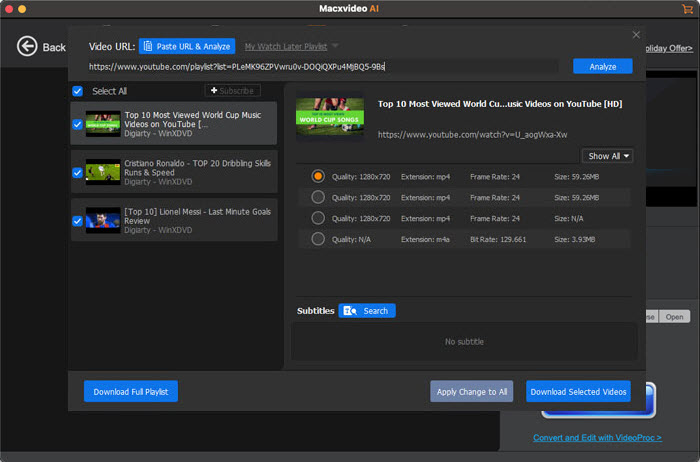
Find your desired YouTube video and copy its URL, then go back to this YouTube converter. Click the Downloader button on the main interface, "Add Link" icon and "Paste & Analyze" to detect YouTube video.
Step 3: Free download YouTube videos.
When MacX finishes YouTube URL analyzing, it will display a list of available output options. You can see the video resolution, file size, video codec, and container format. Now you simply need to choose an MP4 option with desired quality and file size, tap "OK" button, and press "Download Now" button. Then it will start downloading YouTube video to MP4.
Tips:
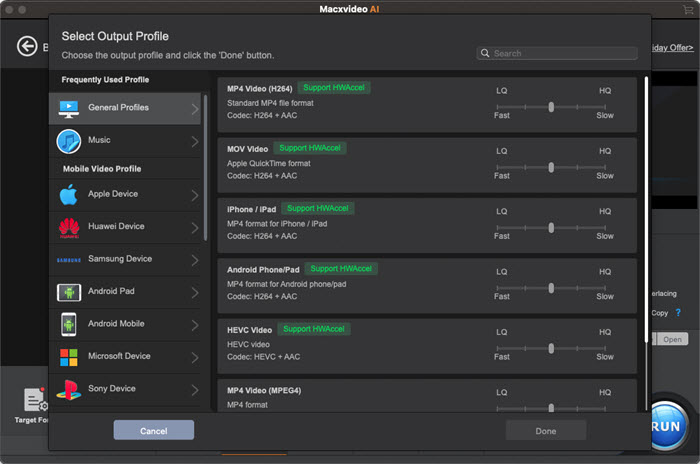
- If there is no MP4 to choose, you can check "Add video to convert list". Then, it will lead you to Output Profile panel where you can choose MP4 profile.
- If you want to convert a video that is already downloaded from YouTube, simply: click "+" button, choose "MP4" as the output format, and click on the "RUN" button to start converting the video to MP4 format.
If you select MP4 with H.264 codec, you can enable hardware acceleration by checking the box of Intel/AMD/Nvidia to improve conversion speed at 5 times faster. The YouTube to MP4 conversion will be finished in very short time.
Tips:
If you want to transfer YouTube videos from Mac to iPhone iPad devices, you can use MacX MediaTrans. It behaves as an expert to convert and transfer videos from Mac to iPhone, not only including YouTube MP4 videos, but also iPhone iPad incompatible formatted videos like MKV, WMV, M2TS, FLV, AVI etc. It will convert incompatible format iPhone iPad supported format automatically.
Method 2. How to Convert YouTube Videos to MP4 Online Free
Online YouTube video conversion websites are also widely chosen. And the Online Video Converter definitely wins the top priority for many users. It enables you to download and convert YouTube videos to MP4 for free.
This website is fully compatible with mobile devices as well, so you can convert YouTube to MP4 directly on mobile as well. Better yet, there is no need to install any software on your computer. It can directly give you download link of YouTube videos in your browser itself.
However, online tools may direct you to outside sites. For a safer and virus-free way to convert YouTube videos, you'd better choose a reliable tool like the first method we mentioned above.

Follow us to see how convert a YouTube video to MP4 online:
- Enter the URL or link of the video that you wish to convert.
- Select a format of your choice.
- Click the "Start" button to begin the conversion process.
- Upon successful completion of the conversion, you will receive a download link for the output file.
Compare Desktop and Online YouTube to MP4 Converter
The way how to convert YouTube video to MP4 is not confined to what we mentioned above. All of them do decode and encode YouTube to MP4 without any hassle. But there are considerable differences of each way. In view of the diverse needs of users, they may choose different way to do so.
Yet Macxvideo AI is more comprehensive without doubt. It acts as a free YouTube downloader for Mac and a video transcoder. It downloads videos from more than 1000 sites, edit videos, record videos or screens with fastest speed and original quality ensured. Of course, different decision can be made. Check the comparison table below to find the right YouTube to MP4 converter for you.
| Key Features | Macxvideo AI | Online Video Converter |
|---|---|---|
| Get the YouTube to MP4 converter | Free Download | Learn More |
| Platform supported | Mac/Windows | Browser |
| Encode online YouTube to MP4 | Yes | Yes |
| Change downloaded video to MP4 | Yes | Yes |
| Output format supported | 420+ formats | 14 formats |
| Download sites supported | 1000+ sites | 13 sites |
| Pros | • High-speed conversion. • Add converted videos to iTunes library • Batch conversion, security guarantee |
• No registration and software installation • Unlimited free conversions and downloads • High speed and superior video quality |
| Cons | • Paid software with the free trial version • Need installtion |
• Not safe, adware, malware, plugins pop up • Supported limited formats • No option for batch conversion |



Candice's particularly skilled in writing and sharing video-related contents. Her guides cover from deep-seated video/audio parameters, to media entertainment on different platforms. She also enjoys shooting and processing videos by herself for a more reliable basis of informative info with her articles, which are never at the expense of eliminating an entertaining read.