Do you want to play the DVD background music on your music players, like MP3 player, MP4 players, cell phone, iPad, iPod, iPhone, etc? Maybe you are suggested to rip DVD audio to MP3 using VLC media player, but the truth is that the whole operating procedure is much more complicated than it seems. Eager to try on an easier solution? This article introduces a professional yet free DVD audio ripper for Mac to help you sweat-free rip audio from DVD freely, so that you can enjoy the DVD background music on your gadget wherever you go.
Table of Contents

Part 1: Free Rip DVD Audio with MacX
MacX DVD Ripper Mac Free Edition is an outstanding tool which can rip audio tracks from new DVD movies and rip DVD audio to MP3 files for playback. With this Mac DVD audio free ripper, you will find it is so easy to rip sound from DVD. The following paragraphs would show you how to extract audio from DVD and rip DVD audio to MP3 files step by step.
How to Rip Audio from DVD with this Free DVD Audio Ripper for Mac
Step 1. Add DVD Movie.
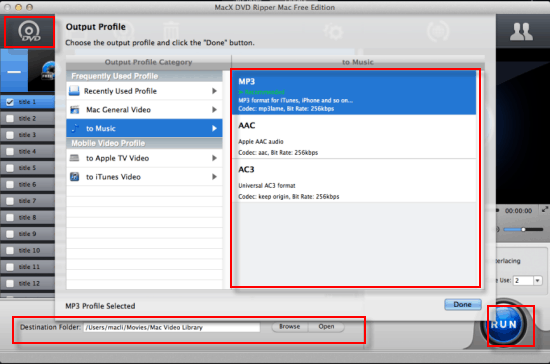
Free download this free audio DVD ripper Mac and run it. Then, just insert your favorite DVD on the DVD-ROM and load your DVD through "DVD Disc" button. Alternatively, you can hit "DVD Path" to import DVD files.
Step 2. Select MP3 Music as Output Format.
In the output format area, select the target format "to Music". There are also much more output video format to be chosen, such as DVD to AAC, DVD to AC3, MP4, iTunes, MOV, FLV etc.
Step 3. Set Output Folder.
Specify output folder on your computer to save the output files. Click the "Browse" to choose the path where you want to save the output files in.
Step 4. Rip DVD Audio to MP3 on Mac.
When the settings are done, click the "RUN" button to start ripping DVD audio or ripping music from DVD disc. And then the free DVD ripper for Mac will automatically start to extract audio from DVD to MP3 on Mac.
This Mac DVD ripper is not only a DVD to MP3 music freeware, but also a professional DVD to Video Converter. It can convert DVD to all popular video formats, such as convert DVD to MP4, DVD to MOV, iTunes, etc. Seeking for another Mac DVD ripper software which supports much more output video, you can check its advanced version MacX DVD Ripper Pro to help you rip any DVD to iPhone, iPod, iPad, Apple TV and PSP etc.
MacX DVD Ripper Pro, the best DVD to audio ripper is designed to rip DVD to MP3, AAC, AC3 for Mac fast with no quality loss, regardless of the DVD copy protections such as CSS, region code, RCE, Sony ArccOS, UOPs, Disney X-project protection, etc.
Part 2: Extract Audio from DVD with DVD Audio Extractor
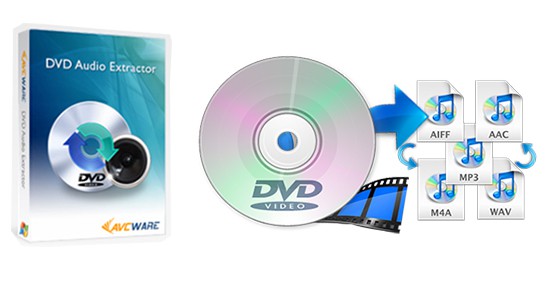
As an addition, here we also recommend you to have a try on another DVD audio ripper open source - DVD Audio Extractor, which is a widely famous tool to free extract audio from DVD disc, Blu Ray disc, DVD-Audio disc and save them as MP3, OGG, Wave or FLAC file formats. Now, it works seamlessly with Mac OS X 10.9 Mavericks. For Yosemite, El Capitan and macOS Sierra users, it's still advisable to rip audio from DVD on Mac with the first DVD converter freeware.
After you ripped DVD to MP3, AAC etc. with the free DVD audio ripper for Mac, you are suggested to move music to iPhone iPad for listening on the go. MacX MediaTrans, an alternative to iTunes, helps you transfer music from Mac to iPhone easily without any bothering of iTunes. It's also featured with managing music files on iPhone, such as editing music detail info, deleting songs in batch, making ringtone etc.
Part 3: Free Rip DVD Audio with VLC Mac
VLC is often used to free convert video formats and extract audio from video. Seldom did we notice that VLC is also a strong performer in DVD ripping. When it comes to extract audio file from DVD disc on macOS, VLC for macOS can also do you such a favor. And the whole operation is damn simple; you can instantly get the hang of it, irrespective of what skill level you're in.
What's noteworthy is that VLC can't cope with commercial encrypted DVDs. Check your input DVD disc before you go. For copyright protected DVDs, go back to MacX DVD Ripper. As for homemade unprotected DVDs, leave it to VLC!
How to Use VLC Mac to Extract Audio from DVD Disc
Step 1: Launch VLC media player > click Media on the top menu of the home screen.
Step 2: Choose "Convert/save..." > select "Disc" on Open Media window.
Step 3: Tap "Browse" to load your input DVD disc > move your mouse to the lower right-corner of the window to click "Convert /Save" button.
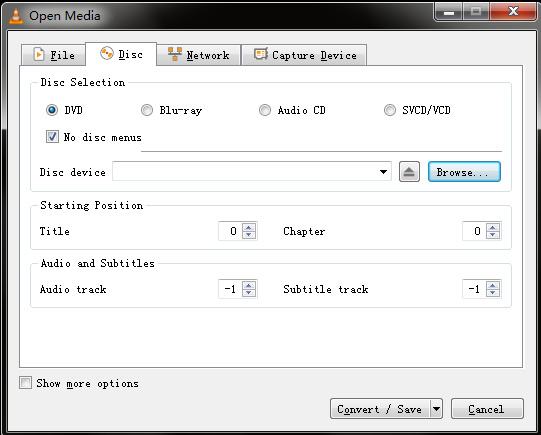
Step 4: Opt for audio format you need under "Profile" section where you can choose OGG, MP3, FLAC or CD as audio format.
Step 5: Tap "Browse" button to choose destination folder for output file saving > hit "Start" button to call it begin! Be patient; this would cost you a couple of minutes. You can free play the resulting audio file to test its audio quality when it's done.


Bella has been working with DVD digitization for over 12 years. She writes articles about everything related to DVD, from disc drive, DVD copyright protection, physical structure, burning and backup tips. The unceasing passion of DVD movies helps her build a rich DVD library and ensure a practical solution to address almost all possible DVD issues. Bella is also a crazy fan for Apple products.