As the most popular handset, iPhone brings people improved digital life as well as enhanced entertainment. It is widely used in every corner of the world. It is also used as a large portable hard drive to store media files for enjoying them on the go. Among them, video of course is one of the must-have files. As we know that the general video format that iPhone supported are MPEG-4, H.264, MP4. But it is not the case that all videos on the internet is in MP4 format. Sometimes they maybe in AVCHD, MKV, AVI, FLV or other formats. So how to play AVI on iPhone or transfer MTS, MKV, FLV, AVI to iPhone XS/XS Max/X/8 Plus/8 etc. on macOS?
How to Transcode AVI to iPhone on macOS
Macxvideo AI is recommended to help you decode AVI files and encode to iPhone video format on Mac OS X step by step.
MacX allows you to convert WMV, MOV, MP4, FLV, MPEG, ASF, AVI to iPhone 8/iPhone X with original quality. With the use of Intel's QSV/Nvidia/AMD hardware acceleration tech, this software gurantees the world's fastest speed to transcode videos in AVI to iPhone on Mac devices, which is 5x faster than other tools. Besides, you can also download and convert YouTube video to iPhone as well as other videos from 1000+ sites. Feel free to download it to have a try:
Steps to Convert AVI to iPhone on MacBook/iMac
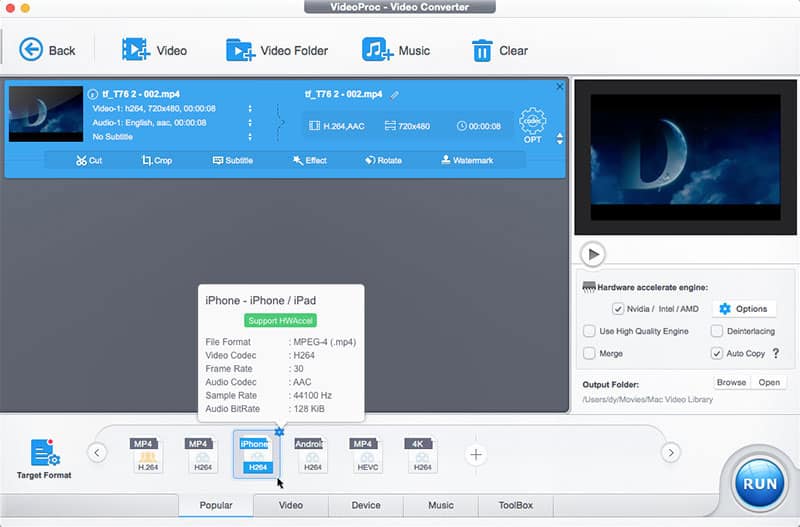
Step 1: Free download this iPhone video processing program, note that Windows (10) version is also available. Launch MacX and get the AVI file as imports. After you load the AVI file, you can see all the information.
Step 2: Choose "To iPhone" as the output format and select the profile according to your devices type. MacX offers of output profiles for all kinds of video formats for iPhone. Users may also change the video quality by adjusting the parameter settings below the profile.
Step 3: Select the output file destination by clicking "Browse" button next to the preview windows.This is helful if one of your hard drive is out of space and keep your videos in order as you desired.
Step 4: When you have well set all the above, you could start to convert AVI to iPhone on Mac by clicking "RUN" Button.
Tags: iPhone Video Tips Convert AVI to iPhone
Related Articles
How to Transcode 4K/8K Videos to iPhone
Top YouTube to iPhone Converter for macOS
Convert WMV Videos to iPhone on macOS
Convert AVI to iPhone Video Format MP4, MOV, M4V etc. with Hardware Accelerated Speed!
Trusted by Macworld,CNET
MOST READ
3Top AVI File Converter for macOS [Review]

 By Candice Liu to Process Video, iPhone Video|Last updated on Nov 23, 2018