"I am a teacher and would like to show some YouTube videos in my keynote presentations. I got the YouTube video off the site, but it is in FLV format. How do I convert FLV to MOV files on my Mac, so that I can edit it in iMovie?"
Sometimes when you download some FLV videos from video-sharing website like YouTube, Myspace, Google Video, Yahoo Video etc, you may want to play them on QuickTime offline, or edit them in iMovie, Final Cut Pro. However, the FLV Videos can not be recognized by the QuickTime player and the Mac editor tools. By this, you need to convert FLV to MOV format first.
Table of Contents
Solution 1 - FREE FLV to MOV Converter
It's highly possible for you to think about applying Handbrake to convert FLV to QuickTime MOV when it comes to use video converter freeware. But sad to tell you that the world-renowned Handbrake will let you down this time, for it only supports you to decode FLV to MP4 or MKV, the two video format, as for MOV, unfortunately, being excluded all the time. Thus, for Handbrake fans, I have to say you need to look for another one somewhere else.
In a bid to save your time and energy, here I personally recommend you the easiest way, I have tried, to convert flash video to MOV - by using the best Handbrake alternative- MacX Free MOV Video Converter, which will easily accomplish the FLV to MOV conversion task meanwhile provides up to 98% output quality. Furthermore, this flash video converter works seamlessly on macOS (Sequoia) can also convert MKV, AVCHD, H.264/AVC, F4V etc to MOV and the whole conversion is downright easy and badly quick. It's 100% free, with powerful conversion performance and excellent output quality!
How to Convert FLV to MOV with No.1 Fast Speed
Step 1: Load FLV videos to the FLV to MOV converter Mac
Free download this top MOV converter freeware on Mac and launch it, click "Add File" button to browse your computer hard drive and select FLV files you want to convert. It supports drag-drop and batch conversion, so you can import and convert several FLV files at a time.
Step 2: Select output format as MOV
Choose "MOV" as output format from format list. The optimized default settings ensure the best output quality.
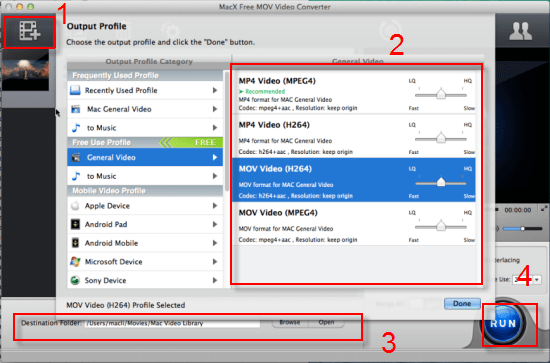
Step 3: Opt for output folder
Click "Browse" button to select a destination folder to save output MOV files.
Step 4: Start to convert FLV to MOV on Mac
Click "RUN" to transcode FLV files to MOV on Mac with a cup of coffee time. You can view the conversion progress from the progress bar.
Beyond transfering FLV to MOV, if you wanna convert more HD videos on Mac, highly recommend you to rely on the award-winning Macxvideo AI, which enables you to convert FLV, AVI, MOV, MP4, MKV, MPEG, M2TS, MTS, RM, RMVB, QT, WMV, etc with world's NO.1 fast speed thanks to its Intel QSV hardware acceleration tech supports. And it's also a fastest solution to free download FLV video from YouTube, Vimeo, Dailymotion, etc. 1000+ sites in a blink of time.
Solution 2 - VLC Media Player
Step 1: Launch VLC media player on your Mac and click "Convert/Save" from Media.
Step 2: Click "Add" to import your FLV video you wanna convert.
Step 3: Again, tick the pull-down button to select "Convert".
Step 4: Here choose "Video for iPod HD/iPhone/PSP", for VLC has no built-in profile for MOV. This one is comparatively the ideal choice.
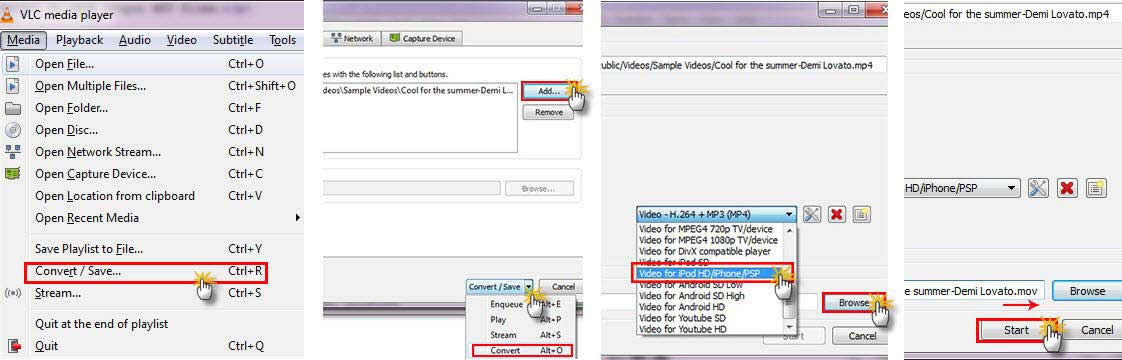
Step 5: Hit "Browse" button to choose a destination folder to store the output mov files. (Note: when you type the output file name, please give the file a file extension with .mov)
Step 6: Last step goes to "Start" button click. Then the VLC player will start to decode FLV video to MOV video format on your Mac OS.
Solution 3 - Free Video Conversion Website
There are dozens of free online websites for you to accomplish the conversion task. But most of them need you to install some thrid party apps or plug-ins, which might carry some malware, spyware or virus. For the sake of security, here recommends you a safe and clean MOV converting website - ZAMZAR to free convert FLV to MOV easy as pie.
Step 1: Enter this free online website and access to FLV video format to MOV conversion section.
Step 2: Followed by FLV files selection from your Mac computer by giving a hit to "Choose Files".
Step 3: Press "Convert files to" button to choose the output MOV video format.
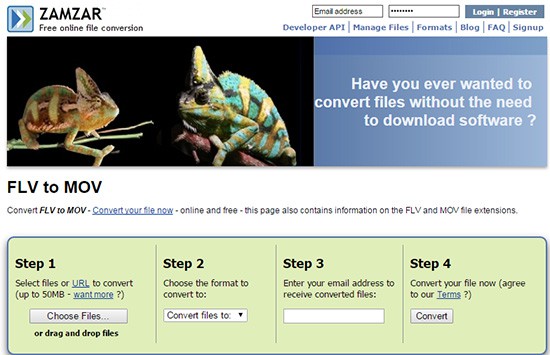
Step 4: Enter your E-mail address to receive the converted MOV files. (G-mail, Foxmail, etc. are alright.)
Step 5: Now click "Convert" button to begin converting FLV to MOV free online.


Candice's particularly skilled in writing and sharing video-related contents. Her guides cover from deep-seated video/audio parameters, to media entertainment on different platforms. She also enjoys shooting and processing videos by herself for a more reliable basis of informative info with her articles, which are never at the expense of eliminating an entertaining read.