M2TS is a Sony high definition video file type. M2TS files are raw AVCHD videos recorded using Sony's camcorders, such as the HDR-SR1 and HDR-SR5 models. Panasonic, Canon and other brands of AVCHD camcorders also record in M2TS format. There are some media players for playing M2TS on Mac and Windows, like Mplayer, Windows Media Player or other media players if there is a codec for DVD playing installed. The file type M2TS plays well only on high-profile computers, it is usually can not be read by portable players (PS4 is an exception).
Transcode M2TS to MP4 for playback on portable devices
If you want to play M2TS videos on portable devices like iPad, iPod, iPhone, Apple TV, PSP, PS4 and so on, you have to convert M2TS files to playable formats at first. Here I recommend you convert M2TS to MP4 format for two reasons. First, MP4 is widely used on the most popular devices. More and more portable devices are support this file form. Second, MP4 has a much smaller file size and meanwhile remain the high video quality.
How to Compress M2TS Video to MP4 for Free
MacX Video Converter Free is designed to convert M2TS files to MP4 format with high sound and image quality. This AVCHD M2TS video converter is totally free without any time or functional limitations. Moreover, it not only helps you convert M2TS MTS to MP4, MOV, AVI etc., but also transcode SD HD videos like AVI to MP4, MKV to AVI, VOB to MP4, MOV to MP4 etc. for playback on iPhone iPad Android devices. Below is a step-by-step guide for directly change M2TS video to MP4 free on macOS.
How to Convert Video to MP4 on Mac with Best Free MP4 Converter?
Step 1: Load M2TS files
After free download this best-ever free M2TS file converter on Mac and run it. Click "Add File" button to browse your computer hard disc and add the M2TS files you want to convert. Batch conversion is also supported, you can load as many M2TS files as you want to convert at one time.
Step 2: Choose "to MP4" as the output format
You can choose different formats for different files in this free M2TS to MP4 Converter. Here we choose MP4 as output format from the format list. You can also change audio and video parameters as you wish.
Note: This free M2TS video converter also supports converting TS and MTS video files. You can easily convert M2TS, TS, MTS MKV to MP4, MOV, AVI, YouTube, iMovie, iPad, iPod, iPhone, Apple TV, Blackberry with a few clicks.
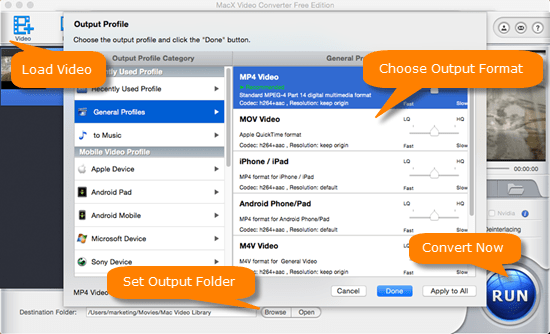
Step 3: Select the output folder
Specify output folder on your computer to save the output files. Click the "Browse" button to select a folder where you want to place your converted MP4 files.
Step 4: Start converting M2TS to MP4 videos
"RUN" button and the program will convert M2TS/TS to MP4 free for you in a few minutes. Then you can enjoy the converted MP4 on iPad (iPad Pro, iPad mini 4), iPod, iPhone, Apple TV (4), PSP, PS4 etc.

- The High Quality Engine used in the best HD video converter gurantees close-to-original HD output MP4 quality
- As the M2TS HD files from Sony Camcorders like HDR-SR5, DR-SR1, Sony HDR-CX, Sony Handycam HDR-XR260VE camvorder etc always come with large file size. And the flexible editing settings of this free M2TS to MP4 converter also provide options to compress the final files without quality loss to fit your handsets.
The free M2TS video converter has an advanced version - Macxvideo AI, supporting hardware encoding technology that offers 5X faster MP4 processing speed, offers more versatile and advanced features, including downloading and converting any online video (720P, 1080P, 4K Ultra HD) to MP4 for your portable devices within merely mins.
After free converting MTS video to MP4 on Mac with any free converter, the small and simple tool MacX MediaTrans will help to transfer MP4 video from Mac to iPhone, iPad Pro, iPad mini/Air series, iPods, as well as backup video, music, photos and more from iOS iPhone iPad to Mac computer.
Free Convert MTS to MP4 with Popular Converter HandBrake
To simply convert M2TS to MP4 format on Mac computer, another free choice is to use Handbrake, a famous free MP4 covnerter that will decode MTS/M2TS camcorder videos to MP4 or MKV only. Follow the guide below to start to change HD MTS video to MP4 on Mac.
Step 1. Open Video File.
Import video you wanna convert from "Open File" under "Media" category after free downloading and running this free converter on Mac. . You can also add more files to the converting queue by clicking the "Add to Queue" button.
Step 2: Choose Convert
As shown on the below picture, select "Convert/Save.." from Media and then again choose "Convert".

Step 3: Opt for Output Format as MP4
Select "H.264+MP3 (MP4)" as output video format. Besides MP4, you can encode videos/DVD to MKV.
Step 4: Start to Free transcode M2TS Video to MP4 Now.
Set an output folder by clicking "Browse" button, and then hit on "Start" button to convert M2TS video to MP4. And when the video conversion is completed, you can watch the video on mobiles freely.
Verdict: Both methods are totally free and safe, with excellent output quality and fast converting speed. You may wonder which is the best FREE M2TS to MP4 converter for you. The only difference is, besides the limited output formats, that HandBrake is quite strict on the video settings. To put it simply, when you adjust the settings slightly, you may get a blurred screen. So you're strongly suggested to remain the defualt settings.