Want to convert DVD to MP4 on Mac for easy playback on your iPhone, iPad, Android, Apple TV, other portable devices or players? Congratulations! You're in the right place. Here you can find the best DVD to MP4 converters for macOS 26 Tahoe, 15 Sequoia, 14 Sonoma, and earlier systems. Now, let's check the specific details of these Mac DVD rippers on aspects of ripping function, output quality, ripping speed, and DVD decryption capability, and learn how to convert a home movie DVD or a commercial copy-protected movie DVD to MP4 format on a Mac.
Free vs. Paid DVD to MP4 Converters: Which Should You Choose?
If you only need to convert a DVD occasionally and don’t mind spending some extra time tweaking settings, free DVD to MP4 converters can be a decent starting point. Tools like HandBrake, VLC, or FFmpeg are widely used and cost nothing, which makes them appealing for basic DVD conversions.
That said, free tools often come with clear limitations. Many of them struggle with copy-protected DVDs, require additional libraries or workarounds, and rely heavily on manual configuration. For beginners, this can mean a steeper learning curve and more trial and error before getting a usable MP4 file.
Paid DVD converters, on the other hand, are usually designed for convenience and reliability. They tend to offer better support for encrypted DVDs, faster conversion speeds with GPU acceleration, and ready-made presets for devices like iPhone, iPad, and Android. The workflow is often more straightforward—insert the disc, choose MP4, and start converting—without worrying about copy protections.
In short, if your priority is "free at all costs" and you’re comfortable with technical setups, a free converter may be enough. But if you value stability, speed, and a smoother experience—especially when dealing with commercial DVDs—a paid solution can save a lot of time and frustration in the long run.
Method 1: MacX DVD Ripper Pro
Personally Tested and Reliable for Converting Copy-Protected DVDs
- Compatibility: Mac OS X 10.6 and above
- Input: Home DVD, commercial copy-protected DVD, ISO image, DVDmedia, Video_TS folder
- Output: MP4 (H.265, H.264, MPEG4), MOV, MKV, MPEG-2, QT, M4V, FLV, AVI, MTS, TS, M2TS, DVD ISO image, etc.
- Latest version: 6.8.4 released on November 13, 2025
- Price: A free trial is available. The Premium License (1-year subscription for up to 3 Macs) costs $34.95, while the Ultimate License (lifetime access for 1 Mac) is priced at $59.95.
- Trustpilot rating: 4.7 out of 5 based on 220 reviews — classified as "Excellent"
The Rolls Royce of DVD ripper software! I have tried them all, and this is the best. The support team are very responsive, patient and helpful and to be honest, it was usually me that was the problem, not the software! - by Katey Rowland
If you’ve got an old scratched DVD that won’t play anymore, or you’re running into common protections like CSS, region codes, or even Sony ARccOS, chances are most free DVD to MP4 converters will either freeze or fail to detect the main title properly. We tested popular options like HandBrake, VLC, and MakeMKV, and found that MacX DVD Ripper Pro was by far the most reliable, especially for Mac users. It handled every disc we threw at it—even the tricky ones.
What We Found Impressive
- Automatically detects the main title: Unlike HandBrake, where you sometimes have to guess which title is the actual movie, MacX analyzes the disc and picks the correct one for you.
- Handles newer DVD protections with ease: We tried ripping No Time to Die (a DVD release with tough encryption), and while several other tools threw up errors, MacX successfully converted it to high-quality MP4 file.
- Blazing-fast conversion: On our M1 MacBook Air, it ripped a 2-hour DVD in just under 6 minutes—thanks to hardware acceleration.
- Built-in clipping and subtitle features: Want to skip the opening credits or add custom subtitles? You can do it all directly in the app.
Who Is This For?
If your DVDs are encrypted, scratched, or from other regions, MacX DVD Ripper Pro is hands-down one of the most stable tools we've used. It’s not free, but it’s well worth the price.
Just a Heads-Up
Make sure you’re ripping DVDs for personal use only, like backups or private viewing. Don’t use the software to share or distribute copyrighted content without permission.
Support copy-protected DVDs.
A wide range of output presets.
High-quality output.
Support full GPU acceleration.
Flexible parameter settings.
Built-in video editor.
It doesn't support Blu-ray discs.
Free vesion only allows converting 5-minute video from DVD.
How to Convert DVD to MP4 on Mac with MacX DVD Ripper Pro
The following tutorial will demonstrate how simple it is to convert DVDs to MP4 on Mac using MacX DVD Ripper Pro.
Preparatory work:
- Download MacX DVD Ripper Pro. It is fully compatible with Mac OS X 10.6 and above. Then install it.
- Insert the source DVD into your computer's DVD-ROM drive. If there's no built-in drive, connect an external drive.
If you're looking for a DVD to MP4 converter for Windows, click here.
>> MacX DVD Ripper Pro Review: Is It Still Worth Using?
Step 1. Load the source DVD.
Run MacX DVD Ripper Pro, and click the "DVD Disc" button at the top-left corner to select the DVD you just inserted as the source DVD. Then, it will start analyzing your DVD. After that, it will automatically detect the correct title of the DVD, regardless of any copy protections on it, which most software can't do.

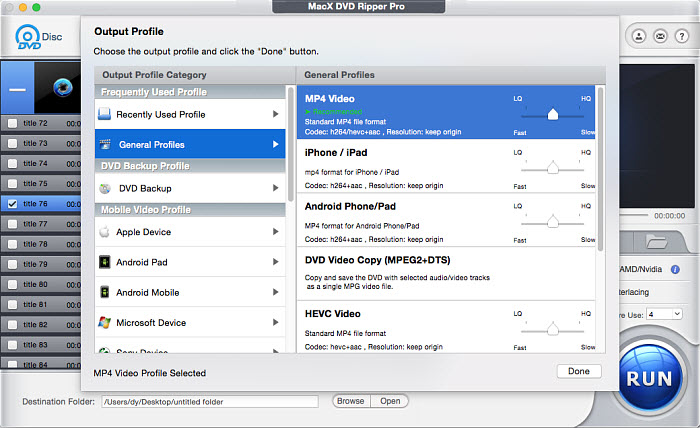
Step 2. Choose "MP4 Video" as the output format.
This Mac DVD ripper allows you to convert DVD to MP4 with H.265, MPEG4, or H.264 codec. There are a lot of MP4 presets for Mac, iPhone, iPad, Apple TV, and so on. You can choose any one you like. Here we choose the "MP4 Video" option in the category of "General Profiles" as an example.
Step 3. Choose the DVD content to convert.
As we mentioned in Step 1, MacX DVD Ripper will choose the main movie title for you automatically. And it will automatically choose an audio track and a subtitle track. You'd better check if the selected title and tracks are exactly what you want. If not, change them.

In addition, we would like to remind you that you can select multiple titles from your DVD to convert at one time. This need usually occurs when you need to convert a TV series DVD. You can toggle the "Merge titles" option on if you want to convert all selected titles to a single file. Otherwise, you'll get separate files.
What's more, you can trim the DVD title. Simply click the Edit button, and then you'll find this feature. And you'll find the options to add external subtitles, crop, and expand video.

Step 4. Set the MP4 output location.
Click "Browse" button in the output setting area and select a destination folder to save your converted MP4 video.
Step 5. Start converting DVD to MP4 on Mac.
Click "RUN" to start the DVD to MP4 conversion. You can view the conversion progress and are able to cancel the conversion process at any time.
Here is a video tutorial to guide you through DVD to MP4 ripping on a Mac. Learn how to rip a physical DVD to MP4 and other high-quality formats step by step by clicking here.
FAQs about MacX DVD Ripper Pro
1. How to cut the introduction or other unwanted parts of a DVD?
MacX DVD Ripper Pro allows you to trim the video before conversion, ensuring you only keep the parts you want. Simply click the Edit button → Trim tab → check Enable Trimming. You can then drag the sliders or specify the start and end times to select the desired portion of the video.
2. How to merge multiple DVDs into one MP4 file?
You can convert each DVD individually and then use a video merger to combine all the files into one MP4. This allows you to easily merge your DVDs into a single file.
3. Can you convert a DVD and then put it on an iPad?
Yes, MacX DVD Ripper Pro supports converting DVDs to formats compatible with iPad. There are also iPad presets available to streamline the process. After conversion, you can transfer the MP4 file directly to your iPad using iTunes, iCloud, or other file transfer tools.
4. When the DVD is copied, do the menu and special features get copied too?
MacX DVD Ripper Pro allows you to either copy the entire DVD, including menus and special features, or rip just the main movie. You can choose your preferred output depending on your needs.
5. Can you convert a DVD to 1080p HD video?
Yes, MacX DVD Ripper Pro allows you to set the output resolution to 1080p. However, if the original DVD resolution is lower, choosing 1080p will only increase the file size and will not improve the video quality. However, you can take the DVD rip and enhance the video quality and resolution using Macxvideo AI. This software can not only enhance video but also improve images, add color, perform frame interpolation, repair faces, reduce audio noise, and more.
6. How do you handle DVDs with multiple language subtitles?
Many DVDs include multiple subtitle and audio tracks for different languages. When converting a DVD to MP4, it’s important to select the correct tracks before starting the conversion.
With MacX DVD Ripper, you can choose your desired audio track and subtitle track directly next to each DVD title.
7. How do you transfer MP4 files to an iPhone or iPad after converting a DVD?
Once your DVD has been converted to MP4, transferring it to an iPhone or iPad is straightforward. You can connect your device to your Mac and use Finder (on macOS Catalina or later) or iTunes (on earlier macOS versions) to sync the MP4 file to the Apple TV or Movies app.
Alternatively, you can import the MP4 file into apps like Apple TV, VLC for Mobile, or other third-party video players, then sync or transfer the file via AirDrop, iCloud Drive, or a USB cable. Using an iPhone/iPad-compatible MP4 format ensures smooth playback without additional conversion.
Method 2: VideoProc Converter AI
Convert DVDs to MP4 and Upscale DVDs If Necessary
- Compatibility: macOS 10.13 or later, Windows 7 or later
- Input: DVDs (including encrypted ones), ISO image, Video_TS folder, video/audio/image files
- Output: MP4, MKV, MOV, AVI, HEVC/H.265, H.264, WebM, MP3, AAC, and more
- Latest version: 8.9 released on March 11, 2026
- Price: $34.95/1 year/1 Mac/pc, $54.95/lifetime/1 Mac/pc, $79.95/family license/5 Macs/pcs; free trial available
- Trustpilot rating: 4.0 out of 5 based on 467 reviews — classified as "Great"
"Great product, does everything I needed it to do. I was able to convert my DVDs with ease so I could store them on my computer." – by James
VideoProc Converter AI is an all-in-one multimedia toolkit that combines a DVD ripper, video converter, audio converter, video/image upscaler and enhancer, video stabilization, background noise removal, video downloader, and video recorder.
When it comes to ripping DVDs, it offers powerful features to convert virtually any disc, even those with encryption. If you want to boost the resolution after ripping, you can take advantage of its Super Resolution feature to upscale DVD content.
For anyone looking for a complete DVD to MP4 solution with AI enhancement, VideoProc Converter AI is one of the most versatile tools available today.
Supports encrypted DVDs natively (no extra plugins needed).
GPU acceleration for faster DVD to MP4 conversion.
AI enhancement tools to upscale or denoise video.
Beginner-friendly interface with 1-click presets.
Versatile — works as a DVD ripper, video converter, downloader, editor, and more.
Paid software (free trial has limitations).
Interface may feel "feature-heavy" for users who just want simple DVD ripping.
How to Convert DVD to MP4 on Mac with VideoProc Converter AI
Step 1. Download and install VideoProc Converter AI on your Mac.
Step 2. Insert the DVD you want to rip into your computer’s DVD drive.
Step 3. Launch VideoProc Converter AI, and click DVD on the main screen.
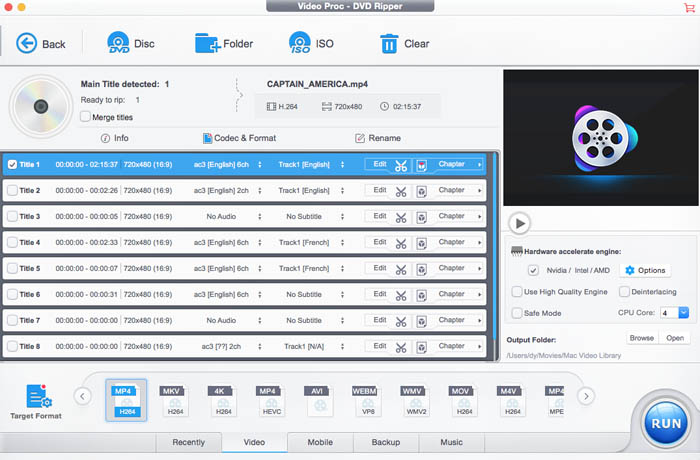
Step 4. Click the DVD Disc button and select your DVD disc. The program will automatically detect the correct main title.

Step 5. Click the Video tab at the bottom and select an MP4 preset.
Step 6. Click the Browse button to choose a destination folder where the converted file will be saved.
Step 7. Click RUN to start converting the DVD to MP4.
Method 3: HandBrake
A Free Way to Convert DVDs to MP4 (But Limited with Encrypted Discs)
- Compatibility: macOS 10.13 or later, Windows, Linux
- Input: Unencrypted DVDs, Blu-ray discs, ISO image, Video_TS folder, video files
- Output: MP4, MKV, and Webm (H.265, H.264, H.265 MPEG-4, MPEG-2, VP8 and Theora)
- Latest version: 1.11.0 released on March 8, 2026
- Price: Free
- Trustpilot rating: 4.2 out of 5 based on 10 reviews — classified as "Great"
As a man, I am almost at tears at how easy it is to convert my personal DVDs to MP4 (video file). I copy only the VIDEO_TS folder to the PC, and drag it onto the app. Incredible ! Note, I discovered that if I turn off and on the monitor while it is converting, it creates a super long, duplication video. If I leave the monitor on, it creates a single copy of the DVD. - by Floyd Beck
If you're looking for a free solution to convert DVD to MP4 on Mac, Handbrake is probably the first name you'll come across. It's open-source, lightweight, and does a solid job — as long as the DVD isn’t copy-protected. Most commercial DVDs come with encryption like CSS or region locks, and HandBrake alone can’t handle those out of the box.
If you're trying to rip a commercial DVD, you’ll need libdvdcss – a library that allows HandBrake to read encrypted discs. For Mac: Install via Homebrew with the command: brew install --cask libdvdcss
💡 Note: Installing libdvdcss is a legal gray area in some countries. Please make sure it's allowed in your region.
That said, if your DVD is home-burned or unprotected, HandBrake works great.
Free and open source.
Tons of filters and settings.
No watermark.
Handbrake can't rip protected DVDs to MP4. Only region codes and CSS are supported by libdvdcss.
Handbrake performance is not stable on M1 Macs.
How to Convert DVD to MP4 on Mac Free with HandBrake
Step 1. Download and install HandBrake on your Mac.
The latest HandBrake version, 1.11.0, is compatible with macOS 10.13 and later. For M1/M2 Macs, you should at least have Handbrake 1.4.0. For macOS 10.12 and earlier, you should download an older release.
Step 2. Download libdvdcss for HandBrake.
To convert protected DVDs to MP4 using Handbrake, make sure you've installed libdvdcss on your computer for Handbrake to use. Learn how to download libdvdcss on Mac here >>
This trick doesn't 100% work. If HandBrake cannot convert your DVD to MP4 on Mac, try other programs.
Step 3. Open Handbrake and click the Open Source button to load the source DVD. It will take some time to read the DVD data and find the correct titles.

Step 4. Once the DVD is loaded, open the Title drop-down menu and select the movie title you want to rip.

Step 5. Click Preset and you will see Very Fast, Fast, HQ, and Super HQ. To free convert a DVD to MP4, you're suggested to choose either 480p or 576p based on the NTSC or PAL DVD. Don't select any higher resolutions as they won't do anything good to the output quality.

Step 6. Next, choose MP4 as the output format. In the section below, you can further adjust the video codec, quality, crop, rotate, add filters, etc.

Step 7. Specify a file name and a save path for the converted MP4 file.

Step 8. Click Start on the toolbar to begin converting DVD to MP4 on Mac.
Check out "How to Convert DVD to MP4 with Handbrake" for a more detailed guide & tips.
What Are the Best Settings for HandBrake for DVD to MP4?
Handbrake has many settings, which may be confusing for beginners. Below are the recommended Handbrake DVD to MP4 ripping settings on Mac.
For high-quality DVD to MP4 ripping:
- Super HQ 480p30 Surround – Framerate: 30fps; Constant Quality: 16; Encoder Preset: Very Slow; Encoder Level: 3.1
- Super HQ 576p25 Surround – Framerate: 25fps; Constant Quality: 16; Encoder Preset: Very Slow; Encoder Level: 3.1
For fast DVD to MP4 ripping:
- Very Fast 480p30 Surround – Framerate: 30fps; Constant Quality: 20-22; Encoder Preset: Very fast/Superfast; Encoder Profile: Main; Encoder Level: 3.1
- Very Fast 576p25 Surround – Framerate: 25fps; Constant Quality: 20-22; Encoder Preset: Very fast/Superfast; Encoder Profile: Main; Encoder Level: 3.1
Method 4: iSuper DVD Ripper
Convert Home-made DVD to MP4 on Mac
- Compatibility: macOS 10.7 or later
- Input: Unencrypted DVDs
- Output: MP4, M4V, MOV, MKV, AVI, WMV, etc.
- Latest version: 6.3.13 released in October 15, 2024
- Price: Free with a paid version for $26.25
- Mac App Store rating: 4.8 out of 5 based on 4.2K ratings
This app has been perfect for converting old family video DVD's to digital files that I can save to my computer and add to my iphotos shared albums. It's intuitive and pretty easy to use even for technical amateurs. - by Ckaine
While HandBrake works well for unprotected DVDs, another beginner-friendly option worth considering is iSuper DVD Ripper. It’s a lightweight Mac app that focuses specifically on converting home-made DVDs—like family recordings or burned discs without copy protection—into digital video files.
The tool supports common output formats such as MP4, MOV, MKV, AVI, and more, giving you flexibility in how you want to store or share your content. For casual users who don’t want to mess with complex settings, iSuper offers a streamlined experience with a clean interface and a short learning curve.
The latest version (6.3.13, released in October 2024) brings smoother performance and fixes a previous issue where some videos played audio without video during preview or export.
Rip DVDs to MP4 and various formats.
Edit and add video effects.
DVDs with copy protections are not supported.
How to Convert DVD to MP4 on Mac with iSuper DVD Ripper
Step 1. Install iSuper DVD Ripper from the Mac App Store on your computer.
Step 2. Run the free converter and insert your non-protected disc. Click the Load Disc button to import your DVD.
Step 3. Once the DVD is loaded, check the DVD title you'd like to convert. Then click the profile menu at the bottom and choose the MP4 profile.
Step 4. You can click the adjustments button on the main window to adjust the encoding parameters, rotate, crop, add watermarks, add effects, etc. Then click Browse to select a destination on Mac to store the converted MP4 video.
Step 5. Next, click Convert to begin ripping DVDs to MP4 on Mac.

Method 5: VLC Media Player
Free Way to Convert CSS-Protected DVDs to MP4 on Mac
- Compatibility: Mac OS X 10.7.5 or later. It supports Macs with a 64-bit Intel processor or an Apple Silicon chip, Windows, Linux, Android
- Input: Unencrypted DVDs, ISO image, Video_TS folder, video files
- Output: MP4, MKV, MOV, AVI, WMV, and more
- Latest version: 3.0.23 released in January 8, 2026
- Price: Free
- Mac App Store rating: 3.6 out of 5 based on 4.6K ratings
I kind of have half-figured out VLC in successfully converting an older DVD to MP4 with an audio track - by Waffler11
If you’re looking for a free, no-frills method to convert home-made or CSS-protected DVDs to MP4 on your Mac, VLC Media Player can get the job done—though with a few caveats. Unlike dedicated rippers like MacX or iSuper, VLC is primarily a video player, but it comes with a hidden gem: a built-in DVD ripping function that can handle basic conversions.
What makes VLC stand out is its built-in support for CSS decryption via libdvdcss, which allows you to convert some protected DVDs—something that many free tools can't manage. However, it doesn't support more advanced protections found on commercial discs.
Free to use.
No watermark.
Customize video/audio settings, like codec and bit rate.
VLC is not a professional DVD ripper. Only able to convert homemade and CSS DVDs to MP4 on Mac.
Slow DVD ripping.
How to Free Convert DVD to MP4 on Mac with VLC
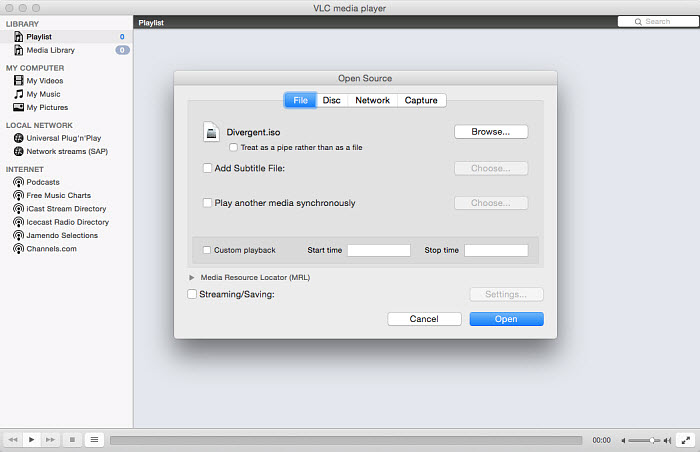
Step 1. Download VLC if you haven't installed it on Mac, then insert the DVD you want to convert on your Mac. Open VLC Media Player, click on "File" at the top left corner of the Mac screen, and select the " Open Disc…" button.
Step 2. Click the Disc button and you will see your DVD here. If you don't want to include the DVD menus in the converted MP4 video, click Disable DVD menus. If the DVD is protected, you need to click Enable DVD menus and manually select the title and chapters.
Step 3. Next, check the Streaming box. Then click the Settings button to customize the DVD to MP4 conversion. Specifically, click Browse to set an output folder on your Mac to store the MP4 video; Go to the Encapsulation Method dropdown menu and select MP4 as the output format. Set the video/audio bitrate if necessary.
Step 4. After all the steps, click OK and VLC will start to convert DVDs to MP4 on your Mac. Still not clear?? Check out our guide on how to rip DVD with VLC here for more detailed info.
How long does VLC take to convert DVD to MP4?
It will take the entire runtime of the movie to convert it because VLC is "streaming" the movie to a file on your hard drive.
How to fix "VLC converts DVD to MP4 without sound"?
This is a common problem. You may fix it by choosing the MPEG 4 audio (AAC) option instead of the default mpeg audio and changing the sample rate to 48000.
Method 6: FFmpeg
Advanced Command-line Tool for Custom DVD to MP4 Conversion on Mac
- Compatibility: macOS 10.9 or later, Windows, Linux
- Input: Unencrypted DVDs, ISO image, Video_TS folder, video files
- Output: MP4, QuickTime, 3GP, AVI, MKV, MPEG, etc.
- Latest version: 8.0.1 released in November 20, 2025
- Price: Free
- G2 rating: 4.6 out of 5 based on 20 reviews
For users who are comfortable with command-line tools, FFmpeg is a highly flexible and powerful option. It’s widely used under the hood of many popular media tools (like HandBrake, VLC, and Avidemux), but can also work as a standalone solution.
FFmpeg supports converting unencrypted DVDs, ISO images, and Video_TS folders to MP4 or any codec/container you specify—H.264, H.265, MPEG4, MOV, MKV, and more. You can tweak every detail, from bitrate and resolution to audio channels and subtitle extraction. It also allows for cutting, trimming, and even streaming, making it a versatile all-in-one toolkit for advanced users.
💡 Note: FFmpeg doesn’t support commercial or encrypted DVDs. It also lacks a graphical interface, which makes it less beginner-friendly.
Free, flexible, and powerful.
No watermark.
It requires users to enter the VOB file names.
DVD copy protections are not supported.
Make mistakes easily.
Need a steep learning curve.
How to Convert DVD to MP4 on Mac with FFmpeg
Step 1. Download FFmpeg and install it on your Mac. This is the hardest part for many. The easiest way is to install FFmpeg on Mac using HomeBrew. If you don't already have FFmpeg installed on your Mac, run the following command in the terminal:
/usr/bin/ruby -e "$(curl -fsSL https://raw.githubusercontent.com/Homebrew/install/master/install)"
Then install FFmpeg using the ffmpeg formula:
brew install ffmpeg
Now FFmpeg is installed on your Mac. Let's continue to convert a DVD to MP4 with it:
Step 2. To rip a DVD with FFmpeg, you just need the *.VOB files in the VIDEO_TS folder. Below is the command line to convert a DVD to an mpeg4+mp3 MP4 on Mac.
ffmpeg -i - -s 720x576 -c:v mpeg4 -c:a mp3 -qmin 1 -qmax 3 -b:a 256k -b:v 4000k -y encoded.mp4
Step 3. If there are several VOB files in the DVD and you'd like to convert them into a single MP4 video, you will need to combine them into one VOB first:
cat VTS_01_1.VOB VTS_01_2.VOB VTS_01_3.VOB VTS_01_4.VOB > temp.VOB
Method 7: Movavi Video Converter for Mac
Convert Non-Protected DVDs to MP4
- Compatibility: Mac OS X® 10.13 or higher, Windows 7 or higher
- Input: Non-protected DVD, video, audio, image files
- Output: MP4, MKV, MOV, WebM, and more.
- Latest version: Version 24.3.0 released on March 10, 2025
- Price: 1-Month Subscription – $19.95; 1-Year Subscription – $54.95; Lifetime License – $79.95.
- Mac App Store rating: 3.2 out of 5 based on 410 reviews
Movavi Video Converter is mainly used for video format conversion, but it also works with DVDs—as long as they’re not copy-protected. On Mac, you can use it to convert DVD content to MP4, MOV, MKV, AVI, and other popular formats. The software comes with a sleek interface and offers some basic editing and compression tools, making it handy for lightweight tasks.
Note: The free version is limited to converting only half of a file, adds a watermark to the output, and expires after 7 days. Plus, it cannot handle encrypted DVDs. To unlock all features, you'll need to upgrade to the paid version, which starts at $54.95.
Bundled with tools to convert, edit, compress videos, audio, and image files.
Flexible parameter settings.
Can't convert copy-protected media files and DVDs.
The output is watermarked.
How to Convert DVD to MP4 on Mac with Movavi
Step 1. Download and install Movavi Video Converter on your Mac. For macOS 10.13 and later, choose the newest version to download. For Mac OS 7- 12, go to Movavi Store to download an older version.
Step 2. Open Movavi Video Converter, click the + Add Media button in the top left corner and choose Add DVD - > Open DVD. Next, navigate to your DVD and select the VIDEO_TS folder.

Step 3. Find the Video tab at the bottom of the screen, locate the MP4 group, and then select an MP4 preset that fits your needs.
Step 4. Click the Save to button at the bottom to determine where you want to save the MP4 output.
Step 5. Click the blue Convert button at the bottom to begin converting your DVD to MP4.
Method 8: DVDFab
A Feature-Rich Tool with Heavy Limitations in the Free Tier
- Compatibility: macOS 10.10 – 15.x, Windows
- Input: DVD disc (2D & 3D), DVD folder, DVD ISO image file
- Output: MP4, MKV
- Latest version: 13.0.5.7 released on March 12, 2026
- Price: $84.49 for DVD ripper, and $279.99 for All-in-One version.
- G2 rating: 4.5 out of 5 based on 2 reviews
It has ripped 20 DVDs so far and the only problem was bad DVD (scratches). - by shinji
DVDFab DVD Ripper comes packed with advanced features for converting DVDs to digital formats like MP4 and MKV. It even includes a built-in video editor and customizable output settings. However, the free version is more of a trial than a truly free solution.
During the 30-day trial period, you're limited to converting DVDs only to MP4 or MKV at 480p resolution with 2.0 audio channels. Higher-quality settings and other formats are locked behind a paywall. You also won’t get access to hardware acceleration features like CUDA, AMD, or Intel Quick Sync—conversion relies entirely on CPU power, which can result in long processing times and high system load.
Another drawback is its limited support for newer DVD copy protections. If you're trying to back up recently released commercial discs, you might run into issues with decryption or incomplete rips.
That said, DVDFab DVD Ripper is worth checking out if you want to explore its interface and get a feel for how it works. But for serious DVD archiving—especially if quality, speed, and copy protection handling matter—you’ll likely need to upgrade to the full version.
It can rip some protected DVDs.
Rich Fliters and customizing settings.
Offer built-in video editor.
It can't support latest encryptions.
It doesn't support GPU acceleration.
How to Convert DVD to MP4 on Mac with DVDFab DVD Ripper
Step 1. Download and install DVDFab DVD Ripper on your Mac computer.
Step 2. Launch DVDFab and choose the Ripper option on the top tool bar.

Step 3. Insert the DVD you want to convert into your optical drive and then click the + button on DVDFab to load your DVD. You'll be required to specify the DVD disc's region code. Once selected, click OK. Then it will start opening your DVD.

Step 4. Select your wanted title, chapter, audio track, subtitle track, output format, and quality.
Step 5. Navigate to Save to section and select the output path.
Step 6. Click on the Start button to begin converting DVD to MP4. Or, you can choose Start Later to add it to scheduled task and convert it later.

Method 9: Mac DVDRipper Pro
Convert 5 DVDs to MP4 for Free
- Compatibility: Mac OS X 10.13 or higher
- Input: DVD disc
- Output: MP4, MKV, M4V, ISO, DVD
- Latest version: 14.0.6 released on February 3, 2026
- Price: $49.95
- MacUpdate rating: 4.4 out of 5 based on 433 user rates
Worked great for me. I made backup discs of some expensive (rare) DVDs for peace of mind. - by michaelanthoney
Mac DVDRipper Pro (MDRP) is one of the few DVD ripping tools built specifically for macOS, with a long-standing reputation for simplicity and reliability. It’s not just a ripper—you can also use it to copy and burn DVDs, whether you want to back up the main movie or the full disc with all the menus and extras.
One nice touch: you can rip up to 5 DVDs for free before deciding whether to pay. The ripping speed is quite decent too—converting a standard 2-hour DVD takes about 15 minutes.
However, the software does come with a couple of caveats. Unlike some more advanced tools, it can’t bypass region code restrictions. That means the DVD region must match your DVD drive’s region setting, or the rip will likely fail. Also, it doesn’t handle many modern copy protection schemes that some commercial DVDs use.
Still, if you're working with personal or unprotected discs and want a streamlined Mac-native app, MDRP is worth trying—especially while those first 5 free rips are on the table.
Rip, copy, and burn DVD.
Rips DVDs to MP4 quickly (around 15 minutes for a 2-hour disc).
Different modes for DVD copy: entire content, main movie only and duplicate copy for backup.
Free version allows to rip first 5 DVDs for free.
It cannot remove DVD region code.
How to Convert DVD to MP4 on Mac with Mac DVDRipper Pro
Step 1. Download and install Mac DVDRipper Pro on Mac.
Step 2. Launch MDRP.
Step 3. Take out the DVD you want to convert to MP4 and insert it into your DVD drive.
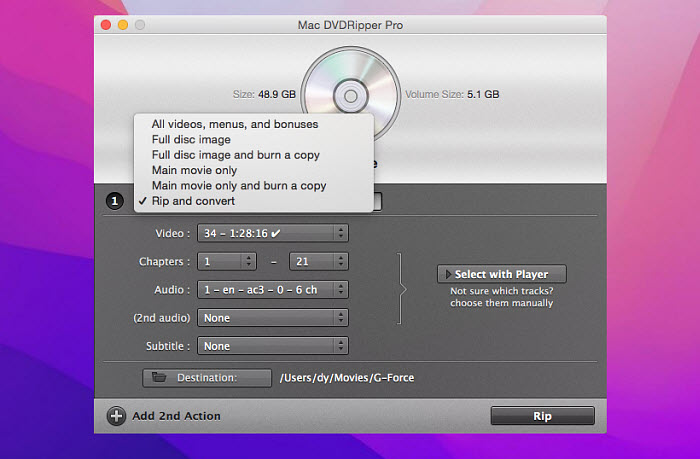
Step 4. Go back to the MDRP window, which now shows the DVD's title, and click on the "Destination:" button to specify where you want to save the ripped MP4 file.
Step 5. Click the pull-down menu that reads "All videos, menus and bonuses" and choose "Rip and convert".
Step 6. Click the "Rip" button at the bottom of the MDRP window. Then MDRP will start ripping the DVD's main movie as an MP4 file.
FAQs about Converting DVD to MP4 on Mac
1. Does converting a DVD to MP4 reduce video quality?
Converting a DVD to MP4 can result in slight quality loss, especially when using high compression settings. However, with proper tools and settings—such as the H.264 codec at a high bitrate and deinterlacing enabled—you can preserve nearly original quality. Choose software that offers advanced encoding options to minimize quality degradation.
2. Why can't I convert my commercial DVD?
Many commercial DVDs are protected by encryption technologies like CSS, region codes, or other DRM schemes that prevent standard converters from working. To handle these, you need a professional DVD ripper that supports decrypting copy-protected discs.
MacX DVD Ripper Pro is a reliable option for Mac users, offering support for most commercial DVDs, including those with complex protections.
3. How do I transfer the converted MP4 file to my iPhone?
There are several ways to import MP4 videos to your iPhone:
- iTunes or Finder: Add the video to your library and sync it to your device.
- AirDrop: Quickly send the file from your Mac to your iPhone wirelessly.
- Third-party tools: Use file transfer apps like MacX MediaTrans, which let you import videos via Wi-Fi or USB.
4. Can I convert a DVD to MP4 on Mac using QuickTime?
No. In QuickTime, you can import a video, then choose File > Save As, and convert the video to MP4 H.264 or HEVC. It will be the perfect program if it's able to convert DVDs into MP4. Unfortunately, while QuickTime supports various different video formats, it doesn't accept DVDs or DVD media. As a result, you can't use QuickTime to convert a DVD to MP4.
5. How long does it take to rip a DVD to MP4?
The DVD to MP4 converting speed on Mac is influenced by several factors, including the DVD ripper software, the desired MP4 quality (which affects encoding complexity), and your computer's hardware configuration.
Generally, using a DVD converter that supports GPU hardware acceleration can significantly improve conversion speed on compatible hardware. Among the Mac DVD to MP4 converters discussed earlier, MacX DVD Ripper Pro and HandBrake are notable for their support of hardware encoding.
6. How to convert a DVD to MP4 on a Mac without disc drive?
An optical drive and a big hard drive are a must for DVD ripping. If your Mac doesn't contain an internal disc drive, get an external DVD drive like Apple's USB SuperDrive. Here is a list of external disc drive for Mac >>
7. Is it legal to convert DVDs to MP4?
The legality of ripping DVDs of your own depends on your region law. For example, in the US, it's illegal to rip a copy-protected DVD. But in Australia, Spain, and many other areas, users are allowed to copy a commercial DVD for personal use. With that being said, you won't be caught or sued for converting a protected DVD for private use. Unless you distribute the copies, no one will ever know.
8. Can iTunes convert DVD to MP4?
No, iTunes itself cannot convert a DVD to MP4. However, you can use third-party software to rip the DVD and then import the resulting MP4 file into iTunes.
9. How to convert DVD to MP4 using Format Factory?
Step 1. Download and install Format Factory on your computer.
Step 2. Open Format Factory and access to DVD to Video File tool.
Step 3. Insert the DVD your want to convert and make sure it is selected as the source media on Format Factory.
Step 4. Select the title you want to rip.
Step 5. Select MP4 as the output format.
Step 6. Click the Convert button to begin converting DVD to MP4.
Note: Format Factory can convert DVD to MP4. However, this program works on Windows only. So, you may need to find the best alternative to Format Factory for Mac.
10. Is there a free DVD to MP4 converter without watermark?
Yes, there are several free DVD to MP4 converters that won't add watermarks to your output. Some of the options include HandBrake, VLC, and FFmpeg.
11. How do I convert a copy-protected DVD to MP4 on a Mac?
Not all DVD to MP4 converters can handle copy-protected DVDs. To convert a copy-protected DVD to MP4 on a Mac, you can try using programs such as MacX DVD Ripper Pro (which supports all DVD copy protections), VLC (which only works with CSS-protected DVDs), DVDFab DVD Ripper (although the free trial doesn't work with the latest encryptions), or WinX DVD Ripper for Mac (which supports all DVD copy protections).


Bella has been working with DVD digitization for over 12 years. She writes articles about everything related to DVD, from disc drive, DVD copyright protection, physical structure, burning and backup tips. The unceasing passion of DVD movies helps her build a rich DVD library and ensure a practical solution to address almost all possible DVD issues. Bella is also a crazy fan for Apple products.