MPEG, standing for Moving Picture Experts Group, is the name of a family of standards used for coding audio-visual information (e.g., movies, video, music) in a digital compressed format. The common-used standards are MPEG-1(.MPG), MPEG-2(.MPG) and MPEG-4(.MP4).
The major advantage of MPEG compared to other video and audio coding formats is that MPEG files are much smaller at the same level of video quality. Attracted by this feature, more people are willing to rip DVD to MPEG for backup. To do the task, a DVD to MPEG converter is highly demanded.

Best Free DVD to MPEG Ripper to Convert DVD to MPEG
As one of the most powerful DVD rippers, MacX Free DVD to MPEG Converter enables you to copy DVD in MPEG with intact quality and fast rip both homemade and commercial DVDs to a wide range of formats easily with a simple-to-understand GUI under the hood, producing any popular video formats like MOV, AVI, MP3, AAC, AC3, etc etc so that you can play any DVD movie on Mac, Windows, iPhone, iPad, Samsung, PSP, or other mobile devices.
How to Convert DVD to MPEG with MacX DVD Ripper
The guide below will show you how easy it is to rip DVD to MPEG on Mac OS with this DVD to MPEG ripper. Windows version is also available for you to do the conversion on your PC.
Step 1: Load DVD Movies or DVD Folder.
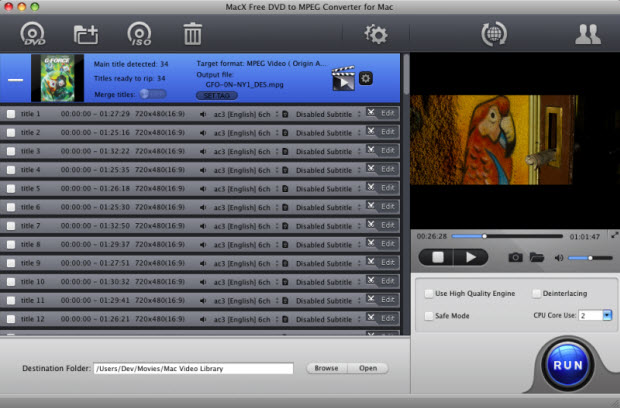
After free download DVD to MPEG ripper on Mac computer or Windows version on PCs, click "DVD Disc" to add DVD from DVD drive. Or you can click "DVD path" to import DVD from DVD folder saved on your computer.
Step 2: Choose Output Video Format.
Select the output format as you want, in this guide, we choose "to MPG" from the DVD Backup column.
Step 3: Choose Output Folder.
Specify an output folder on your computer to save the output files. Click "Browse" to choose the path where you want to save the output files in.
Step 4: Start Conversion.
"RUN" to start the conversion of DVD to MPEG on Mac. You can view the conversion progress and are able to cancel the converting process at anytime.
For those who would like to convert DVD to more output formats with advanced functions, MacX DVD Ripper Pro is qualified as well. It is the fastest DVD ripping solution which features converting any DVD to variety of formats, including MP4, H.264, MOV, FLV, MPEG 4, M4V, AVI, QT, etc. It makes you easily watch any DVD on Mac, iPad, iPhone, iPod, Apple TV, QuickTime Player etc without third party assistance.
Note: For users who want a 100% free solution to rip movies on DVDs to MPEG-4 digital video format on Mac without any virus, admare, malware or plugins, they may resort for the free Mac DVD ripper which will also rip DVD to MPEG-4/H.264 free on Mac regardless of the CSS copy protections.


Bella has been working with DVD digitization for over 12 years. She writes articles about everything related to DVD, from disc drive, DVD copyright protection, physical structure, burning and backup tips. The unceasing passion of DVD movies helps her build a rich DVD library and ensure a practical solution to address almost all possible DVD issues. Bella is also a crazy fan for Apple products.