





Twitter

Home > MacX DVD Ripper Pro > Disney

How to Backup Disney Copy Protected DVD Movies on Mac OS

It is no doubt that no matter children or adults like Disney animations. Almost every DVD movie fans will have a great collection of Disney DVDs. Then how to keep the Disney DVD movie disc away from scratch or damage? Copy and rip Disney DVD to your Mac computer is certainly a good way. But you will find it is not a easy task since latest Disney DVD movies are all protected with new copy protection.

What's Disney DVD Copy Protection

Not all DVD fans know what Disney DVD copy protection is and how to judge which DVD is protected from decrypting. Generally, there are several ways to see if your DVD movies are protected by new copy protection.

  • When you use typical DVD backup tool to backup Disney DVD movies, you will get error when copying or DVD files with big size, even larger than 50G.
  • It is not playable on DVD player which is not matching for the protected DVDs.
  • The new copy protection will prevent the DVDs from ripping by general DVD ripping software and the videos converted from DVD will be out of order.
  • It may even shorten the life for DVD drive if wrong decoding scheme is misused.
  • Many Mac users may tried to rip Disney DVDs by handbrake before, but lots of them got errors when starting the ripping or during the ripping process.

However, MacX DVD Ripper Pro is one of the few solutions which successfully solve this problem and backup new copy protected DVDs released by Disney, Paramount, Warner and many other companies, such as Alice in Wonderland, The Princess and the Frog, Avatar, Twilight New Moon, 2012, etc,.

Although almost all other DVD backup programs got stuck when working on these protected DVDs, MacX DVD Ripper Pro is able to rip all them to Mac or convert them to other video formats compatible with portable devices easily and quickly. Besides ripping the new Disney copy protections, it also supports other copy protections that are commonly used in DVD movies, like Sony ArccOS, CSS encryption, region protection, UOPs, APS, etc.

MacX DVD Ripper Pro

MacX DVD Ripper Pro

70% of those who used our DVD ripper software upgrade to MacX DVD Ripper Pro Edition

Time-limited Special Offer: $49.95, $39.95

Buy MacX DVD Ripper Pro Download MacX DVD Ripper Pro

MacX DVD Ripper Pro Main Features:

  • Backup protected DVD movies by removing Disney DVD protection, CSS, ARccOS, RCE.
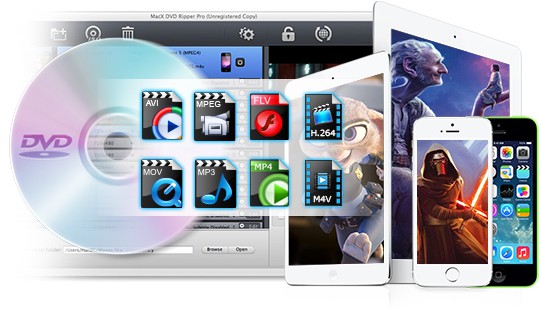
  • Support rip DVD to 13+ different formats , including H264, FLV, MP4, MOV, AVI, MP3 and so on.
  • Rip and transfer DVD to iPhone 4S, iPad, iPod, Apple TV, iTunes, PSP, Android YouTube, etc.
  • Blazing fast DVD ripping solution offers up to 8x real time converting speed on Mac OS.
  • Backup DVD to single MPEG-2 file with original Video and 5.1-channles AC3/DTS Dolby Audio.

Customer Testimonials

I got Avatar DVD few months ago, it is pretty nice movies and I wanted to backup it on my Mac. What frustrated me was that it seems to be copyright protected. I tried the free software handbrake and MacTheRipper . However, both of them failed to help me out. After a Google search, I found MacX DVD Ripper Pro, it is a great program. It removes the protection for me and

- Tom

Great Program. I downloaded the latest HandBrake with the VLC managed to rip Alice in Wonderland, it failed to for me last night. But MacX DVD Ripper Pro offers fast speed and perfect performance on ripping this protected DVD. Thanks.

- William

Here we will take Ripping DVD Alice in Wonderland for example. You will see, with MacX DVD Ripper Pro, you can decrypt and make backup of your favorite Disney DVD movies to Mac computer , iPhone, iPod, iPad with only a few clicks.

DVD Alice in Wonderland, published on Match 23, 2010, is released by Walt Disney. Johnny Depp and Tim Burton stared together to make a three hundreds million dollars box office. And this trend grows stronger as for these DVD collection fans.

This DVD movie is also protected with new copy protection technology. Then how to Rip DVD Alice in Wonderland to make a backup of it?

How to Rip Alice in Wonderland to MP4, FLV, iPhone, iPod, iPad

Before ripping the DVD movies, please make sure you have full copyrights of your DVD and backup the encrypted DVD for fair use. Don’t use it to break the DVD copyright law.

The Tools You Need:

  • DVD player or DVD player software.
  • Download MacX DVD Ripper Pro.

Step One –Play DVD Movie and Record the Title.

Play the DVD movies you want to rip with DVD player software. When it comes to main content of the movie, please check the DVD title and record the title number.

Step Two – Select the Correct Title Number

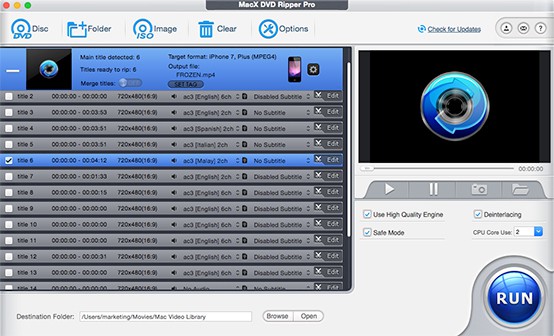
  • Launch MacX DVD Ripper Pro and insert the DVD disc. You can load from DVD driver by clicking "DVD Disc" or from DVD folder by clicking "DVD Path".
  • Find the title number you record and tick it. Then you are able to rip and backup DVD from the main content. The title in this tutorial is just an example.

Rip Disney protected DVD on Mac

Step Three – Rip Protected DVD to MP4, FLV, MOV, iPhone, iPad, iPod on Mac

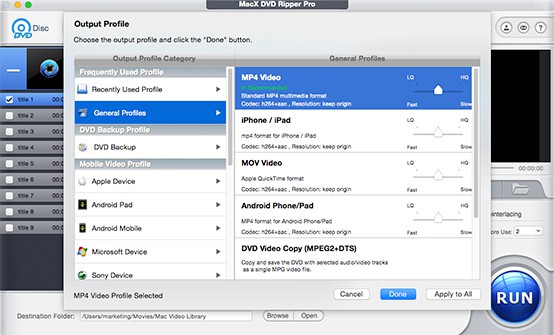
  • Select the output format as you wish, like DVD to AVI, DVD to MP4, DVD to iPod, DVD to iPhone, DVD to iPad etc.
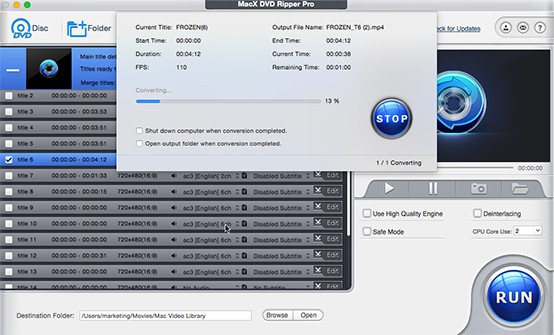
  • Click "Browse" button in output setting area and select a destination folder to save your converted video.
  • Start ripping. You can view the conversion progress and are able to cancel the converting process at anytime.

Rip Protected DVD to MP4, MOV for iPhone, iPad, iPod

List of Protected DVD Released by Disney, Paramount

Backup The Princess and the Frog

Backup The Princess and the Frog

Rip The Twilight Saga: New Moon to MP4, FLV

Rip The Twilight Saga: New Moon to MP4, FLV

Transfer DVD 2012 to iPhone, iPad, iPod

Transfer DVD 2012 to iPhone, iPad, iPod

Convert DVD Avatar to other video formats

Convert DVD Avatar to other video formats

Copy Bolt to Mac computer

Copy Bolt to Mac computer