

Home > Video > Software Review > Copy iPhone Video to Mac Computer


Home > Video > Software Review > Copy iPhone Video to Mac Computer
iPhone XS offers a storage up to 512GB, cool! But users with 64GB iPhone devices will continue suffering from not enough storage problem. One effective solution to this is to backup video from iPhone to Mac, especially those large-size shot in 4k, 1080P resolutions.
iTunes is used for music video sync between iPhone and Mac. But most of the Apple users may be upset for iTunes just because they cannot transfer iPhone video to Mac computer with iTunes. They want to copy videos from iPhone to Mac/PC computer to edit or for other purpose, but as iTunes can only copy files from Mac to iPhone. Don't worry; this guide will offer you the easiest way to import video from iPhone to MacBook Air/Pro, iMac 4K/5K etc.
MacX MediaTrans is a sound of blessing for frustrated Apple users who want but cannot copy video from iPhone to Mac. With this iPhone to Mac transfer software, you can transfer videos from iPhone to Macbook Air/Pro or iMac 4K/5K directly and easily. This iPhone file manager stays super fast to transfer 4K/1080p shot videos, recordings, downloaded movies from iPhone XS/XS Max/XR/X/8/7/6S/SE/6/5S, iPad, iPod on iOS 12 to Mac (macOS Big Sur) computer (and also PC on Windows 10).
In addition to sync iPhone video files to Mac, it will also add movies, videos, music videos, TV shows from Mac computer to iPhone iPad directly. More importantly, it will automatically remove any unsupported formats, allowing you to drag and drop the videos directly. What's more, you can backup music and photos from iPhone to Mac. Here is the step by step guide teach you how to copy iPhone video to Mac computer, backup your iPhone videos and songs in your computer, even you are computer newbie.


Next, we will show you how to export video from iPhone to Mac without iTunes. BTW, this tutorial is also suitable for you to copy photos from iPhone to Mac and move music from iPhone to Mac.
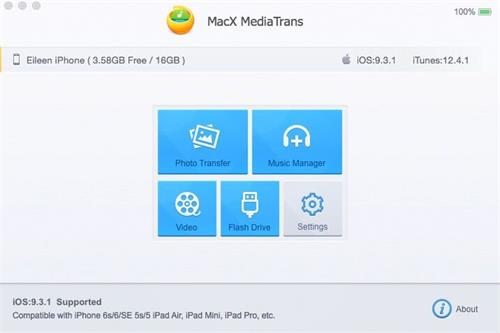
Step 1 Download the software
Download iPhone to Mac video transfer on your Mac computer (macOS Big Sur included) and then run it.
Step 2 Connect iPhone to Mac
Connect your iPhone XS/XS Max/XR/X/8/7/6S/6/SE to your Mac, your device can be automatically recognized by the program.
Step 3 Copy iPhone Video to Mac
Click "Video" button to enter the iPhone video management interface and you can see your whole videos/movies/TV shows immediately. Select the videos you want to download from iPhone to Mac and click the "Export" button on the top to fast move iPhone stored video to Mac computer.
For your reference:
MacX MediaTrans can backup iPhone files to Mac including music, movies, photos, pictures, etc. Apart from these, the syncing speed is super fast, the whole process can be done in a short while without conflicting other programs.
This iPhone video to Mac transfer also allows you to mount iPhone as a portable hard disk, so you can copy files like video, audio, images, etc from Mac to iPhone, iPod, iPad.
It is worthy mentioning that this iPhone to Mac video transfer will automatically convert the inputted video to MP4, MOV or M4V video format for compatible with iPhone/iPad when you copy video from Mac to iPhone.
 Author: Rico Rodriguez | Updated on Dec 26, 2025

Here is the step-by-step guide on how to backup iPhone file to Mac. MacX iPhone Mounter is versatile Mac to iPhone transfer, which can fast backup iPhone file to Mac. It also supports iPod/iPad backup on Mac.

MacX MediaTrans is an all-in-one iOS iPod iPad iPhone transfer app to copy iPhone video to Mac computer, as well as transfer music/photos from iPhone iPad iPod to Mac and vice versa with world's fastest speed!

 MacX MediaTrans - Copy iPhone Videos to Mac Easily