"Please recommend a DVD ripper for Mac M1 and doesn't need questionable extensions or contain malware?- from Reddit
I have a shelf of DVDs that I'd like to rip and store the main title or episodes on my Mini to play on my AppleTV. "Mac the Ripper" (MTR) used to be my go-to product, but it's long gone. Is there another DVD ripper for Mac? - from Reddit
I want to make a copy of a DVD that's not available on iTunes or other streaming services. I tried Handbrake but it doesn't work on my M1 Max and outputs distorted videos. Any DVD ripper for my M1 Mac or intel iMac ? - from Macrumors"
If you're searching for the best DVD ripper for Mac in 2026, you will want something that’s safe, fast, and actually works with copy-protected DVDs on all Mac models, including the latest Apple Silicon Macs like MacBook Air/Pro, iMac, and Mac mini.
In this guide, we tested 13 free and paid DVD rippers on macOS Tahoe Sequoia, Sonoma, and earlier macOS, including Disney, Sony, and region-locked DVDs. Some tools failed to load discs, some crashed on M1 Macs, and others produced distorted output. You'll find Mac DVD ripping tools that really work, whether you want a free DVD ripper for Mac, a lossless ISO backup, or a fast MP4 for Apple TV and iPhone.
Download 2026 Best DVD Ripper for Mac
MacX DVD Ripper Pro - Easily Rip Protected DVDs on Mac! [Most Recommended by Users]
- Strongest! Rip new & old DVDs protected by 99 titles, region codes, CSS, RCE, Disney X-project, UOP, ARccOS, etc.
- 5x faster GPU accelerated DVD ripping speed on Mac: It takes 5 mins Only to rip a full DVD with original quality.
- Rip any DVD to Macs in MP4, MKV, MOV, H.264, HEVC, M4V, AVI, QuickTime, and 350+ formats.
- 1:1 clone DVD to ISO, MPEG2, or MKV with all content incl. video, audio, menus, subtitles, etc.
- Extract the soundtrack or audio content from DVD as MP3, AAC, or AC3 format.
- Compress DVD VIDEO_TS/ISO to smaller, widely compatible formats like MP4 and MOV. Rip DVDs for hard drives, Apple devices, or 420+ device profiles.
- Fully compatible with Intel/Apple Silicon Macs (M1/M2/M3/M4), incl. MacBook Air, MacBook Pro, iMac, and Mac mini.
What users say about MacX DVD Ripper:
"I have been a very satisfied user of MacXDVDRipper Pro since 2016. It consistently turns out excellent digital encodes from DVDs including discs HandBrake can't read." -- David Kalat
"I highly recommend this. If you have a lot of DVDs and you wanna digitize them, MacX DVD Ripper Pro proves useful and worth the price." -- Ishmael
"The Rolls Royce of DVD ripper software! I have tried them all, and this is the best. " -- Katey Rowland
"I was looking for software to digitise my DVD collection because I travel a lot internationally. Also, I have a MacBook Pro and can't play DVDs from all Regions on it. My DVDs are from Australia, Europe, Asia and USA. Converting all of my DVDs to mp4 files was a breeze and the Region code restrictions are removed as part of the process. Average 15-20 minutes each DVD for me." -- Tavishi
How to Select the Best DVD Ripper for Mac
There's a wide array of free and paid DVD ripping software for Mac, all claiming to convert any DVD to any format. However, it's crucial to ensure you're choosing a truly reliable option before downloading. Otherwise, you might encounter frequent crashes, discs failing to load, choppy output video, or persistent "no valid source found" messages.
To help you choose wisely, here are 5 key criteria to consider:
1. Compatibility: Ensure the best DVD ripper for Mac supports the latest macOS (like Sonoma) and Apple Silicon (M1/2/3/4) Macs. And it should be able to rip DVD to the format you need (e.g., MP4, MKV, AVI, etc.).
2. Rip protected DVDs: Some free DVD rippers fail to handle copy protections. Good DVD ripping software for Mac should be able to remove copy protections as most commercial DVDs are copy-protected.
3. Fast Speed: Some Mac DVD rippers rely on the CPU, whereas others can double or triple the speed with GPU concurrent computing. For a large DVD collection, choose a DVD ripper for Mac that supports GPU acceleration.
4. High Quality: Good DVD ripping software for Mac uses an advanced transcoding engine to maintain high visual quality, aiming for imperceptible loss (around 1500 kbps bitrate is ideal).
5. Ease of Use: Great tools will feature an intuitive interface with features clearly marked and locally placed, leaving little room for guesswork. Preferably, users can go from DVD to digital on Mac within 3 clicks, regardless of their computer skills.
Our Research Process:
We have spent almost a week to test and select the best free/paid DVD ripper for Mac.
- A total of 25 Mac DVD ripping programs (free and paid) have been tested.
- We've tested homemade DVD, a region 2 DVD, a copy-protected Disney DVD, a Sony DVD, and a TV series DVD (for test and personal use only).
- The tests were conducted on an iMac 5K (3.2 GHz Intel Core i5, AMD Radeon R9 M380, 2048MB, on Big Sur).

- Encoding speed can vary based on your computer's specs. Higher configuration will lead to better performance.
- Ripping copyrighted DVDs may violate copyright laws. Check the laws in your region before proceeding.
Top 13 Best DVD Rippers for Mac Free & Paid
To rip DVD on Mac, there are various options, free and paid. Which is the best DVD ripper for Mac? If you prefer free ones, MakeMKV and HandBrake are among the top free Mac DVD rippers. However, free tools may not always meet our needs. For example, HandBrake cannot rip protected DVDs, MakeMKV outputs large files, VLC takes too long to rip DVDs, Disk Utility can't rip DVDs to MP4... Therefore, you may also need more advanced paid DVD rippers for Mac. Below are our top picks:
Best DVD rippers for Mac in 2026:
- MacX DVD Ripper Pro - best for ripping strictly-protected DVDs on mac at high speed.
- iSuper DVD Ripper - rip homemade DVD to different formats.
- Mac DVDRipper Pro - archive DVDs or rip protected DVDs for Apple devices.
- Cisdem Video Converter for Mac - an all-in-one protected DVD ripper and video converter.
- WinX DVD Ripper for Mac - rip encrypted and region-locked DVDs to MP4 fast.
- DVDFab DVD Ripper for Mac - rip protected DVDs with flexible settings, built-in editing, and AI enhancement.
- Movavi Video Converter for Mac - convert non-protected DVDs to diverse formats with built-in editing features.
Best free Mac DVD rippers in 2026:
- Handbrake - free rip non-protected DVDs on Mac with flexible settings.
- MakeMKV - simple and free to copy protected DVD to MKV format without quality loss.
- VLC - convert homemade DVDs on Mac to MP4 and several other formats with basic options.
- Disk Utility - create a backup of a DVD on Mac in ISO format.
- FFmpeg - a powerful non-protected Mac DVD ripper for tech-savvy users who need high customization.
- MacTheRipper - rip DVDs with basic copy protections on older Mac systems.
No.1 - MacX DVD Ripper Pro
- Price: Free trial is available. Premium license (One-Year Subscription / 3 Macs): $34.95; Ultimate License (Lifetime License / 1 Mac): $59.95
- Compatibility: MacOS Sequoia, Sonoma, Ventura, Monterey, Big Sur, Catalina, and ealier
- Latest version: 6.8.3 (December 9, 2024)
MacX DVD Ripper Pro is a DVD ripper for Mac, including Apple M1/2/3/4 Macs and macOS Sequoia systems. It tackles even the toughest encryption, making it a top choice for ripping DVDs on Mac. It bypasses a wide range of copy protection schemes, including common ones like CSS and Region Code, as well as more complex ones like Disney X-Project DRM. No additional tools or complicated setups are needed.
It can freely rip DVDs to Mac in HEVC, MOV, M4V, H.264, MKV, AVI, ISO, and any other formats . With just a few clicks, you can watch DVD movies on Mac QuickTime, iPhone, iPad, iTunes, Apple TV, or save them on SSD, NAS, USB, and cloud storage. 4 unique DVD backup modes are provided for lossless DVD copy. And there are basic editing features to cut, crop, merge, subtitle videos, etc.
Additionally, MacX DVD Ripper Pro leverages Nvidia/Intel/AMD GPU acceleration to rip DVDs on Mac at impressive speeds. Expect a full DVD to MP4 conversion in just 5-10 minutes on a newer Mac – that's up to 3x faster than Handbrake! Additionally, the built-in High-Quality Engine ensures excellent output quality, and the De-interlacing Engine smooths out video for a flawless viewing experience.
How to Rip a DVD on Mac?
Learn how to use MacX DVD Ripper Pro to rip DVDs on Mac with the best balance in speed, quality, and size.
Step 1: Insert DVD into your Mac drive
Prior to the ripping, make sure to spare some space to save the final rip. Then free download the DVD ripper on your Mac (Macintosh or newer machines) and insert your disc. Run the software and click the "DVD Disc" button to load the disc. You can also convert DVD folder or ISO image to a digital format.
 Free download the DVD ripper on Mac >>
Free download the DVD ripper on Windows >>
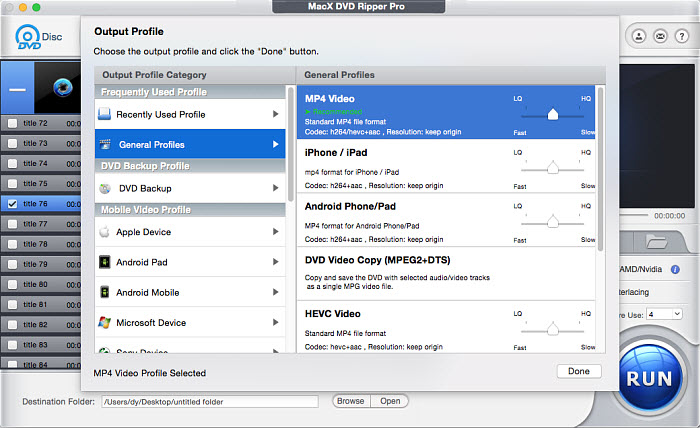
Step 2: Choose the output format
MacX DVD Ripper Pro will automatically identify the main movie on the DVD, even for discs with strong copy protection. Its advanced technology seamlessly scans the title, cracks the encryption, and streamlines the ripping process.
Once analyzed, a clear output format window appears. MacX DVD Ripper boasts a Mac-friendly library with a variety of options, whether you want a complete ISO image backup, a versatile MKV file, or a format compatible with Apple devices, Android, TVs, or even online sharing. We'll provide some recommended settings for Mac DVD ripping in the next step.
- Universal Compatibility: For playback on most players, phones, tablets, and TVs, choose the MP4 (H.264) format. It offers a good balance of compatibility, quality, and file size.
- Space-Saving High Quality: If prioritizing storage space for iPhones, iPads, or Android, opt for MP4 (HEVC). This format delivers higher quality at smaller file sizes but might not be compatible with all devices.
- Exact Disc Copy: To preserve your DVD with menus and extras exactly as they are, choose the ISO Image. This creates a 1:1 copy of the entire disc, ideal for future burning but limited compatibility with media players and devices.
You can also enable the editing features, available for you to cut the commercials, merge the useful parts, add subtitles to the movie rip, etc.
Step 3: Start ripping the DVD on Mac
Click the Browse button to specify the output folder on your Mac and press RUN to begin DVD ripping. Just leave the rest to the Mac DVD ripper. It will finish the process quickly.
After the DVD ripping on Mac, use Finder to transfer the ripped file to your phone or tablet. Connect your iPhone or iPad to your Mac using a USB or Wi-Fi connection. Select the device in the Finder sidebar > Movies > check the box "Sync movies onto [device name]"> choose the movie you want to sync > click Apple.
>> MacX DVD Ripper Pro Review: Is It Still Worth Using?
Performance Tests:
MacX DVD Ripper did a great job selecting the right title. While Handbrake, VLC, or other free Mac DVD rippers encountered errors, crashed unexpectedly, or produced faulty rips.
It provided an average ripping speed of 240 fps, doubling Handbrake's speed. Ripping the entire Frozen 2 DVD to MP4 took only 12 minutes, an I was able to multitask seamlessly with minimal CPU usage (around 131-134%).
It took several minutes to back up a movie directly into MKV format. For MP4 conversion, it efficiently compresses the DVD (7.84GB) into a smaller 1.61GB file with minimal quality loss (720x480 resolution, 16:9 aspect ratio). The resulting MP4 file maintains near-identical quality to the source DVD, with only minor pixel-level differences.
Pros
- This Mac DVD ripper stands out for its speed and stability when converting DVDs to digital files.
- The DVD ripping software for Macintosh supports almost all copy protections on a purchased DVD.
- Choose from a vast library of over 350 output profiles tailored for different devices.
Cons
- It doesn't support Blu-ray discs or DVD burning.
- Navigating the 350+ output profiles might be overwhelming for some users seeking less common formats.
Verdict: MacX DVD Ripper Pro offers a user-friendly way to rip and back up your DVDs on Mac. It's particularly helpful if you have a collection of DVDs, including those with strong copy protection, that you want to preserve digitally. The fast speed and ready-made profiles all make the ripping process a no-brainer experience. But it lacks more advanced features like editing or fine-tuning the ripping process.
No.2 - iSuper DVD Ripper
- Price: Free with a paid version for $26.25
- Compatibility: macOS 10.7 or later
- Latest version: 6.3.13 (October 15, 2024)
iSuper DVD Ripper is a useful program for ripping homemade DVDs on MacBook Pro, Air, and iMac. It is the most popular DVD ripper among the several options available on the Mac App Store. You can rip non-protected DVDs on Macs to MP4, MOV, AVI, WMV, MKV, FLV, M4V, HD MP4, and more. It can even extract the DVD audio in MP3, AAC, WMA, etc.
iSuper boasts a user-friendly interface, making it a good option for converting your personal DVD collection, like family videos, to digital files you can store on your Mac. You can even add some basic video effects during the conversion process.
However, iSuper can only rip DVDs without copy protection. If you want to rip DVDs with copy protections, create ISO images, or make full DVD backups, you will need to purchase its upgrade version at $26.25.
How do I rip a DVD to my Mac for free with iSuper DVD Ripper?
- To rip DVDs on Mac with iSuper DVD Ripper, download it from the Mac App Store. You might need your Apple ID or Touch ID to complete the download. Once downloaded, launch the application.
- Insert the disc into the Mac's drive or an external disc drive. In iSuper DVD Ripper, click the Load Disc button on the top to import the disc.
- Select the DVD chapter you want to rip and click on the profile menu to select an output format.
- You can crop, edit, and adjust the video settings if needed. Once finished, select an output folder on your Mac and click the Convert button to start ripping the DVD on Mac.
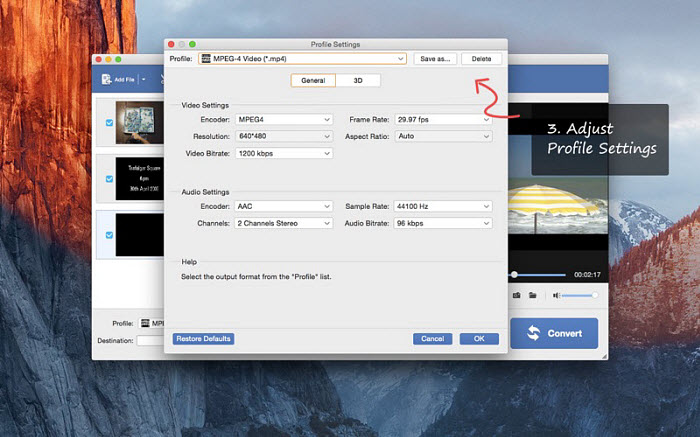
While iSuper DVD Ripper ripped some older homemade DVDs to Mac successfully in my tests, we did encounter some issues: In some cases, the audio might go out of sync with the video or be missing entirely during playback. The ripped videos might not fill your entire TV screen, leaving black bars on the top and bottom. The free trial allows you to try the software, but many desirable output formats are locked and require purchasing the paid version.
Pros
- The Mac DVD ripper is available on the Mac APP Store.
- iSuper DVD Ripper is able to rip a DVD on Mac to a wide range of output video and audio formats.
- It offers the ability to add audio/video effects, crop, rotate, add watermarks, merge, record, etc.
Cons
- iSuper DVD Ripper for Mac is able to rip unencrypted DVDs only.
- It lacks the functions to make an intact copy of a DVD on Mac, such as rip a DVD to ISO image.
- iSuper DVD Ripper for Mac works well on even difficult DVDs but needs a fair amount of setup.
- The ripped DVD files are often out of sequense and you need to manually move each file has to the right place.
- DVD ripping errors occur sometimes, such as missing audio, black bars, audio and video go out of sync, etc.
Verdict: iSuper DVD Ripper is a simple solution for ripping unprotected homemade DVDs to MP4 on your Mac. However, if you need to handle copy-protected discs or require more advanced features, consider other Mac DVD rippers.
No.3 - Mac DVDRipper Pro
- Price: $29.95 with first 5 rips for free
- Compatibility: Mac OS X 11.0 or higher
- Latest version: 14 (May 31, 2025)
Mac DVDRipper Pro is a professional DVD ripper for Mac that will "copy DVDs to you Mac to protect your DVD from scratches and save the batter life without spinning a disc". If offers different modes to copy the full DVD to your Mac in ISO image or dvdmedia, backup a DVD to another disc, compress the DVD to iTunes, and rip DVDs to .m4v/.mp4/.mkv for iPod, iPod Touch, iPhone, iPad, Apple TV, etc.
Mac DVDRipper Pro tackles most copy protections and includes a frequently updated database of popular DVDs, which helps access and rip a DVD on Mac efficiently. The latest Mac DVDRipper Pro 12 introcuces GPU hardware encoding on compatible Macs. This makes DVD ripping on Mac even faster than before. If you want an easy Mac DVD ripper to copy a DVD, explore the full potential of Mac DVDRipper Pro with the first 5 rips completely free. After that, it's available for a one-time purchase of $29.95.
How do I rip a DVD on Mac with Mac DVDRipper Pro?
- Free download Mac DVDRipper Pro on your Mac and open it. Insert the DVD you'd like to rip into the optical drive.
- MDRP will load the DVD. If the DVD has a region code that doesn't match your Mac's drive region, Mac DVDRipper Pro may not be able to open and rip it.
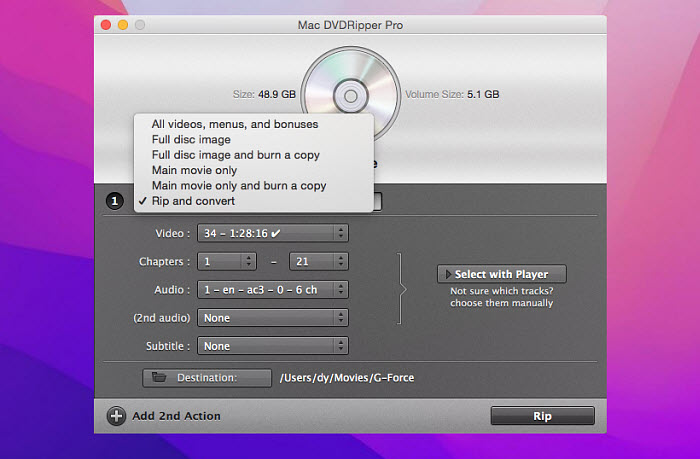
- To rip the DVD on Mac, select "Rip and Convert". Next, use the built-in player on the right to select the specific chapters you want to rip and adjust the desired audio and subtitle track.
- Click the Destination button to set where you want to save the output video on your Mac. Then click Rip to start.
Pros
- Modes to archive the entire disc as a mountable image, save just the main movie, convert DVDs to M4V/MKV/MP4.
- Advanced OCR engine allows users to rip DVD on Mac with soft subtitles on or off.
- MDRP is able to rip protected DVDs and re-mount a DVD unencrypted with a mode similar to Fairmount.
- Great customer service and support.
Cons
- Mac DVDRipper Pro offers less extensive output formats and limited customization options.
- Mac DVDRipper Pro may not bypass all DVD encryption methods, such as DVD region codes and Disney movies.
- The software displays DVD titles using numbers instead of the actual movie title or chapter information. This might require using the built-in player to identify and select the specific chapters you want to rip.
Verdict: Mac DVDRipper Pro excels at creating secure digital backups of your DVD collection. Think of it as a user-friendly alternative to Handbrake, with the added benefit of tackling copy protection for those stubborn DVDs. Plus, recent updates have significantly boosted the performance of its core features on Apple Silicon Macs, making it a great DVD ripper for Mac M1 and M2 users.
No.4 HandBrake
- Price: Free
- Compatibility: macOS 10.13/later; Windows 10/later(Intel or AMD x64/Qualcomm/ARM64); Linux
- Latest version: 1.10.2 (September 06, 2025)
Handbrake is one of the best free Mac DVD rippers for converting DVD/Blu-ray to your digital library for use on iTunes, DLNA, websites, etc. It can freely convert DVD to MP4 and MKV in H.265, H.264, H.265 MPEG-4 and MPEG-2, VP8, VP9, and Theora. There are pre-configured settings optimized for Apple, Android, Roku, PSP, Xbox, Web, etc.
Handbrake supports AMD VCE, Apple VideoToolbox, Intel Quick Sync Video, and NVIDIA NVENC GPU acceleration for H.264/HEVC encoding. Generally, Handbrake auto enables HW acceleration for DVD ripping tasks and switches to pass 2 for better encoding. That means Handbrake will rip DVDs fast on a Macbook or iMac equipped with a powerful video card.
However, HandBrake can only rip homemade DVDs or those without copy protection. It cannot handle commercial, copy-protected DVDs by default and requires a third-party tool like libdvdcss to decrypt the DVD first. However, installing libdvdcss on Mac can be cumbersome, and it doesn't always succeed in decrypting the DVD.
For a faster and more reliable solution, many users prefer to use a tool like MacX DVD Ripper Pro, which bypasses various DVD copy protections without the need for third-party software. This powerful tool allows you to effortlessly rip any DVD, including copy-protected commercial discs, ensuring a smooth and hassle-free ripping experience.
How do I use Handbrake to rip a DVD on a Mac?
- Go to its official site to download and install HandBrake. Handbrake works with Mac OS X 10.13 and later. If you're running on an Apple silicon based Mac, make sure the Handbrake is 1.4.0 or later.
- Insert DVD disc into Mac's DVD drive and run Handbrake. Click the Source button to load the DVD. To rip protected DVDs, you need to download libdvdcss for Handbrake to remove the CSS.
- Click "Browse" to set where you want to save the output files. Then click "Presets" and select an output format.
- Adjust settings. What's the best setting for Handbrake ripping a DVD? Unless you aim for a target file size or speed, we recommend you use Constant Quality with an RF of ~21, Contant Frame Rate, Very Slow encode speed, High Encoder Profile, and 3.1 Encoder Level.
- Apply other filters if needed. Once finished, click "Start" to rip DVDs for free on Mac now.
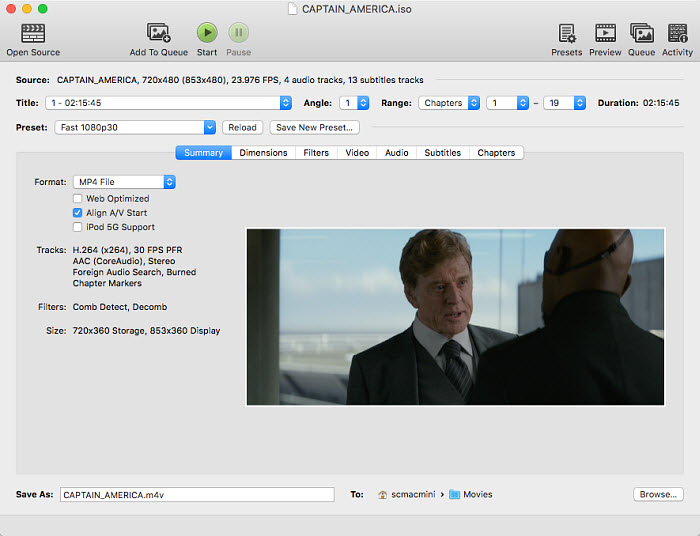
Handbrake delivered great results when ripping my personal family DVDs. However, for protected DVDs, things got trickier. While installing libdvdcss through Homebrew allowed me to attempt ripping them, the process wasn't entirely reliable. Handbrake consistently failed to rip two specific movie DVDs with copy protection. Troubleshooting proved difficult since libdvdcss seemed to be working correctly. In the end, I turned to other Mac DVD rippers.
Pros
- Handbrake provides tons of filters and DVD ripping setting options.
- Handbrake rips DVD on Mac freely with fast speed and high output quality.
Cons
- Handbrake requires libdvdcss to rip protected DVDs. But Handbrake with libdvdcss support region codes and CSS only.
- Handbrake might not be fully optimized for Apple M1/2 Macs. This could result in slower ripping speeds and reliance on the CPU instead of the potentially faster GPU.
- The output formats are limited to MP4, MKV, and WebM.
- Handbrake doesn't have a built-in feature to merge multiple titles or episodes into a single file.
- Handbrake might have a steeper learning curve for new users.
Verdict: Handbrake is the best free DVD ripping software for Mac users who know how to adjust video settings, codecs, and various customization options to fine-tune the ripping process for specific needs. The copy protection is a problem for Handbrake, but you can try installing libdvdcss to work with HandBrake.
No.5 - MakeMKV
- Price: Free
- Compatibility: x64 or ARM64 Mac OS X 10.7 or later; Windows XP or later, x86 or x64
- Latest version: 1.18.2 (September 25, 2025)
MakeMKV is among the top solutions to rip protected DVDs on Mac for free. It's an easy & free DVD/Blu-ray ripper for Mac, Windows, and Linux. MakeMKV remuxes the movie content from DVD MPEG2 to MKV without affecting the quality, reserving all video/audio tracks and subtitles with meta-information. That also means the whole DVD to MKV converting is pretty fast. Therefore, MakeMKV is your premium choice to backup your movie collection on your hard drive, NAS, or USB.
However, the output MKV files tend to be really big in size. Normally, a DVD MKV movie takes 2-8 GB on the hard drive and a Blu-ray movie takes 30 GB. This can be problematic, especially when trying to transfer the DVD movie to devices like an iPhone or iPad, which have limited storage. Therefore, if you're looking to rip DVDs into smaller files, MakeMKV may not be the best option.
MakeMKV typically rips a DVD in about 20 minutes, so you only need to check in every 20 minutes to start ripping another DVD. Then just set up a queue of your ripped DVDs (in MKV format) and let your computer handle the rest.
How do I rip a DVD on Mac with MakeMKV?
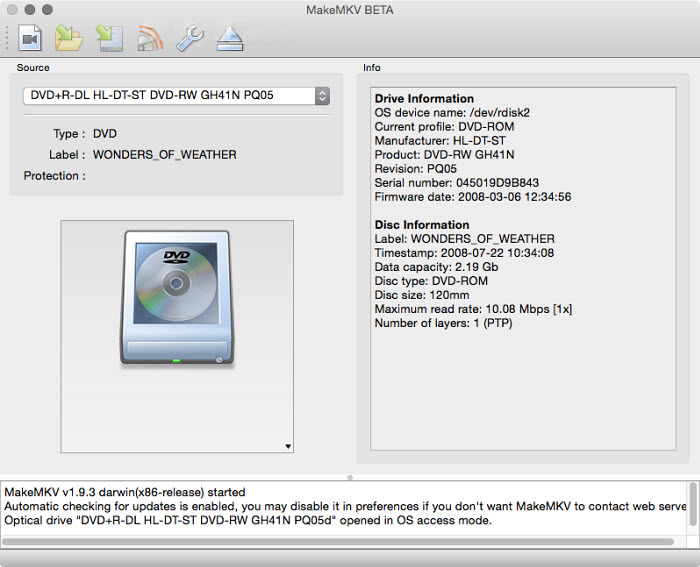
- Free download MakeMKV on Mac. It's completely free to rip a DVD disc to Mac during the beta-testing phase, and if you want to decrypt a Blu-Ray disc, you will need to pay $50. (macOS might prevent MakeMKV from opening because it isn’t signed by Apple, requiring a Gatekeeper setting change.)
- Open the software and insert the disk. It accepts both DVD and Blu-Ray discs. Then click "Open Disc" to load the information.
- MakeMKV will scan and identify the titles correctly and pop up a list of disk chapters. Choose the chapter, normally the longest and biggest title.
- Select a folder on Mac to save the output MKV files and click "Make MKV". It shows a fast DVD to digital processing speed on Mac, with an average of 30 minutes to rip Blu-ray disc. The output MKV keeps high video and audio quality, but the MKV file is enormous (6.73GB MKV file for a 7.84GB DVD in our test).
If your Mac won't run MakeMKV because it "can't verify it is free of malware", follow these steps:
- Try opening MakeMKV again, then click "Cancel" on the warning message.
- Go to System Settings > Privacy & Security.
- Scroll down and click the Open Anyway button next to the app.
- Enter your password and proceed through any warnings.
This tells macOS that you trust the app, and it won't show the warning again for this software.
If you are using the latest MakeMKV version but still encounter the message "This application version is too old. Please download the latest version at http://www.makemkv.com/ or enter a registration key to continue using the current version" and the app closes after clicking OK, you can bypass this by entering a registration key. Use the code found here.
In addition, some users have reported encountering the issue "MakeMKV can't open specific DVD, but it plays fine in VLC". In this case, try switching to different DVD opening modes in MakeMKV. If that doesn't resolve the problem, you may need to consider using an alternative DVD ripper.
Pros
- MakeMKV can copy a DVD to MKV on Mac with original video, audio, and subtitle tracks without quality loss.
- MakeMKV supports both encrypted Blu-ray discs and DVDs.
- MakeMKV offers fast speed as it only remuxes DVD data to MKV without re-encoding.
Cons
- MakeMKV doesn't support GPU. This may result in high CPU usage and take a long time to finish the rip.
- MakeMKV rips DVD to MKV only, which is large in size and not playable in Apple apps such as iTunes or iDevices.
- There are no options to configure the video and video settings.
Verdict: MakeMKV's focus on preserving the original quality makes it the best Mac DVD ripper for users who prioritize creating high-quality, uncompressed backups of their DVD and Blu-ray collections. While the resulting MKV files are playable, they are not highly compressed, meaning you may need to transcode them further into your preferred format for better file size and compatibility.
No.6 - VLC
- Price: Free
- Compatibility: Mac OS X 10.7.5 or later; Windows XP SP3 to the last version of Windows 11; others
- Latest version: 3.0.21 (June 10, 2024)
Among the many ways to rip a DVD on a MacBook Pro, Air, or iMac, there is no doubt the easiest one. Whether you're on Mac, Windows, Mac, Linux, and even mobiles, chance that you have VLC player installed on your system. VLC is not the most powerful DVD ripper for Mac, but it can get the job done. It offers a handy option to convert DVDs to H.264, H.265, MPEG-1/2, MPEG-4, DIVX, H.263, VP8, WMV, MJPEG, Theora, and Dirac.
Like Handbrake, VLC itself supports homemade DVDs only. The good news is that VLC has libdvdcss in it to help decode a protected DVD. That means you can use Handbrake and VLC together to rip a DVD with encryptions without the need to download extra libdvdcss library.
When you rip a DVD on Mac using VLC's convert/save function, it essentially reads the data from the DVD in real-time and encodes it into a digital file (like MP4). That means, it's like recording the whole movie. As a result, the time it takes to rip a DVD in VLC is often close to the actual playback time of the movie.
How do I rip a DVD on Mac with VLC?
- Free download VLC on Mac if you haven't installed it. It works on Mac OS X 10.7.5 or later.
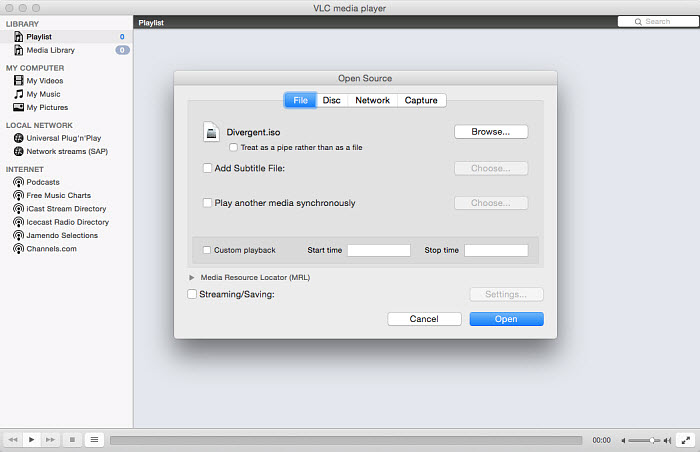
- Insert the DVD to Mac and open VLC. On the top menu bar, click File and select Open Disc. It has no problem loading any non-protected DVDs. For commercial DVDs, you need to you need to skip the DVD title in the VLC settings, or it'll keep recording the menu video repeatedly (if this doesn't work, try Handbrake and VLC together or use other professional DVD rippers).
- At the bottom left corner, check the box for Stream output and click the Setting button.
- First, click Browse and a window will pop up to let you name the converted DVD and select an output folder on Mac to save it. Next, open the drop-down menu at the Encapsulation Method and choose an output format. You can free rip DVDs to QuickTime for Mac. Below are some basic options for video and audio settings.
- Then click Open to convert DVD on Mac with VLC.
See the detailed guide on ripping DVDs with VLC on Mac.
Pros
- VLC is free and open-source.
- VLC lets you convert DVDs to MP4, MOV, H.264, and various other formats freely on Mac.
Cons
- VLC doesn't support protected DVDs. But you can rely on Handbrake and VLC to handle encrypted discs.
- Don't expect a high DVD ripping performance as VLC only specializes in video and audio playback.
- It takes very long time to rip a DVD.
Verdict: VLC is not a dedicated DVD ripper for Mac. VLC offers basic DVD ripping on Mac, making it a handy option for occasional use before exploring dedicated rippers.
No.7 - Disk Utility
- Price: Free
- Compatibility: all macOS systems
- Latest version: N/A
Although it's not the best option for ripping DVDs, Disk Utility can be used as a DVD ripper for Mac. If you just want to rip a few handmade DVDs for simpler playback or backup, you don't need to look for or download additional software because it comes pre-installed on all Mac machines. Even novice users will find it straightforward to navigate thanks to its user-friendly layout.
However, Disk Utility lacks advanced features commonly found in dedicated Mac DVD ripping software. As a result, you won't be able to choose which audio, video, or subtitle tracks to use while the file is being ripped. More so than other rippers, it is slower. It can manage tiny DVDs rather well, but larger or more complicated discs could be difficult for it to handle.
Furthermore, if you encounter a copy-protected DVD, you'll need additional software or tools to bypass the encryption before using Disk Utility for ripping.
How do I rip a DVD on Mac with Disk Utility?
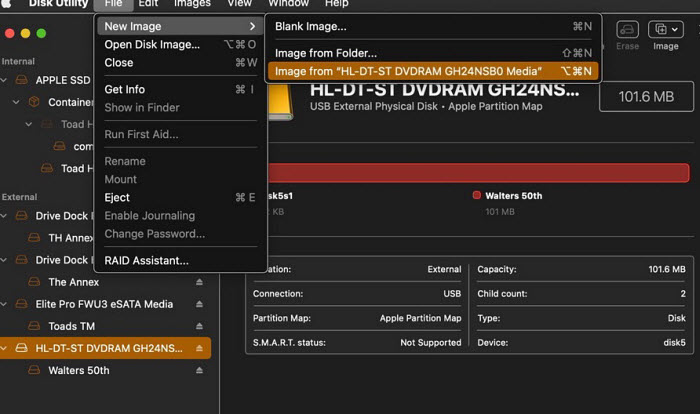
- Insert the DVD into your Mac's DVD drive. Open "Disk Utility". You can find it in the "Utilities" folder, which is located within the "Applications" folder.
- In Disk Utility, you will see a list of drives and volumes on the left-hand side. Select the DVD that you want to rip from the list. Click on the "File" menu in the top-left corner of the screen and select "New Image" and then "DVD/CD Master". This will create a disk image of the DVD.
- Choose a location on your Mac where you want to save the disk image file. You can also choose the desired file name for the disk image. Make sure to select a location with enough storage space. Adjust the image format to "DVD/CD master" and the encryption to "none".
- Click the "Save" button to start creating the disk image. This process may take some time, depending on the size of the DVD and the speed of your Mac. Once the disk image is created, you can eject the DVD from your Mac by right-clicking on its icon and selecting "Eject".
Pros
- It's built in macOS so users don't need to download extra DVD rippers on Mac.
- Disk Utility allows you to create disk images of DVDs on Mac without quality loss.
- Disk Utility is easy to use.
Cons
- It doesn't support DVDs with copy protections.
- It can't rip DVDs to other formats.
Verdict: If all you want is to backup your family DVDs and ditch the discs, Disk Utility can help you make a complete copy of homemade DVDs in ISO files without quality loss.
No.8 - FFmpeg
- Price: Free
- Compatibility: macOS, Windows, and Linux
- Latest version: 8.0 (August 22, 2025)
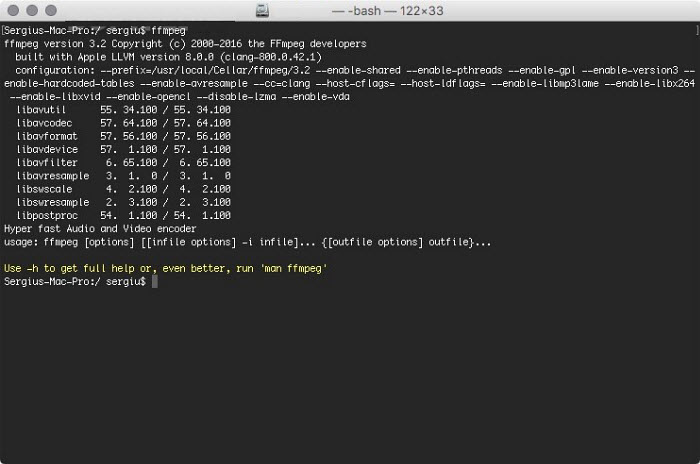
FFmpeg is a powerful, free and open-source command-based project used to handle videos, including ripping DVDs on Mac. FFmpeg supports most video formats, from the most obscure ancient formats up to the latest ones. The libavcodec, libavutil, libavformat, libavfilter, libavdevice, libswscale and libswresample libraries contained in it can satisfy any needs when ripping a DVD on Mac.
However, the command-line interface comes with a steep learning curve, which makes FFmpeg a less beginner-friendly DVD ripper solution for Mac users. That said, advanced users can simply run brew install ffmpeg to get started. With a single command line, FFmpeg allows for highly flexible DVD ripping tasks. For example, to rip a DVD on Mac using FFmpeg, you’ll need to locate the desired .vob files within the VIDEO_TS folder using Finder, then specify the file name for conversion.
To rip DVD to MP4:
ffmpeg -i concat:VTS_02_1.VOB\|VTS_02_2.VOB\|VTS_02_3.VOB\|VTS_02_4.VOB\|VTS_02_5.VOB -map 0:v:0 -map 0:a:0 -codec:a libvo_aacenc -ab 128 -codec:v libx264 -vpre libx264-ipod640 movie.mp4
To rip DVD to H.265:
ffmpeg -i "concat:VTS_01_1.VOB|VTS_01_2.VOB" -vcodec libx265 new-video-h265.mp4
Pros
- FFmpeg lets you rip a DVD free on Mac with different file sizes, quality, video codecs, subtitles, etc.
- It's very easy to combine multiple DVD titles and episodes using FFmpeg concatenate commands.
Cons
- FFmpeg doesn't know how to remove the DRM and read a DVD directly. To rip a DVD on Mac with FFmpeg, you need to tell FFmpeg the VOB files in the VIDEO_TS folder of the DVD.
- FFmpeg, as a command line tool, is more error-prone than other GUI free DVD rippers for Mac.
- FFmpeg can be a bit difficult to get started for a beginner in audio/video processing.
Verdict: If you're comfortable with command lines and want a free, highly customizable DVD ripping solution on Mac, you can try ffmpeg. Note that it doesn't support protected DVDs.
No.9 - MacTheRipper
- Price: Free for versions 2.6.6 and earlier
- Compatibility: Mac OS 10.8 Mountain Lion or earlier
- Latest version: 5.409 (December 1, 2021)
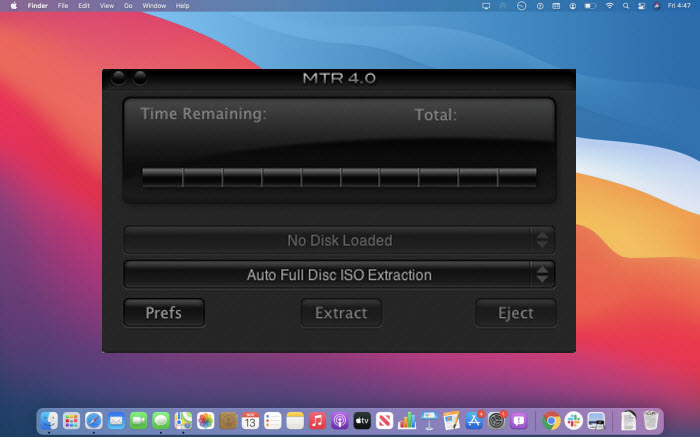
MacTheRipper, also called for MTR, has long been a popular tool that helps Mac users to create backup copies of DVDs. It has many versions, and MacTheRipper V2.6.6, V3, and V4 are the most downloaded versions. You should note that only Version 2.6.6 and earlier is free and supports protected DVDs (UOPs, ARccOS, RCE, CSS, APS, etc.). But it doesn't work on Mac OS X newer than Snow Leopard. You need to send a gift on its official forum for a license to use MacTheRipper 3.0 and MacTheRipper 4.1.
There are 3 modes provided to rip DVDs on Mac: Auto Full Disc Extraction mode, Auto Full Disc ISO Extraction mode, and Full Disc Rip And Rebuild mode. You can't use it to convert a DVD for QuickTime, Apple TV, iPad, iPhone, or other devices as it only extracts DVD and won't convert DVD to video. It's the best choice to save a DVD backup copy on Mac hard drive for later burning.
While there are no newer versions available on its official site, you can find newer updates such as MTR 5.x on Techspot, Macupdate, Softpedia, etc. The newer versions add the ability to remove copy protections on Mac.
How do I rip a DVD on Mac with MTR?
- Download the latest version of MactheRipper on your Mac, and install it for ripping DVDs on Mac.
- Insert your DVD disc into your Mac and launch the Mac The Ripper application.
- MTR will detect and scan titles in the disc. If RCE Region Protection was detected, it will ask you to modify the "RCE Region" number. The RCE Region should be set to the region the DVD was purchased in. For example, the US is Region 1, while Europe is Region 2.
- Click Extract to start ripping DVDs on Mac with MacTheRipper. The converted DVD will be saved as a folder on Mac.
Pros
- This DVD ripper for Macintosh offers flexible options for users to extract DVD data to an ISO image/Video_TS folder with 100% original quality.
- Excellent support forum and the developer is always open to questions and bugs.
Cons
- The free MTR 2.6.6 doesn't work on the latest macOS Sequoia/Sonoma/Ventura/Monterey while the latest versions require a complicated gift-sending process to get a code.
- The latest MTR V4.1 doesn't support DVDs with protections.
- It can rip DVDs to ISO image or DVD folder only. You need to take an extra step to convert the output file to a more compatible video format.
Verdict: MacTheRipper is a great Mac DVD ripper to backup your copy-protected DVDs. But the process needs technical settings and may contain potential troubleshooting. So it's recommended for technically savvy users.
No.10 - Cisdem Video Converter for Mac
- Price: $49.99 with free trial available
- Compatibility: macOS 10.15 or later
- Latest version: 9.0.0 (September 24, 2025)
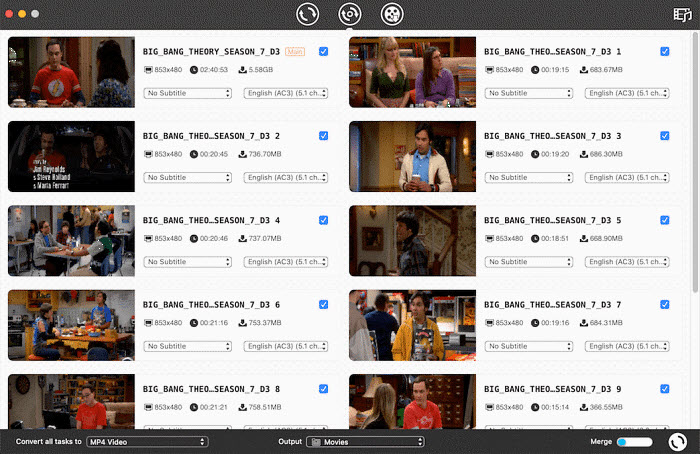
Cisdem Video Converter for Mac, though not free, is an all-in-one solution for various audio and video processing operations. It has a strong DVD ripper built-in to rip both homemade and protected DVDs. Most encryptions currently applied on discs are supported, including CSS, region code, RCE, RPC, UOP, and more. Simply load any disc, you can rip it to MP4, MKV, MOV, H.265 MP4, H.264 MKV, etc. More than that, 300+ ready profiles for Apple devices, Android devices, TVs, etc. are here to make things easier.
The overall DVD ripping speed on Macintosh is fast with its advanced accelerating tech. You can further fine-tune video parameters such as resolution, frame rate, aspect ratio, and more to achieve better output quality. However, unlike some professional DVD ripper software for Mac, it doesn't support creating a full DVD backup in formats like ISO or VIDEO_TS folders. As a result, it may fall short in preserving 100% of the original DVD quality.
Pros
- Cisdem Video Converter offers rich features beyond DVD ripping, including video converting and editing.
Cons
- Cisdem Video Converter for Mac doesn't have the ability to make an exact copy of a DVD without quality loss.
- It doesn't work with some old DVDs.
- Priced at $49.99 for a license code for a Mac, it's quite expensive.
Verdict: Cisdem Video Converter is for who need both basic DVD ripping and video conversion functionalities in one program.
No.11 - WinX DVD Ripper for Mac
- Price: Free trial is available. Premium license (One-Year Subscription / 3 Macs): $34.95; Ultimate License (Lifetime License / 1 Mac): $59.95
- Compatibility: MacOS Tahoe or earlier
- Latest version: V6.8.4 (November 13, 2025)
WinX DVD Ripper for Mac is another DVD ripper designed for macOS from Digiarty. As one of the flagship products from the company, WinX DVD Ripper for Mac is one of the most powerful DVD rippers on macOS that are able to handle DVD encryptions, such as region codes, bad sectors, multiple titles, fake titles, etc.
You’ll get nearly everything you'd expect from a premium Mac DVD ripper. It lets you convert DVDs to virtually any format, including MP4, HEVC, MOV, M4V, ISO image, MPEG, WMV, AVI, and more. There are also built-in presets tailored for Apple TV, Mac, iPhone, iPad, and Apple apps, ensuring compatibility without extra tweaking. Designed to fully leverage your Mac's hardware acceleration, this DVD ripper for Mac delivers fast and efficient ripping performance.
How to rip a DVD on Mac with WinX DVD Ripper for Mac?
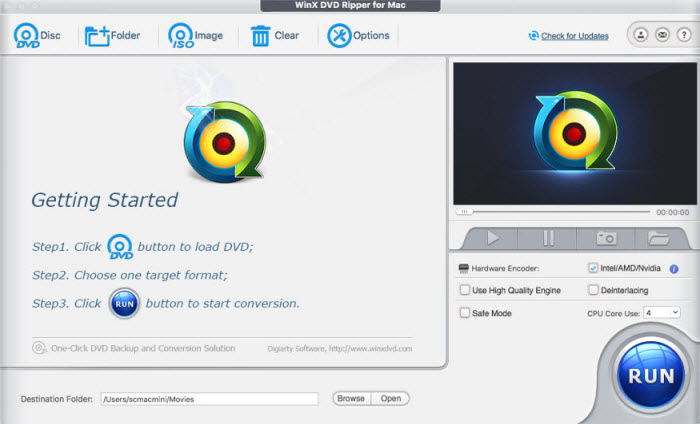
- Free download WinX DVD Ripper for Mac and open it. Insert the DVD into the optical drive.
- Clik the Disc button on the top menu bar of WinX DVD Ripper for Mac to load the DVD. Then the Mac DVD ripper will start to read the DVD info and remove the protection if any.
- It will then pop up the output format window. Select your desired format and set an output folder.
- Once everything is ready, click RUN to start DVD ripping for Mac free.
Pros
- It lets you convert DVDs into various different formats .
- It supports ripping DVDs with encryptions without using other tools.
- Very fast rippipng speed on a decent Mac.
Cons
- It offers free trial only, which allows you to rip 5 minutes of a DVD.
- Not as stable as its counterpart for Windows.
Verdict: Users who have a collection of DVDs, including potentially copy-protected ones, and want to digitize for easier access, can try this Mac DVD ripper.
No.12 - DVDFab DVD Ripper for Mac
- Price: $59.49 for the paid version
- Compatibility: macOS 10.10 - 15
- Latest version: 13.0.5.1 (November 14, 2025)
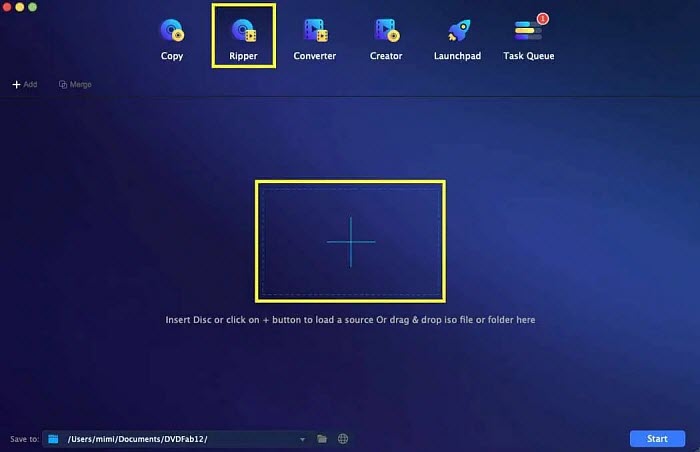
DVDFab DVD Ripper for Mac has free and paid versions. With the free version, you're allowed to rip DVDs to MKV and MP4 at 480P only. Don't expect to rip the DVD at a satisfactory speed, as the free version relies on the CPU for encoding. You may also find that newer DVDs are not supported. But if you upgrade to its paid version at $59.49, you will get a far more comprehensive Mac DVD ripping solution.
The paid version stays up to date with the latest encryption support, making it one of the most reliable DVD ripper tools for Mac. It offers a wide range of output formats and device-specific presets to suit virtually any playback need. You’ll get full control over advanced settings like frame rate, output resolution, video and audio bitrates, sample rate, cropping, and more.
Thanks to GPU acceleration, DVD ripping on Mac is fast and efficient. Even better, with its optional Enlarger AI add-on, you can upscale standard 480P DVD videos to crisp 1080P quality—ideal for users seeking both speed and high-definition output.
Pros
- It supports DVDs protected by CSS, APS, RC, Sony DADC, and more.
- You can use it to rip 3D DVDs to 3D MKV, MP4, AVI, WMV, M2TS, etc. (paid version).
- Flexible subtitle options are available to extract subtitles to IDX/Sub file/SRT file for future use.
Cons
- The free version has many limits on the output video formats, resolution, audio quality, etc.
- DVDFab DVD Ripper is bundled in DVDFab. You need to download the package to get the DVD ripper (make sure you have at least 20GB of free hard disk space on your Mac).
Verdict: DVDFab DVD Ripper for Mac is a comprehensive DVD ripping solution, suitable for users who need a feature-rich solution for ripping a variety of DVDs.
No.13 - Movavi Video Converter for Mac
- Price: $74.95 with free trial available
- Compatibility: macOS 12.0 or higher, with 64-bit Intel processor, Apple M1 or higher
- Latest version: 24.4.0 (December 1, 2025)
Movavi Video Converter for Mac is among the best DVD rippers for Mac that are designed for family DVDs. It has a very user-friendly interface that lets even a beginner get started DVD ripping on Mac immediately. You can easily rip home DVDs to MP4, MOV, AVI, WMV, devices, audio, and image, a total of 180+ files. It's also one of the fast Mac DVD rippers that support Nvidia, AMD, and Intel GPU acceleration. So users can rip a DVD to Mac in no time.
It offers more features and settings than many other Mac DVD ripping freeware on the list. With this tool, you can easily compress output files, apply visual effects, fine-tune color and video settings for a more polished result. Additionally, it allows you to search and add online subtitles effortlessly and even enhance the quality of your ripped videos—making it a powerful and flexible DVD ripper for Mac users.
How to rip a DVD on Mac with Movavi Video Converter for Mac?
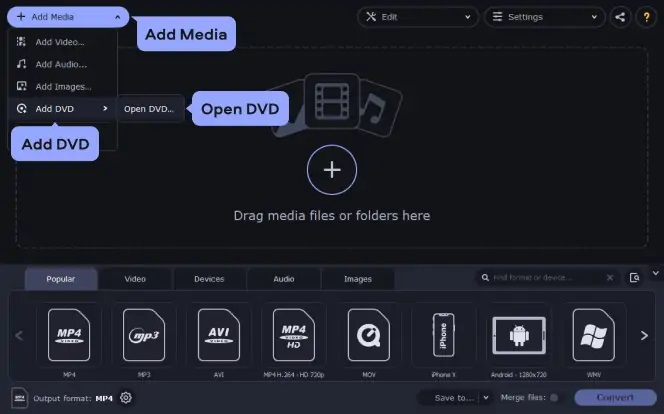
- Movavi Video Converter for Mac has a free trial to let users try out it. Free download the DVD ripper for Mac and open it. Insert the DVD into the optical drive.
- Clik the Add Media button on the top menu bar and choose Add DVD. Then click Open DVD and navigate to the source DVD in your Mac's opitical drive.
- Once the source DVD is loaded, you can scroll the output format list on the bottom of the screen and choose an output format or device you need.
- Click Save to and set an output folder on your Mac for the ripped DVD video and then click Convert. It will then start to rip the DVD to the Mac folder you just set.
Pros
- The DVD ripping speed is very fast with support to GPU acceleration.
- As an overall media converter, it offers many other features to transcode, compress, edit, add filters, upscale quality, and more.
Cons
- It can't rip DVDs that contain region codes and copy protections.
- It chrages for $69.95 and the free trial has some limits such as watermarks, length limits, etc.
Verdict: Movavi Video Converter is a great choice for anyone who wants to easily rip and edit their home DVDs on Mac. Movavi Video Converter excels at converting videos on Mac, but for DVD ripping and editing, it might be pricier than some feature-specific alternatives.
Part 3. Comparing the Best DVD Rippers for Mac
To help you select the best DVD ripping software for Macintosh that suits you the most, here we perform a head-to-head comparison on the key features of the above Mac rippers.
| Mac DVD Rippers | Input | Output | Speed | Quality | Rip Protected DVD | Edit features |
|---|---|---|---|---|---|---|
MacX DVD Ripper [Editor's Choice] |
DVD, ISO image, Video_TS folder | 320+ | Very Fast, Rip a DVD in 5 minutes |
Original | Yes | Add subtitle, cut, merge, crop, rotate, adjust... |
| iSuper DVD Ripper for Mac | DVD | 20+ | Slow | Fair | No | Yes |
| Mac DVDRipper Pro | DVD | 5 | Fast | Original | Yes | No |
| Handbrake | DVD/Blu-ray, ISO, DVD folder, video | MP4, MKV, WebM | Slow | Excellent | No | Yes |
| MakeMKV | DVD, Blu-ray | MKV | Fast | Original | Yes | No |
| Movavi Video Converter | DVD, videos | 180+ | Fast | Good | No | Yes |
| Cisdem Video Converter | DVD, videos | 300+ | Fast | Excellent | Yes | Yes |
| VLC | DVD, videos | 15 | Slow | Fair | No | No |
| Disk Utility | DVD | ISO image | Fast | Original | No | No |
| MacTheRipper | DVD | DVD folder, ISO Image | Slow | Original | Yes | No |
| WinX DVD Ripper for Mac | DVD, ISO image, DVD folder | 350+ | Fast | Excellent | Yes | Yes |
| DVDFab | DVD, DVD folder, ISO image | 1000+ | Fast | Good | Yes | Yes |
| FFmpeg | videos | 30+ | Slow | Good | No | Yes |
Which is the best DVD rippping software for Macintosh? The above-mentioned Mac DVD rippers are equally matched. What matters most is whether the program fits your bill. For a quality-loss DVD ripping, MakeMKV and Mac The Ripper are second to none. But if you have hundreds of discs and want to have your entire DVD library backed up onto a hard drive at a fast speed without exhausting your storage space, you will need MacX DVD Ripper, Handbrake, VLC, iSuper DVD Ripper, Movavi Video Converter or other programs.
If you dont' want to end up with errors just because the new DVD title comes with a tricky protection scheme or the DVD is formatted unnaturally, the ultimate choice is to download MacX DVD Ripper, which not only features great DVD decryption ability but also comes with unique level-3 hardware acceleration tech that can speed up the whole process and maintain a good balance between quality and size.
Part 4. FAQs about Mac DVD Rippers
Q1. Is It Legal to Rip DVDs on Mac?
Many users who want to space-shift or format-shirt their legally purchased DVD or Blu-ray discs are often concerned about the legality of DVD ripping. The fact is, currently it is considered illegal to rip copyrighted DVDs in the US, even if you bought the DVDs yourself. Some other countries have already made it legal. In practice, as the DVD conversion happens locally on your computer, you won't get prosecuted or caught if you don't distribute the digital copies. However, you're highly suggested to obey the law where you live. Check if it's legal to rip copy-protected DVDs in your country.
Q2. Does Mac have a DVD ripper build-in?
Yes, Mac's built-in app Disk Utility can be used as a DVD ripper for Mac. It is able to rip a homemade DVD to an ISO image file, as long as the DVD is non-protected. However, you can't use it to rip a protected DVD on Mac.
This is because almost all DVD movies or TV shows bought or rented are technically copyrighted and DVD rips will inevitably involve breaking DVD copy protections, e.g. the Content Scramble System. Such action is currently unlawful in the US and UK. Apple is of course unwilling to set against law or money in consideration of continuous cooperation with U.S. studios for iTunes movies. Therefore, there is no built-in method to rip DVDs to Mac. This makes it a sense to download a third-party free DVD ripper for Mac instead.
Q3. How do I Rip a Protected DVD on a Mac?
For DVDs encoded with CSS or region code, you can install libdvdcss on Mac or windows to crack the DVD copy protection and then rip the DVD with Handbrake or VLC.
Chances are DVDs from major film studios like Disney, Sony, Warner Bros., etc. often impose strong protections on DVDs. These discs are deliberately placed with bad information and hide the true titles. As a result, 99% of DVD rippers for Mac will go awry like DVD won't load, encounter a large number of tracks with the same runtime, show impossibly 40GB or more of data but output just several KB.To rip the severely protected DVDs, the workaround is to resort to MacX DVD ripper that is built-in a DVD analysis scheme to crack Sony ARccOS, Disney X-project DRM, UOP, 99-titles, and more.
Q4. What Is the Best Format to Rip DVD to Mac?
Apple apps such as Mac's default player QuickTime, Photos, and Keynote work with many video formats, among which MP4 and MOV are well-known with the best compatibility. When digitizing DVDs with a free DVD ripper for Mac, many users are at a loss whether to choose MP4 or MOV.
* MP4 - Both MP4 and MOV use lossy video compression to sacrifice minimal quality for file size. MP4 is popular for streaming over the internet and playable on Mac, Windows, and almost all media players, say VLC, 5KPlayer, QT, etc. But P-frames or B-frames in MP4 makes it difficult to edit.
* MOV - As MOV is originally developed by Apple for its QuickTime player, it's much friendlier in the Apple ecosystem. MOV contains one or more tracks, meant to store each type of data including audio, video, subtitle, etc in a hierarchical structure, which is good for editing. So for Mac computers, converting DVD to digital MOV for Mac QuickTime is more preferred than MP4.
Q5. Is it Possible to Rip Scratched DVD on Mac?
DVDs are too fragile, that's why we need to back up the DVD collection. If your discs are already damaged or scratched, there are measures to remedy them.
- For a few scratches on the surface, polish the surface with cotton balls and abrasive white toothpaste or Brasso polish. You need to polish across the grain and don't do it in circular direction. This needs patience.
- For deep scratches and severe damages, you can take the damaged disk to a local DVD store with a polishing machine or other places like Phoenix to resurface the badly scuffed disc. This will cost a couple of dollars. Or if the standalone DVD player with an error-recovery scheme can ignore the errors and play the DVD, you can capture the movie with a DV. But this will lost the selectable audio, subtitles streams, and original menus.
Note: if the program refuses to rip a well-conditioned DVD with an error stating that there is a bad sector, it's because the DVD is protected by a copy protection scheme from Sony named ARccOS. The system deliberately mixes corrupted sectors with the correct ones to mislead DVD copy software.
Q6. How long does it take to rip a DVD on Mac?
The DVD ripping speed mainly depends on factors like the CPU performance, the read speed of the DVD-ROM drive, USB transfer speed, the contents of the movie, the ripping ability of the software, etc. That means more CPU cores, RAM and a specialized video encoding module in graphics cards, and an advanced drive, all make it faster to rip a DVD. However, on the same computer, some DVD rippers can take advantage of the GPU, such as Intel QSV, Nividia Cuda/Nvenc, and AMD to speed up the rip. Free Mac DVD rippers that support GPU acceleration are MacX DVD Ripper and Handbrake.
Q7. Can you rip DVDs with QuickTime on Mac?
No. QuickTime is the default player on Macs. It doesn't provide a DVD-ripping feature. More than that, it's not able to play DVD and DVD media such as ISO image and Video_TS folder files.
Q8. What is the best open source DVD ripper for Mac?
The open-source Mac DVD rippers include Handbrake, MakeMKV, FFmpeg, and VLC. Among them, Handbrake is one of the most popular and highly rated. It's able to rip DVDs to Mac in MP4, MKV, and WebM, with a wide range of features and settings for video encoding. Handbrake is regularly updated and supported by a large community of users.
Q9. How do I rip old DVDs to my Mac?
First, you can try to rip an old DVD with the Mac DVD ripping software of your choice. However, an old DVD may get damaged or become unplayable, and to rip an old and damaged DVD successfully, you will need to use a DVD ripping software for Macintosh that is capable of recovering data from damaged discs. Mac DVD rippers like MacX DVD Ripper, Handbrake, and DVDFab may help handling corrupted DVDs.
Q10. How do I rip a DVD to MP4 on Mac?
MacX DVD Ripper, Handbrake, iSuper DVD Ripper, MDRP, Cisdem Video Converter, etc. are all Mac rippers that supports MP4 output. Simply select one that suits you the most and follow the steps to rip DVDs to Mac in MP4.
Q11. How to rip 1:1 copy of DVD on Mac
If you want to rip DVDs in their original quality, including menus and additional content, you can use MacX DVD Ripper. It allows you to create a 1:1 copy by ripping the entire DVD to an ISO file or a DVD VIDEO_TS folder, preserving everything on the disc.
Q12. How to rip a region 2 DVD on a Mac?
MacX DVD Ripper can bypass region code restrictions, allowing you to rip DVDs from any region, including Region 2. Simply load the DVD into the software, and it will handle the region code, enabling you to back up or convert the DVD without issues.
Q13. Is MacX DVD Ripper safe?
Yes, MacX DVD Ripper is safe to use. It's a popular and well-established DVD ripping software for Mac users, developed by Digiarty Software, a reputable company in the media software space. MacX DVD Ripper doesn't contain malware or harmful software when downloaded from the official website, and it has a solid track record of safe and reliable performance.
That being said, as with any software, it's important to ensure that you're downloading MacX DVD Ripper from the official website or other trusted sources to avoid potential risks like malware from unofficial or pirated versions. Additionally, while the software itself is safe, be mindful of the legal implications of ripping DVDs, as some content may be protected by copyright laws.


Bella has been working with DVD digitization for over 12 years. She writes articles about everything related to DVD, from disc drive, DVD copyright protection, physical structure, burning and backup tips. The unceasing passion of DVD movies helps her build a rich DVD library and ensure a practical solution to address almost all possible DVD issues. Bella is also a crazy fan for Apple products.