"Hello, I have some old concert footage of my old band. I have them in VOB. I would like to convert them to use on MacBook Pro. Guessing they need to be converted to MP4. What's the best solution out there?" -- MacRumors
Converting VOB to MP4 on a Mac can seem daunting, but with the right tools and approach, it's a straightforward process. This guide explores the leading VOB to MP4 converters available for macOS, detailing their strengths, weaknesses, and performance in converting VOB files to the widely compatible MP4 format. We've rigorously tested each tool to provide you with a clear understanding of their capabilities, helping you choose the best solution for your needs.
Choosing the Right Tool to Convert VOB to MP4 on Mac
| Tools | Ratings | Best for | Output Quality | Conversion Speed | Ease of Use |
|---|---|---|---|---|---|
| Macxvideo AI | 4.6/5 from Trustpilot | High efficiency & pro quality | 98% HEVC/H.264 50Mbps, lossless |
⏩ 1min/GB GPU acceleration |
⭐️⭐️⭐️⭐️⭐️ One-click |
| HandBrake | 4.5/5 from Techradar | Tech customization | 95% H.265 CRF adjustable |
⏩ 2min/GB CPU multi-threaded |
⭐️⭐️⭐️⭐️ Manual setup |
| VLC Player | 3.1/5 from Trustpilot | Quick temporary use | 90% H.264 480p scaling |
⏳ 5min/GB | ⭐️⭐️⭐️ Complex |
| FFmpeg (CLI) | 4.6/5 from G2 | Advanced users | 97% Custom Lossless |
⚡ Fast GPU acceleration |
⭐️⭐️ CLI only |
| Allavsoft | 4.1/5 from Trustpilot | Multi-functional | 93% H.264 20Mbps max |
⏩ 3min/GB | ⭐️⭐️⭐️⭐️ Simple |
| Adapter Video Converter | 4.3/5 from CNET | Quick tasks | 92% H.264 8Mbps fixed |
⏩ 3.5min/GB | ⭐️⭐️⭐️⭐️⭐️ Zero config |
| CloudConvert | 4.1/5 from Trustpilot | Small files | 85% Low-bitrate 720p max |
⏳ 10+min/GB | ⭐️⭐️⭐️ Privacy risk |
| Video Converter Extension | 3.4/5 from Chrome Store | Minimalist | 80% Low-quality 360p/480p |
⏳ 15+min/GB | ⭐️⭐️ Unstable |
| QuickTime | 3/5 from CNET | Basic users | 88% H.264 12Mbps |
⏳ 6min/GB | ⭐️⭐️⭐️ Indirect steps |
| iMovie | 4.3/5 from G2 | Mac editors | 90% H.264 Auto-color |
⏳ 4min/GB | ⭐️⭐️⭐️⭐️ Project-based |
* These VOB to MP4 converters Mac were selected based on popularity, type diversity, and core features. This comparison was conducted in a standardized Mac environment (2023 16-inch MacBook Pro (M2 Max, 32GB RAM, 1TB SSD) using the same VOB video source for all tools. Output Quality, Conversion Speed, and Ease of Use were assessed through hands-on testing. Ratings reflect data from reputable third-party review platforms to ensure an objective and balanced overview.
Part 1. Top 10 Ways for Converting VOB to MP4 on Mac
There are piles of tools helping you convert VOB to MP4 on Mac in the market. To help you pick, we've tried out ten of the best choices. Each one works a bit differently and is good for different kinds of users. In this part, we'll explain how well they work, how easy they are to use, and if they're worth your time. This will help you decide which one is right for you, and turn your VOB files into MP4s without any fuss.
1. Macxvideo AI
Convert VOB to MP4 on Mac with Speed, Quality, Size Well-balanced!
Macxvideo AI can convert VOB to MP4 H.264, H.265, MOV, M4V, iMovie, QT, etc. 370+ formats.
- 47x realtime faster conversion speed accelerated by Nvidia NVIDIA & NVENC, Intel QSV, and AMD GPU.
- Convert VOB files to MP4 format without obvious quality degradation, 98% quality kept thanks to High Quality Engine.
- 420+ built-in presets lets you convert VOB to iMovie, QuickTime, iTunes, Apple TV, YouTube, PS4, Xbox, etc.
- Compress large VOB to MP4 with 40%-90% smaller file size with quality well-balanced. No Input Size Limits!
- Repair damaged/corrupted VOB files, rotate, crop, trim, add external subtitles, adjust parameters, and more.
Get Macxvideo AI to convert VOB to MP4 on Mac with no watermark Now!
Macxvideo AI is for macOS, while Winxvideo AI (from our WinXDVD brand) is for PC.
Most versatile tool: VOB converter, compressor, editor...
No.1 fast speed (Intel QSV, AMD VCE, Nvidia NVENC all hardware encoders supported), virtually original quality, medium file size.
No input size limit.
No watermark.
VOB files in Video_TS folder unsupported yet. To convert VOB files in a VIDEO_TS folder, you can use MacX DVD Ripper Pro.
How to Convert a VOB File to MP4 on Mac within Macxvideo AI
Step 1: Load VOB Files.
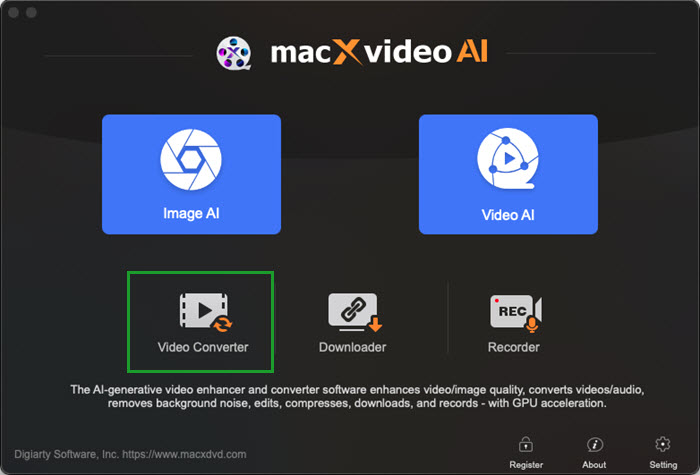
 Free download Macxvideo AI on your Mac (macOS 10.15 and above supported). Run it and click the "Video Converter" > "+ Video " button on the top left corner to import the VOB file you'd like to convert to MP4. Or you can drag and drop the VOB videos from Mac to it directly.
Batch conversion is supported so that you can load and freely decode multiple VOB videos at one stroke.
Step 2: Choose MP4 as output format.
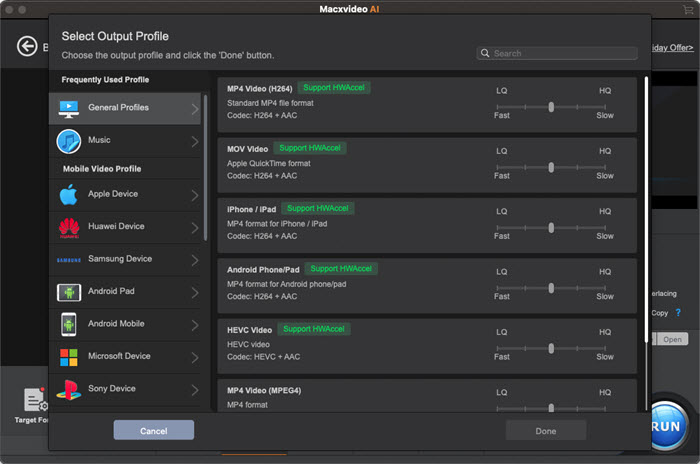
Once the VOB files are loaded, a window will pop up asking you to select the output format. Choose MP4 as the output video format. There are many MP4 presets with different coding formats. You can choose any one you like.
Beyond VOB to mp4, you can convert VOB to iMovie, QuickTime, Apple TV, iPhone iPad, PS4/5, etc. any device.
Tips: If you need to compress and reduce VOB file size, you can trim, crop, and adjust the bitrate, resolution, and other parameters.
- By clicking the Edit button, you can access the video editor where you can trim the video to get the desired video clips or crop video to remove the unwanted parts to get your preferred segment.
- By clicking the Settings icon, you can lower down video resolution, such as from 4K to 1080p/720p, and adjust video codec, bit rate, frame rate, etc. to compress video to a large degree.
Step 3: Select the Output Folder.
Click the Browse button to choose a folder on the Mac computer to save the exported mp4 files.
Step 4: Start Converting VOB to MP4 on Mac.
With the above steps finished, click the "RUN" button to start converting VOB to MP4 on a Mac computer with no watermark.
The built-in hardware accelerator will be automatically activated once it detects that GPU hardware acceleration is supported by your hardware device, as well. Thus, you can enjoy conversion speeds that are 5 times faster than our competitors in VOB to MP4 converting.
2. Handbrake
Best for free converting VOB/Video_TS folder VOB to MP4
How could we miss Handbrake? Handbrake is the second-to-none video transcoder yet free open source software in video & DVD converting field. It works like a charm in converting videos from almost any format into MP4, MKV, or WebM. Your DVDs are supported seamlessly by it, as well. Therefore, you can use it to convert VOB video or a Video_TS folder to MP4. There are a wide selection of pre-programmed settings to help you compress large-sized VOB videos to smaller MP4.
A warm prompt is that you'd better upgrade your Handbrake to version 1.5.0 or above. This is because the newer version has fixed couples of issues that you matter a lot, including fixed an issue on older Intel CPUs causing the CLI to fail to initialize, updated Intel Quick Sync to use the Intel oneAPI Video Processing Library, fixed FFmpeg AAC audio encoder quality mode scale range, etc. After all the preparation jobs are done, check the below guide on how to free turn VOB into MP4 with Handbrake.
Both VOB and Video_TS folder supported.
Free, open source.
Unable to remove DRM from video/DVD on its own.
Limited hardware encoder, only VideoToolbox available.
How to Convert VOB to MP4 on Mac Free with Handbrake?
Note: Before you start, you should know that Handbrake can only handle videos/DVDs without DRM. If the VOB video is ripped from an encrypted DVD, the VOB video may contain copy protection. Handbrake can't convert encrypted VOB videos to MP4. You can download the libdvdcss on your Mac and try again.
Step 1. Free download Handbrake on your Mac and double-click on the dmg file to run it.
Step 2. Click Open Source to select and load the VOB or Video_TS folder into it.
Step 3. Click the Format dropdown menu under the Output Settings section and choose MP4. Handbrake allows you to convert VOB to MP4 in H.264 or H.265. It's set to MP4 H.264 by default.
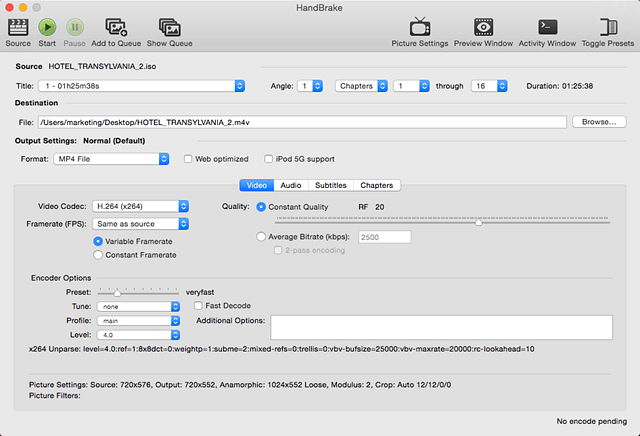
Step 4. Change the Video Codec under the Video tab if necessary. Then click on the Start button to begin. If there is anything unclear, here is a more detailed guide on how to convert VOB to MP4 using Handbrake >>
MacX vs. Handbrake: Focused VOB to MP4 Conversion Test
Given that both Macxvideo AI and Handbrake are frequently recommended by users and tech sites, we conducted an extra comparison to help you choose between them. Our test focused on VOB to MP4 conversion speed and output quality. Keep in mind that results can vary based on your computer's specifications.
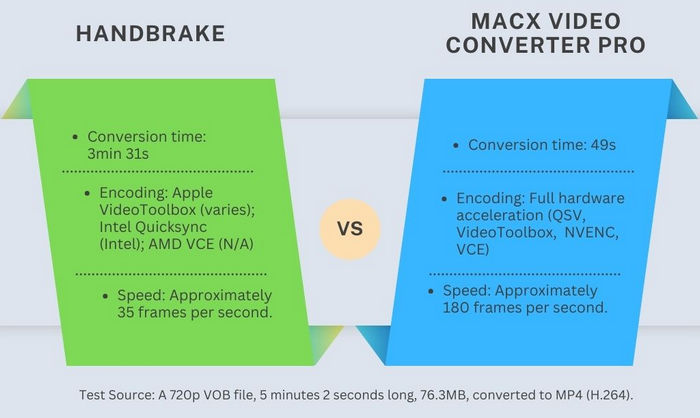
Observation: Macxvideo AI demonstrated significantly faster conversion times compared to Handbrake. Output quality was nearly identical, with differences being subjective and minimal. This test highlights the performance advantage of Macxvideo AI, particularly when hardware acceleration is utilized.
3. VLC Media Player
A 100% free VOB player and converter for Mac
Many users rely on VLC to play different videos. It's free and open-source to play a wide range of videos. Do you know you can also use VLC as a free VOB to MP4 converter? In fact, VLC is able to convert videos from one format to the other. It supports VOB video, Video_TS VOB, DVD, network files, and recordings.
Given that VLC is primarily designed to be a media player, not a media encoder/transcoder, the VOB to MP4 converting speed and performance are not as good as other free VOB to MP4 converters for Mac listed here. The hardware decoder in Preferences is usally on by default. Yet, the hardware encoder needs to manually turn on, which is not easy to be found. You can follow this guide to activate hardware encoder in VLC.
That being said, VLC only supports Apple OpenGL CVPX hw encoder, Intel QSV, AMD VCE or Nvidia NVENC unavailable so far. So the conversion speed becomes a tradeoff for you to understand a free open source application.
Free VOB to MP4 converter, downloader, player.
Easy to use, especially friendly to newbies.
Only Apple OpenGL CVPX hardware encoder supported.
Video audio out of sync error happens now and then.
How to Free Convert VOB to MP4 on Mac with VLC?
Step 1. Free download VLC on your Mac and double-click on the dmg file to run it.
Step 2. Click File on the top menu bar on your Mac and select Convert/Stream. When the window pop up, click Open media and load the VOB video you'd want to convert.
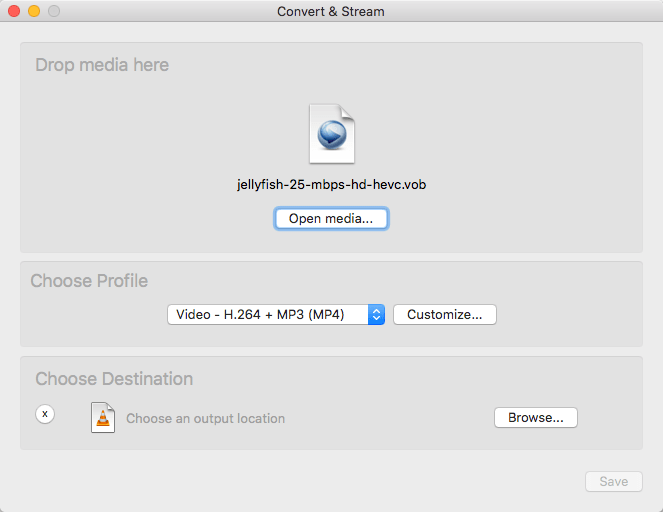
Step 3. Once loaded, click Choose Profile and select Video – H.264 + MP3 (MP4) as the output format. VLC lets you convert VOB video to MP4 in H.264 or H.265 codec.
Step 4. Set an output folder to store the converted MP4 video. Then click Save to start to convert.
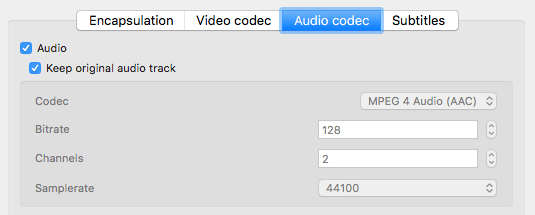
Tips: While VLC offers a free and convenient way to convert VOB files to MP4, it can sometimes have issues with audio after conversion. To fix this issue, you can click the "Customize" button next to the profile selection -> go to the "Audio codec" tab, check the box next to "Keep original audio track" (or similar wording depending on VLC version), choose the "MPEG 4 Audio (AAC)" codec, and adjust the "Sample Rate" to 48000.
If you want to convert VOB files in a VIDEO_TS folder to MP4 with VLC, follow the steps below.
Step 1. Open VLC media player, click File, and select Open Disc.
Step 2. In the Open Source window, click "Open VIDEO_TS / BDMV folder" and open the VIDEO_TS folder that contains the VOB files you want to convert to MP4.
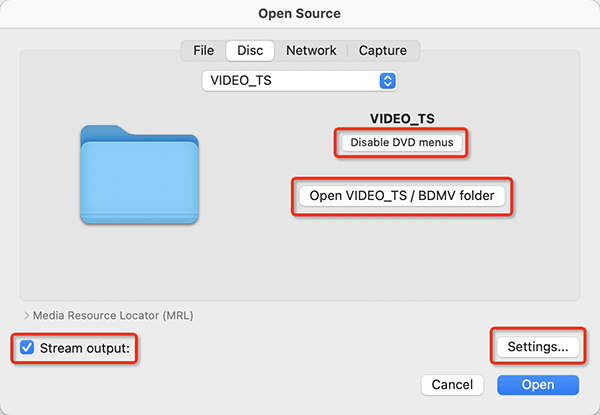
Tips: Checking "Disable DVD menus" can prevent conversion issues with looping menus.
Step 3. Check the "Stream output" box and then click "Settings" next to the "Stream output" option to specify save path and encapsulation method. Once done, click OK to save the settings.
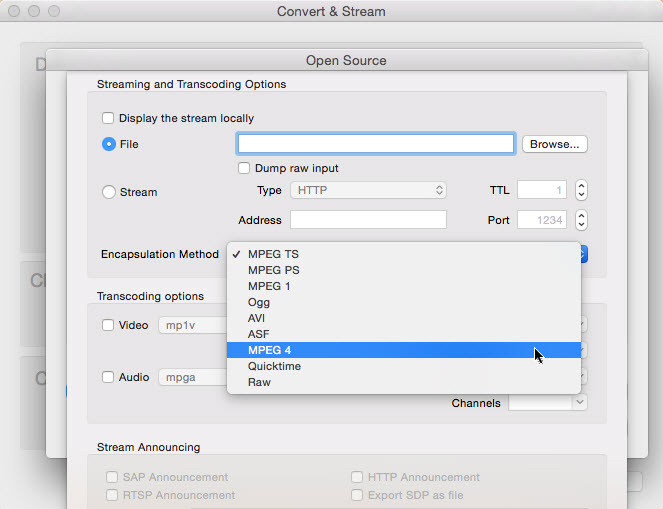
Step 4. Back in the "Open Source" window, click "Open" to start converting the VIDEO_TS VOB files to MP4.
4. FFmpeg
Free open-source comman-line tool to convert VOB to MP4 on Mac
Conversion speed is not your concern, then you can consider FFmpeg - a free and open-source command-line tool for macOS. It's easy to use FFmpeg command lines to free convert VOB videos to MP4 on Mac. It contains a massive library of flags to compress VOB to MP4 with different sizes, codecs, speeds, qualities, etc.
As is known to all, it can also convert videos to other formats, be it VOB to MKV, VOB to MOV, etc. And it always focuses on its major task - conversion, no frills. Therefore, in case you wanna a feature-rich tool with downloader, editor features added, look somewhere else. If you merely needs getting VOB format converted, FFmpeg never lets you down. Check its instruction:
Free open source tool, lightweight.
Compress VOB video to smaller size.
No hardware encoder to speed up conversion.
A tad complicated for green hands.
How to Use FFmpeg to Convert VOB to MP4 on Mac with No Watermark?
Step 1.First, go to https://brew.sh/ in your browser and Copy the code below the "Install Homebrew". Open Spotlight and type in terminal, and double-click Terminal. Paste in the copied code and then press Return. Then type in brew install ffmpeg and press Return.
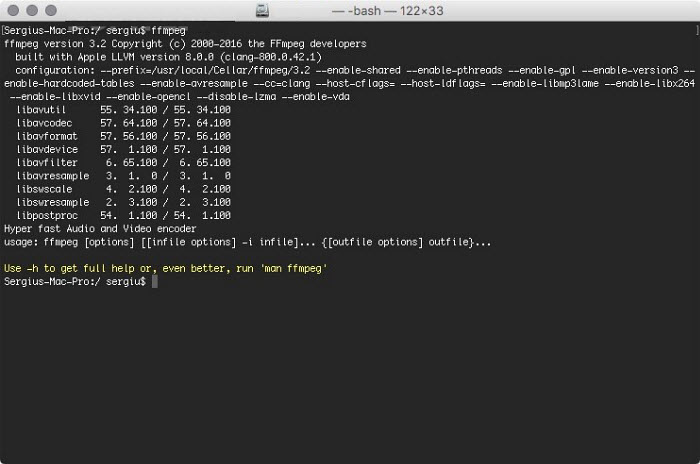
Step 2. Open Spotlight and type in terminal, and double-click Terminal to re-open Terminal. Then you need to enter the command line for the conversion. For example, the simplest command line for VOB to MP4 is:
ffmpeg -i input.vob output.mp4
5. Allavsoft
Best for free converting VOB to MP4 & downloading videos
Allavsoft video and music downloader is exceptional at free downloading videos and audio from online websites. Meanwhile, it also has the knack to convert videos from VOB to MP4 format, as well as MOV, AVI, WMV, MKV, iPhone iPad, etc. on Mac.
You can take advantage of this free VOB to MP4 converter without any limit as long as your video length is within 5 minutes. Or you need to upgrade to its paid version if you need the duration limit vanished. Certainly, its extra feature - video music download can further appeal to some users for monthly/annual subscription. For budget-minded users, you'd better try the above mentioned 100% free MP4 converter.
A large number of output formats supported.
Support you to download video audio, as well.
Restriction on video length, only 5 mins in free version.
Doesn't come with video editing features.
How to Free Decode VOB to MP4 on MacBook iMac?
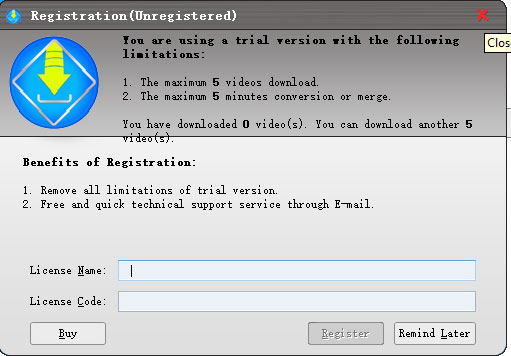
Step 1. Go to Allavsoft official webpage and download Allavsoft Mac version to your MacBook Pro/Air, iMac or Mac Pro. Launch it after the installation is finished. Open Allavsoft video and music downloader software. A registration window will pop up, asking you to log into it with your license code. Close it if you don't have one.
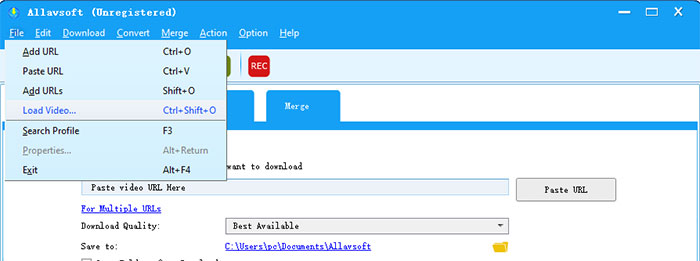
Step 2. Tap File > Load Video at the top menu to load your input VOB file.
Step 3. Choose MP4 (H264/MPEG4) as output format under "Convert to" section. You can see from the below picture that this VOB to MP4 converting software also supports you to convert video to MKV, MOV, AVI, ProRes, VCD video, DVD video, as well as mobile devices iPhone iPad, Android, Xbox, PSP, etc. (though most profiles are in lack of instant upgrades).
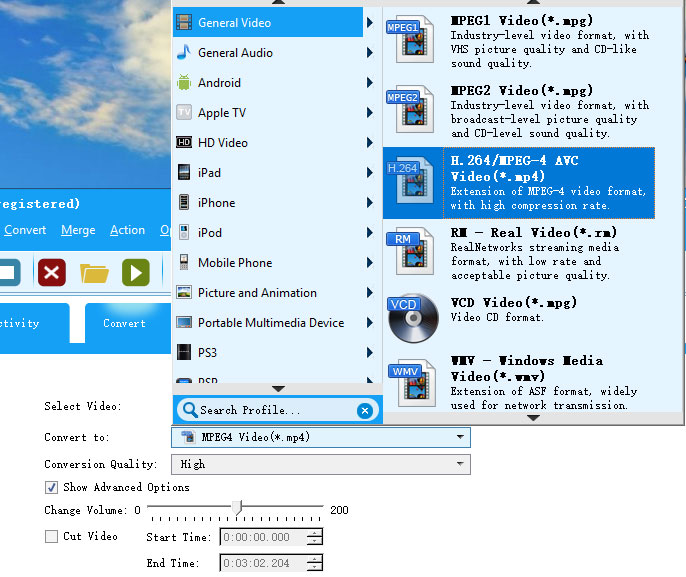
Step 4. Tap the Browse button to choose the destination folder for output MP4 storage. Afterwards, tap Convert button at the top of the menu to call VOB to MP4 converting begin!
6. Adapter's Video Converter
Best for converting VOB Videos to MP4 Free yet Fast
Adapter's Video Converter isn't so popular as handbrake. It's equal to the VOB to MP4 converting task as Handbrake is. No matter you load it with VOB file or Video_TS folder VOB file, it can instantly recognize your input file and list the video details. One tricky point is that it usually shows a red Error icon next to the video info, which would mislead you. Actually, your VOB file loading is successful. Ignore this error tag.
Converting VOB video to MP4 format is not its whole story. With large batches of output profiles, it also grants you the opportunity to convert VOB to iPhone iPad, iPod, Apple TV, Xbox 360, PSP, Kindle Fire, etc. mobile devices. Converting VOB to audio or GIF is a walk in the park to this VOB video converter, too. A wide selection of audio formats are accessible, including MP3, M4A, AC3, M4R, OGG, etc.
As long as your VOB video length is medium, the whole converting time is as short as blinking an eye. You don't need to make a cup of coffee to kill the converting time.
Free and easy to use.
Fast speed provided.
Both VOB and Video_TS folder VOB file supported.
Output profiles for mobile devices are outdated.
Confusing error hint.
How to Free Convert Video from VOB to MP4 on Mac
Step 1. Free download this VOB to MP4 converter freeware, Run it and click the "Browse" button to import your VOB video footages. Or you can directly drag and drop the VOB clips into this program.
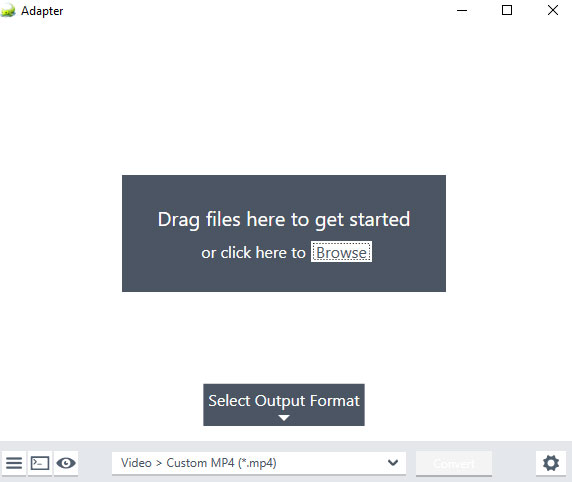
Step 2. Choose MP4 from General under Video category as your resulting video format. Meanwhile, you can tap the setting icon to adjust output MP4 video resolution, frame rate, bit rate, as well as trim MP4 video length if needed.
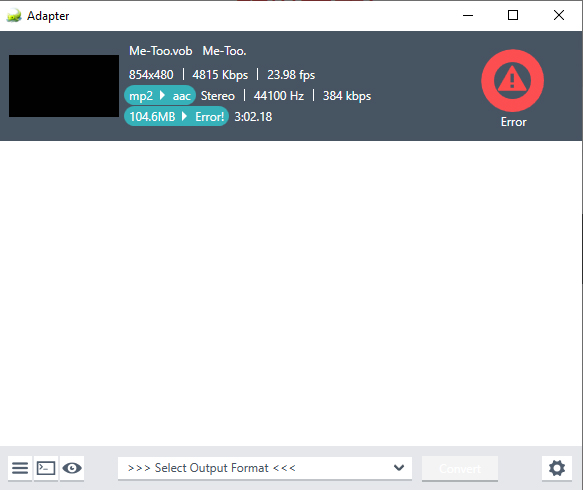
Other common used video formats like AVI, SWF, MPG, MKV, FLV are also covered here. Certainly, you can choose the preset profiles for handheld devices. Be noted that the device profiles are outdated and might not be suitable for your latest devices.
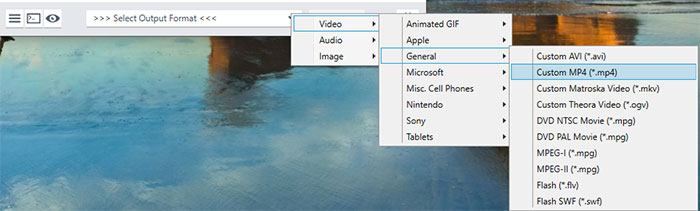
Step 3. Tap the Convert button to begin converting VOB to MP4 free on Mac. You can tap Stop button to pause the process if needed. Your final MP4 video file will be auto saved into the input video folder. Go back to find your resulting MP4 file.
7. Online VOB Converters (CloudConvert)
Free convert a VOB file to MP4 on Mac without any software installed
There are many free online VOB to MP4 converters to help you create MP4 videos from VOB files on Mac fast and easily. You don't have to install any desktop VOB to MP4 video converter on Mac. Some best free VOB to MP4 converters online includes Freeconvert, Cloudconvert, ConvertFiles, MP4.to, etc.
Note: Online VOB to MP4 converters have some major drawbacks. First, there are size limits. For example, Cloudconvert and Freeconvert support VOB files of less than 1GB, while on ConvertFiles, the VOB video should not exceed 250MB. Second, the upload and conversion speed is highly dependent on the internet connection. Last, you have no control over you video.
No software installed.
Free, easy and fast.
Limited input file size, no more than 250MB.
Commercial ads pop up now and then.
How to Convert VOB to MP4 free online?
Here we take Cloudconvert as an example to show you how. First, google cloudconvert and open the site. You will then see the window below.
Click the Select File button and choose your VOB file from your local Mac computer. Once uploaded, select MP4 from the output dropdown menu.
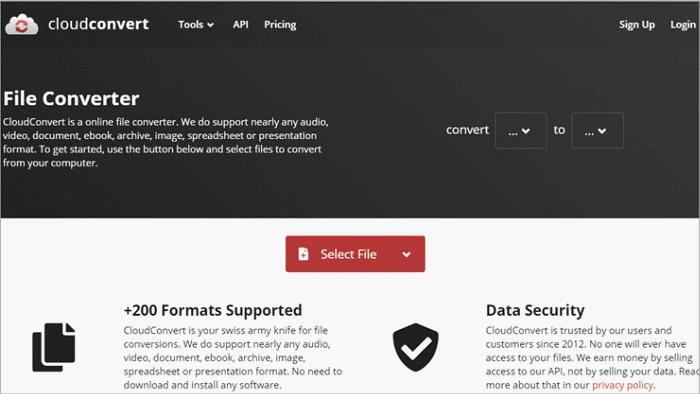
You can click the gear button next to the selected MP4 profile to adjust the video settings such as resolutions, aspect ratio, codec, CRF, etc. Then click Convert.
It will take some time based on the file size and internet connection. Onece finished, download the MP4 to your Mac.
8. Video Converter Extension
Free convert VOB videos to MP4 on Mac inside your Browser
The highly recommended VOB to MP4 converter browser extension is called Video Converter extension, which uses the FFmpeg JavaScript library to help you convert VOB to MP4 inside your Chrome, Firefox or Opera browsers.
Since this add-on runs FFmpeg in the browser, it runs slower than the native FFmpeg applications/library. However, using the add-on is very easy. It can independently change video format from VOB to MP4 without any 3rd party help. Read the following user tutorial if you're new to it.
Free and easy.
Has a stand-alone popup window to drag drop video files.
Convert most common video formats to MP4, WebM, etc.
Comparatively slow in converting speed.
Unable to adjust parameters or edit video clips.
How to Use Browser Extension to Free Transcode VOB to MP4 on Mac?
Step 1. Here we take Chrome browser for instance. Open your Chrome browser > search video converter under Extensions (located at the drop-down list of the 3 dots on the right upper corner of your browser). Then, add this video converter extension to your Chrome.

Step 2. Tap the Video Converter extension icon after the installation is done. Then, it will show up a stand-alone video converting window (similar to an independent video converter software).
Click the Choose File button to add your VOB video footage into this extension. It will display the video info later.
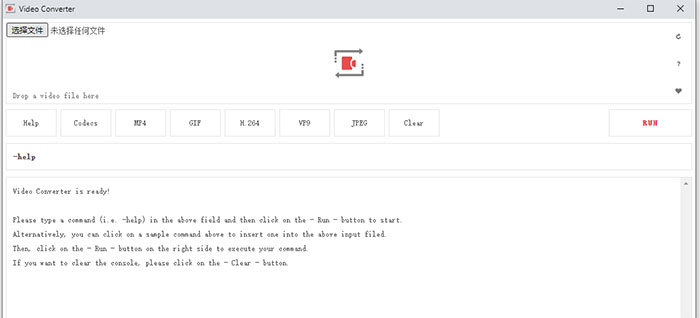
Step 3. Select MP4 as the final output format. Other video formats are also available, including H264, VP9, GIF, JPEG, etc. Then, hit the red RUN button to commence VOB to MP4 converting process.
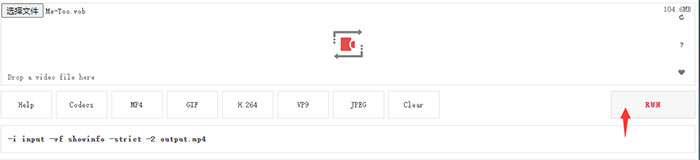
It will take comparatively more time since it relies on FFmpeg library. Once the conversion is done, the link to download the video file will be available at the bottom of the UI. And resort to other VOB to MP4 converting programs if you need further editing MP4 files like trimming, cropping, splitting, merging, etc.
9. QuickTime
Free convert VOB videos to MP4 on Mac with built-in Mac player
QuickTime Player lacks the direct capability to export videos as MP4 files. However, you can still employ QuickTime to convert VOB to MOV on your Mac. Afterward, you'll need to adjust the file extension from .mov to .mp4. Keep in mind that movies saved in audio format will be stored as MPEG4 audio files. This method is convenient if you already have QuickTime on your Mac and prefer not to install additional software. To be cautious, it's advisable to create a backup of the original VOB files, as the final file might become corrupted during the renaming process. Here are the steps to follow.
Free and easy.
Mac built-in video player.
Unable to convert VOB to MP4 directly.
How to Free Convert VOB to MP4 on Mac with QuickTime?
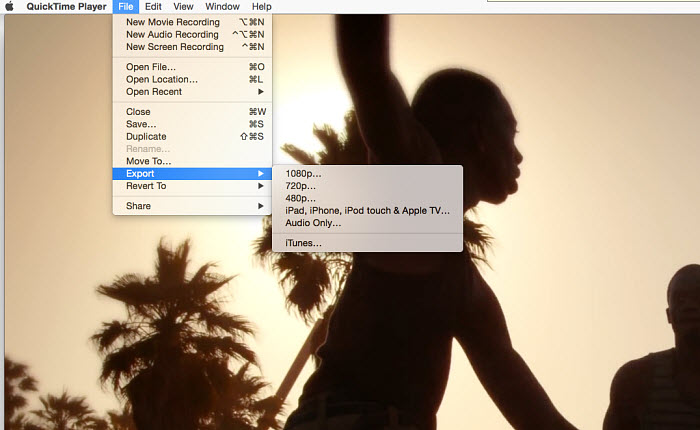
Step 1. Open the QuickTime Player application on your Mac, then navigate to File > Export As. Choose an option from the Export menu.
Step 2. If you selected either the 4K or 1080p export resolution, click on the Format drop-down menu. From there, you have two options:
Select "Smaller File Size" to export the movie in HEVC format.
Opt for "Greater Compatibility" to export the movie in H.264 format.
Step 3. Provide a name for your exported file and select a destination. Click Save. Proceed to import the .vob movies into .mov format, and subsequently, rename the .mov file to .mp4 on your Mac.
10. iMovie
Convert VOB videos to MP4 on Mac with built-in Mac editor
A Mac user inquired, "Years ago, I recorded a video with my camcorder and saved it onto a DVD. Now, I'm attempting to import these videos from the DVD into iMovie so I can split them into several videos for sharing on YouTube. The videos are in VOB format. Can I export VOB to MP4 on Mac using iMovie?"
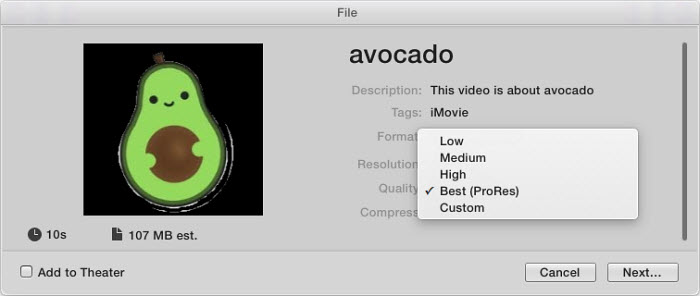
iMovie's High Quality setting facilitates the conversion of VOB files to MP4 on Mac. Simply import your .vob files into iMovie and proceed to export them. The resulting files will be in MP4/AAC format across all iMovie settings except for Best Quality (pro res), which yields a file size four times larger than the MP4 due to its significantly higher bitrate. Therefore, for space efficiency, it's recommended to use the High Quality setting rather than Best Quality (pro res).
Free and easy.
Mac built-in video editor.
No flexible settings.
Limited output/input format support.
How to Export and Convert VOB to MP4 on Mac with iMovie?
Step 1. Open the iMovie application on your Mac and select a movie, trailer, or clip in the browser. Click the Share button in the toolbar, and then choose File.
Step 2. In the dialog box that appears, set the title, tags, and output format. Click the Format drop-down menu and select the MP4 option. Next, click the Resolution drop-down menu and choose an option. Note that Best Quality (pro res) exports as a .mov file.
Step 3. Click Next. In the ensuing dialog box, either enter a name in the Save As field or leave the default name. Navigate to the location where you want to save the file, and click Save.
Final Words
So above are the VOB to MP4 converters we want to introduce to Mac users. We’ve covered built-in applications, online converters, and dedicated desktop software.
For a quick VOB to MP4 conversion without installing additional software, you can try the built-in programs – QuickTime and iMovie. These Mac applications offer basic conversion capabilities.
If these methods don’t work for you, you can try an online solution. Online converters offer a convenient way to convert VOB files to MP4 on the go. However, these services often have limitations in file size and may experience slower conversion speeds depending on your internet connection. Additionally, security concerns might arise when uploading your files.
For the most control and efficiency, consider dedicated desktop software like MacX Video Converter Pro. This program offers several advantages:
- Faster conversion speed: Leverage multi-core CPU and GPU hardware acceleration for quicker processing.
- Superior output quality: High Quality Engine maintains excellent video quality during conversion.
- Batch processing: Convert multiple files simultaneously, saving you time.
- Versatile functionality: Offer other features: online video downloading and screen/webcam recording.
The ideal VOB to MP4 converter depends on your priorities. If speed and quality are paramount, a desktop program like Macxvideo AI is the way to go. For occasional conversions, built-in applications or online tools might suffice. Consider factors like file size, desired features, and budget when making your decision.
Part 2. Common Problems During VOB to MP4 Conversion on Mac
Converting VOB to MP4 on Mac is anything but smooth. There are complaints about the sound, subtitles, codecs, etc. converting using HandBrake or others. While free VOB to MP4 converting on Mac can be loaded with problems, sad users can take solace in the fact that the VOB to MP4 converters above have fixed some common problems you may have experienced:
1. VOB to MP4 sound problems
"When I try to free convert a vob to mp4 with Handbrake on Mac, the sound of some files are horrible (distorted) after the conversion, but the vob plays with no problem." Most users who ran into sound problem will have audio distortion or bad sound quality, while some even worse, get no sound after the conversion.
2. Vob conversion error with subtitles
Another common problem with Mac freeware involves video subtitles. For example, "I've converted the VOB files to MP4's, but the subtitles are gone! All I really need is a program that will keep the subs ON, after conversion from a VOB.", or "the subs are improperly synced with the audio in the exported MP4, while the vob file ripped from DVD was OK."
3. Vob to mp4 conversion on mac finishes parts only
Sometimes the free tool won't convert the full VOB files without giving any reason. After an hour or so, the ended file gives about 1/3 the size and it only gets the first part finished in MP4 format.
4. Corrupted vob file
Many users may have some corrupted vob files but can't get a solution to process them. "I need the last part of a vob file but there is corruption approx half through the video. The error prevents me to free transcoding VOB files to mp4 on mac." To be specific, this is not a converting problem.
5. Incorrect aspect ratio
The output MP4 videos are different from the original vob files on the display screens. As a user complain that "the new mp4 file was about 50% of the original width and therefore the videos are distorted." For those who want the picture to fill the entire screen of the TV or computer, the distorted or out-of-shape image looks really disappointing.
6. Audio/Video out of sync
"I am attempting to convert the VOB files to MP4 for more compatible use on Mac but have issues with the audio once the conversion is complete. The audio first starts out correct but later on it starts to go out-of-sync." Some users are experiencing A/V out of sync errors after they convert VOB to MP4 on Mac, while some others get no audio after the conversion.
To get rid of any of the above errors, get Macxvideo AI and freely convert VOB to MP4 videos on Mac now!
Part 3. FAQs about How to Convert VOB to MP4 on Mac
1. Can I play VOB files on Mac?
No, you can't play VOB videos natively using Mac QuickTime. But both the built-in video players in Windows and Mac - Windows Media Player and QuickTime do not support the VOB format. To open VOB videos on Mac, you can try a third-party player like VLC, or convert VOB to MP4 for QuickTime.
2. Can you open a VOB file on a Mac?
On a Mac, opening a VOB (Video Object) file is possible through various applications. VLC Media Player, a versatile and widely-used player, natively supports VOB files and can be easily downloaded for free. QuickTime Player, while not initially compatible with VOB, can be extended to play these files with the addition of a codec pack like Perian. iMovie, Apple's video editing software, can import and edit VOB files, making it another viable option. HandBrake, primarily a video converter, also functions as a player and can handle VOB files.
3. How do I convert VOB files to iMovie on Mac?
Same to QuickTime, iMovie doesn't support VOB format, not to mention converting VOB to MP4 using iMovie. You need to convert the VOB files to Mp4/AAC, and then import them into iMovie.
4. How do I convert a VOB file to QuickTime?
First, download and install a reliable video converter program like Macxvideo AI or Any Video Converter. Open the converter and import the VOB file by clicking the "Add" button. Next, choose the output format as MOV or MP4, both of which are compatible with QuickTime. Finally, initiate the conversion process by clicking the "RUN" button. Once the conversion is complete, you'll have a file in a format that QuickTime can play. Simply open QuickTime Player, go to "File," select "Open File," and choose the converted MOV or MP4 file to watch it in QuickTime.
5. Can I merge multiple VOB files into one MP4 video?
Yes. Handbrake doesn't provide a function to merge videos. You can use MacX DVD ripper, or the command line of VLC and FFmpeg to merge VOB videos into an MP4 video. MacX DVD ripper is the easiest way: to merge multiple VOB files together, you simply need to select all the VOB titles before you click Run.
6. How do I convert VOB to MP4 on Mac for free?
There are lots of free VOB video converter for Mac, such as Macxvideo AI, VLC Media Player, QuickTime, FFmpeg, Handbrake, online VOB video converters. FFmpeg and Handbrake are open source and popular video transcoder that can also convert VOB to MP4 on Mac. If quality and speed are factors that you care, Macxvideo AI is a good choice.
Extended Knowledge of VOB to MP4:
VOB: VOB is a container format in DVD-Video media that contains audio, video, subtitles, DVD menus, and other contents. VOB can be played by a DVD player, and a few video players like Windows Media Player and VLC Media Player. However, vob is not supported by all mobile devices, editors like Windows Movie Maker, Final Cut Pro, iMovie, etc., and video sharing sites. The good part is that VOB keeps very low compression.
MP4: MP4 is a digital multimedia container format most commonly used to store video, audio, and subtitles. MP4 is the widest-supported format which is compatible with almost all mobiles, players, websites, editors etc. Besides, mp4 is a format that well balances the quality and file size. If you change a VOB to MP4 for small screens, you can hardly notice any quality differences.
Still have any problem on how to convert VOB to MP4 on Mac, just email us >>


Candice's particularly skilled in writing and sharing video-related contents. Her guides cover from deep-seated video/audio parameters, to media entertainment on different platforms. She also enjoys shooting and processing videos by herself for a more reliable basis of informative info with her articles, which are never at the expense of eliminating an entertaining read.