By Bertha Miller to YouTube Download, Online Video | Last Updated on Sep 12, 2019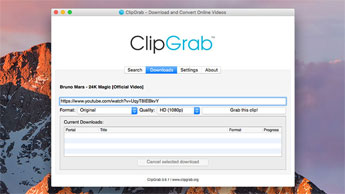
As is known to all, ClipGrab is a functional free video downloader and converter which can be used to download HD/SD videos from online sites like YouTube, Vimeo, Facebook, Dailymotion, MyVideo, Clipfish, etc and convert the downloaded video files to MPEG4, WMV, MP3, OGG Theora and OGG Vorbis. Besides, it offers an "original format" option for users so that you can download video in MPEG4, FLV or WebM with original quality reserved. The supported platforms include Windows, Mac and Linux. Don't know how to use ClipGrab for Mac to download videos on Mac for offline playback or transfer to mobile devices? Now, take a look at the tutorial as below.
Step 1: Download and install ClipGrab for Mac on your Mac computer. Your Mac OS should be at least Mac OS Lion and a 64-bit Intel processor.
Step 2: Open it and copy the web address of the video to the address bar in the "Downloads" tab. And this free video download tool will gather all information of the video.
Step 3: Select the desired format from the "Format" option and also choose the video quality from the "Quality" box.
Step 4: Click "Grab this clip" button to start downloading videos from YouTube, Vimeo, Facebook, etc.
Obviously, after trying the above four simple steps, most of you maybe will believe that ClipGrab apk can be used to download any online free videos. As a matter of fact, though ClipGrab is a super useful free video downloader Mac, it still received many complaints.
Common Problems of Your Video Downloading:
* ClipGrab might not work on the sites you want it to.
* No downloadable video could be found.
* The conversion function of doesn't work. Some users failed to convert the downloaded Vimeo video to other formats.
* Is ClipGrab for Mac safe? Many people worry about ClipGrab virus or malware. Or even their computer may have been infected with malware/adware. In fact, you can far away from any virus or malware as long as you download ClipGrab apk from offical website.
………
It is true that there are many other ClipGrab not working problems on MacOS when downloading videos. Usually, you'll take much time to figure out the proper solutions. Fortunately, there is an once-for-all solution to free download videos in HD on Mac. That is using an alternative apk for ClipGrab on MacOS to get HD/SD video download free from online sites.
Important news: Recently, YouTube has rollled out some important changes that hinder many users from downloading videos. Software and tools including Jdownloader, 4K video downloader, Clipgrab, etc encounter error and fail to download YT videos anymore. But you can find one reliable solutin here. That is MacX YouTube Downloader.
Serving as the professional video downloader, MacX YouTube Downloader is the best alternative to ClipGrab for Mac which is designed especially for Mac users (macOS High Sierra included) to free download any online videos. Certainly, this 100% free and safe free YouTube downloader for Mac is able to download videos, movies, TV shows, music, etc from YouTube, Facebook, Vimeo, Dailymotion, Vevo, SoundCloud and other 1000+ online sites in SD, 720P, 1080P, 3D videos, 8K/5K/4K videos, MP4, WebM, FLV, MP3, AAC , etc. No virus, adware, spyware, or malware.
Besides, it delivers superfast speed to download online videos with original quality reserved. After video downloading, this alternative can automatically add the output MP4 video to iTunes library for transferring to iPhone/iPod/iPad so that you can feel free to enjoy those videos on iPhone X/8/7/6, iPad Pro, iPod Touch or Apple TV.


At the very beginning, you should download MacX YouTube Downloader on your Mac computer. And then follow the guide below to get HD videos download free from YouTube, Vimeo, Dailymotion, Facebook and more.
Step 1: Launch YouTube downloader for Mac and click "+URL" button on the main interface. Figure out your desired video URL and copy & paste it into the address bar. Then hit "analyze" button and this free video download program will automatically load the video info. BTW, you are allowed to download multiple videos at a time thanks to its multi-threading and batch downloading technology.
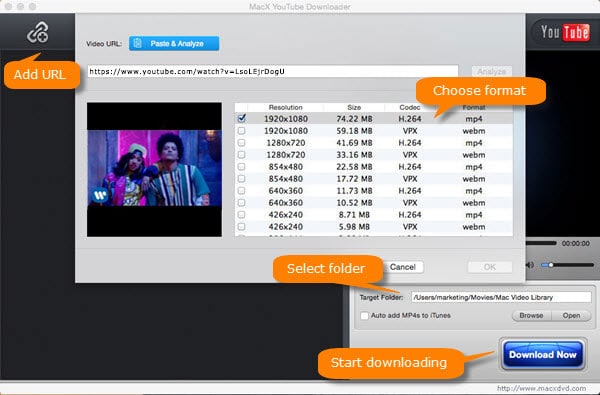
Step 2: Choose your wanted video formats, resolution, codec and size.
Step 3: Click "Browse" button to specify an output folder to save the downloaded video file.
Step 4: Hit "Download Now" button to start to download videos from YouTube, Vimeo, Facebook, etc.
Note: Please select "Auto add MP4s to iTunes" if you wanna play the downloaded videos on iPhone iPad iPod.
Disclaimer: Finally, MacXDVD Software doesn't advocate any reproduce, distribute, transmit, broadcast or sell any content for any other purposes without prior written permission of YouTube/Facebook or the respective licensors of the content. Please refer to specific terms of service for YouTube, Facebook or any other online video sharing sites before you use this video grabber for Mac.

Get the best ClipGrab for Mac alternative - MacX YouTube Downloader to easily download videos free from YouTube, Dailymotion, Facebook, Vimeo, and 1000+ video sites in 720P/1080P HD, 4K/8K UHD, MKV, MOV, 3GP, WMV, FLV, etc at blazing fast speed. No malware, virus, adware and more.



Free Download Video from YouTube for Offline Viewing
 YouTube offline Downloader
How to download YouTube videos for offline viewing
Free Convert YouTube to MP3
A guide about how to convert YouTube (60fps) to MP3 on macOS
For any questions with MacX YouTube Downloader, please feel free to contact our support team.


Home | About | Site Map | Privacy Policy | Terms and Conditions | License Agreement | Resource | News | Contact Us
Copyright © 2026 Digiarty Software, Inc (MacXDVD). All rights reserved
Apple, the Apple logo, Mac, iPhone, iPad, iPod and iTunes are trademarks of Apple Inc, registered in the U.S. and other countries.
Digiarty Software is not developed by or affiliated with Apple Inc.
 Free Download Video on Mac with Best ClipGrab for Mac Alternative