


Home >MacX Free M2TS Video Converter
MacX Free M2TS Video Converter - Free convert M2TS to MOV, MP4, AVI, YouTube, iPhone, iPad, iPod, etc on Mac
100% Free

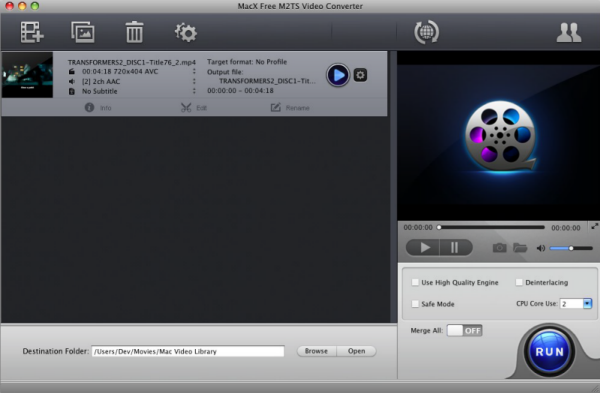
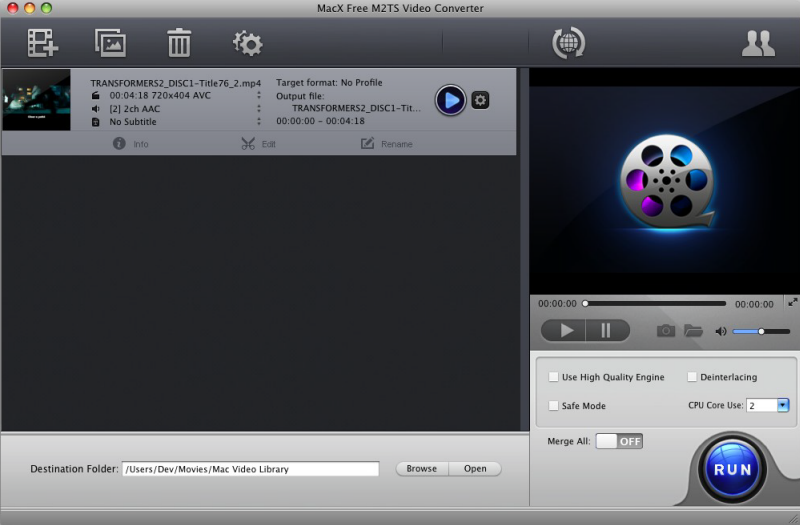
Apart from powerful M2TS converting function on Mac, editing function is another selling point. With the free M2TS video converter for Mac, you can clip file length to convert certain segment of the video, adjust video bitrate, video resolution, frame rate, etc to get the best output effect, and capture good pictures from the original video. Most functions can be called up with a simple mouse click.

 Import Video
 Step 1: Click "+" button to import video on Mac. Batch conversion is supported. You can import your pictures for slideshow making, as well.
 Select M2TS
 Step 2: Select M2TS as the output format. If needed, you're able to choose converting video to MP4, AVI, MP3, etc.
 Start Converting
Step 3: This free M2TS will run into action once you click "RUN" button. It will auto finish the video to M2TS conversion without any 3rd pary apps.

Free Convert M2TS, TS, MTS to All Popular Formats on Mac
MacX Free M2TS Video Converter is specially designed for Mac users to free convert video in M2TS format on Mac OS. It also supports converting TS and MTS video files. You can easily convert M2TS, TS, MTS to MOV, MP4, AVI, YouTube, iMovie, iPad, iPod, iPhone, Apple TV, Blackberry with a few clicks.
High Converting Speed
This free M2TS video converter for Mac takes you the least time to work with it, converting your M2TS video with the great speed, your CPU is fully used in this case. Now time is not a problem, just enjoy the fast video converting speed in your converting project.

Excellent Image and Sound Quality
This Mac free M2TS video converter can convert video with excellent quality with the help of the in-built High Quality Engine, and the De-interlacing feature also contributes to converting the video with high video and audio quality. You can get any formats you want with the best image and sound quality.

Easy to use
It's pleasant and simple for both beginners and advanced users. The default settings are specially designed for beginners. For advanced users, this video converter for Mac gives you much more opportunities to use it as you want as there are a great plenty of settings you can modify.

Split Video into Segment to Fit your Apple Devices
If your video is too large to fit your iPhone/iPad/iPod, the splitting function helps you split the file into several ones in smaller size by the specified file size or time length. You can trim videos by setting Start Time and End Time, get your favorite clips or episodes from your video easily.
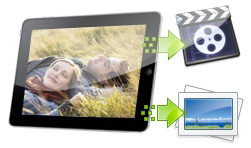
Take Snapshot from Video
You could also take snapshot from the videos in PNG format which can be used for wallpapers or share them with your friends. This feature makes you enjoy your favorite pictures wherever you go.

Make Photo Slideshow with Background Music
This Mac M2TS video converter excels in making slideshow from your photo libraries. Adding background music to your slideshow is also at your disposal. With a few clicks, your memories are transformed into Hollywood-like movies and you can share it on your mobile device effortlessly.
Input Format Supported
Input Files |
High Definition Video |
AVCHD Video (*.mts, *.m2ts), H.264/MPEG-4 AVC (*.mp4), MPEG2 HD Video (*.mpg; *.mpeg), MPEG-4 TS HD Video (*.ts), MPEG-2 TS HD Video (*.ts), Quick Time HD Video (*.mov), WMV HD Video (*.wmv, *.xwmv), Blu-ray Video (*.mts, *.m2ts), HDTV Video (*.ts), Matroska Video (*.mkv) |
Video Camcorder |
JVC HD camcorder Video (*.mod, *.tod), Sony HD camcorder Video (*.mts, *.m2ts), Panasonic & Canon HD camcorder Video |
|
Standard Definition Video |
AVI, MPEG, WMV, MP4, FLV, F4V, H.264/MPEG-4, DivX, XviD, MOV, RM, RMVB, VOB, ASF, 3GP, 3G2, QT, DAT, AVI, MPEG, WMV, MP4, FLV, F4V, H.264/MPEG-4, DivX, XviD, MOV, RM, RMVB, VOB, ASF, 3GP, 3G2, QT, DAT, Google TV, WebM, Vpx 8 |
|
Photo & Picture |
JPG, PNG, BMP |
Output Format Supported
Output Format |
M2TS, MOV, MP4, AVI, MP3, WMA, RA, WAV, PNG |
|
Platform |
Mac OS X Tiger/Leopard/Snow Leopard/Mountain Lion/Mavericks/Yosemite/El Capitan/macOS Sierra |
|






It is quite easy to use. Most of the features are pretty much self explanatory, with the minimalistic, simple interface and the use of tabs, navigating through the features and performing any feature is pretty much a walk in the park.
- Loic
So exciting! Your M2TS video converter for Mac converts tons of my M2TS videos without any problem. I am happy with the corking audio and image quality. BTW, the preconfigured profiles help me a lot!
- AndyRelated Articles

Best free M2TS Video Converter is recommended to you to convert MTS to MP4, MOV, WMV, AVI, YouTube, iMovie, iPhone, iPad, etc.

M2TS can't play on your iPhone iPad? Go to convert M2TS to MP4 with a M2TS converter freeware.

Unable to play M2TS on Mac with QuickTime player? Resort to M2TS converter to convert M2TS to QT MOV or MP4.

No need any 3rd party help, just one M2TS converter to convert M2TS to MOV on Mac just one click away.
I had the problem of converting some format. E-mail:support@macxdvd.com
Home | About | Site Map | Privacy Policy | Terms and Conditions | License Agreement | Affiliate | News | Contact Us
Copyright © 2024 Digiarty Software, Inc (MacXDVD). All rights reserved
Apple, the Apple logo, Mac, iPhone, iPad, iPod and iTunes are trademarks of Apple Inc, registered in the U.S. and other countries.
Digiarty Software is not developed by or affiliated with Apple Inc.