"What is the best method to transfer files like Word, Adobe, Excel, BBedit etc to the 32/64/128GB iPhone storage? Can I do this without jailbreaking and without uploading stuff to the cloud? I just want to mount iPhone as hard disk drive so that I can go from the Mac to iPhone."
iPhone is becoming stronger and smarter, bringing many brilliant features that make life even more easier, there is still one more question: users can't use iPhone as an external hard disk on Mac/PC directly. As iPhone has become an integral part of daily life, it's more convenient to save files on iPhone compared with tiny USB. You can use iPhone as a storage device through iTunes transfer or jailbreaking, but that's too much trouble. Below we will share two simple ways to mount iPhone as hard drive.
MacX MediaTrans comes up with a super-easy and fast solution that can easily mount iPhone as a hard disk, so you can easily turn iPhone/6s/se/6/5s etc into an external hard drive and copy files of any kind like movie, TV show, video, music, playlist, dmg, word, excel, pdf, etc to your iPhone, iPod, iPad (iOS 12 supported). Whatever you want to save on iPhone iPad, just connect your device to Mac (macOS High Sierra incl.) or PC (windows 10), and copy and paste the file then everything is done! You can transfer files to multiple iOS devices simultaneously without conflicting each other's files.


Without using iTunes or jailbreaking your device, its simple and fast and you are free to save anything on iPhone. Belowe we will show you how to use iPhone as an external hard drive on Mac.
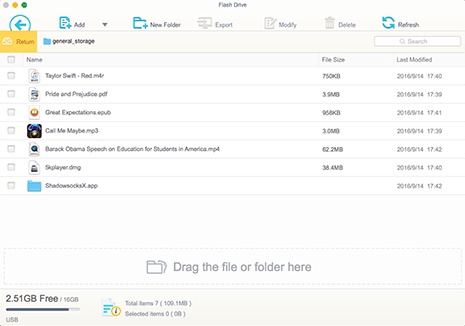
Step 1: Download and run this Mac to iPhone Mounter
Free download this iPhone mounter for Mac computer (Macbook Air/Pro, iMac etc) or the Windows version and launch it.
Step 2: Connect iPhone to Mac
Connect your iPhone to your Mac computer via USB (iPhone 8/7/6S/SE/6 supported), then all the content in your iPhone will be displayed on the main interface and sorted clearly in different catalogs.
Step 3: Store Files on iPhone
Click USB Storage on the left. Then choose the files you would like to transfer from Mac and drag it and drop to your iPhone.
As you can see from the figure above, this iPhone file manager provides several options to transfer iPhone files in addition to the mode to turn iPhone iPad into hard drive. Except the ability to use iPhone as flash drive, it also helps to transfer video from iPhone to Mac, as well as music, album photos, cameral rolls etc from iPhone iPad iPod to Mac with simply a click so that you can manage media on your iOS devices easily.
On top of the mentioned way, you are also suggested to try on the iOS free app named FileManager, which will accept your files and then, via iTunes, let you copy them to another computer.
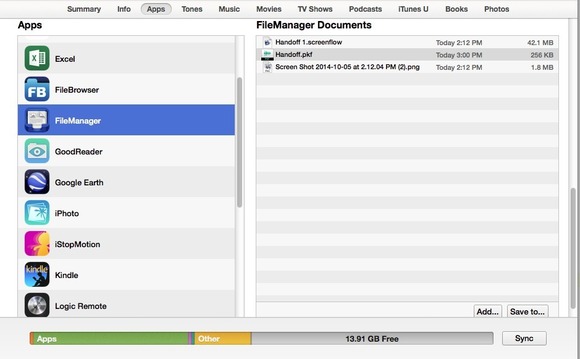
How to use your iPhone as a hard drive?
1. One free download a copy of this iPhone mounter app on iPhone and then connect your iPhone to Mac and launch iTunes.
2. Followed by a click on Apps in the upper ledge and choose FileManager.
3. Thirdly, just drag the documents you want to store on your iPhone into the FileManager Documents area to the right. No matter the file format this iPhone mounter is compatible with or not, it will accept all of them.
4. Last step, unplug your iPhone and now you can use iPhone as a hard disk drive.
 Author: Abby Poole | Updated on Dec 26, 2019

Want to backup or transfer to iphone 6 (Plus) since many users report data loss after iOS upgrade? This article will tell you how to backup iPhone and transfer data with iTunes and iCloud.
iPhone storage full? Hesitate to free up space on iPhone by deleting apps, photos, videos and music? Just follow this page to learn the most efficient ways to clear space on iPhone with/without deleting.

MacX MediaTrans is an all-in-one iOS iPhone mounter to moutn iPhone iPad iPod as hard disk drive, and transfer photos from iPhone iPad iPod to Mac computer, as well as transfer video/photos from iPhone iPad iPod to Mac and vice versa with world's fastest speed!
Home | About | Site Map | Privacy Policy | Terms and Conditions | License Agreement | Resource | News | Contact Us
Copyright © 2024 Digiarty Software, Inc (MacXDVD). All rights reserved
Apple, the Apple logo, Mac, iPhone, iPad, iPod and iTunes are trademarks of Apple Inc, registered in the U.S. and other countries.
Digiarty Software is not developed by or affiliated with Apple Inc.

 MacX MediaTrans - Mount iPhone as Hard Disk Drive