


HandBrake is famous as DVD ripper open source and video converter for Mac and Windows. It is able to convert any DVD-like source such as VIDEO_TS folders, VOB, TS files, and rip DVD to MP4 and MKV. However, a plenty of DVD movies at present are copyright protected by various types of encryption including CSS , Sony ARccOS, Region protection, UOP, APS, Disney Fake, etc, which are not supported internally by Handbrake and must be handled externally with third-party software VLC.
So when you intend to apply Handbrake to rip DVD to MP4 or MKV with copy protection, do you feel troublesome that you have to download and install another plug-in VLC media player? Do you have to stick to Handbrake for DVD ripping task? Of course NOT! See, you are living in a market economy society with dozens of Handbrake replacement for you. DVDShrink, AnyDVD, they are fantastic. But wait, they are the exclusive DVD ripping software for Windows users. How about Handbrake Mac alternatives Mac The Ripper and DVDFab? You can make sure they are compatible with Mac OS X, but Mac The Ripper only supports to rip DVDs to Video_TS and DVDFab is powerless to disable any DVD copy protection.
Disappointed? Don't be man! There is a silver lining to remove the dark cloud over your head Now! Just read on!

5-star solution: MacX DVD Ripper Pro
Take advantages of Handbrake alternative to rip copy protected DVDs to MP4, MOV, WMV, MKV, etc on Mac OS X (10.12) and Windows (10).


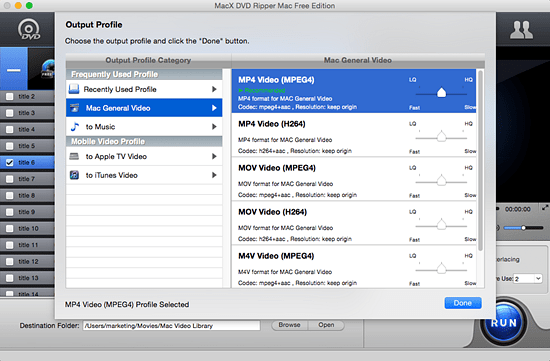
The ultimate Mac program similar to Handbrake goes to MacX DVD Ripper Mac Free Edition, which delivers users exceptional results. This free Handbrake alternative for Mac enables you to rip any DVD on Mac OS with easy removal of any encryption tech like CSS, Region Code, Disney X-project protection, Sony ARccOS, etc. with aplomb. It helps to convert DVD to MP4, MOV, M4V, iTunes, Apple TV, etc for playback your iPhone/6S/SE/6/6 Plus/5S/C, iPad mini 4/pro/Air 2, iPod Touch, etc. with unaffected quality attributing to the inherent High Quality Engine and hyper-threading tech.


Notice: The DVD ripper developer only encourages you to use this DVD ripper Mac to rip DVDs for legal personal use, instead of illegal reproduction or distribution of copyrighted content. Please obey your local DVD copyright law before doing it. DO NOT do harm to others' lawful rights and interests.

Rip copy protected DVDs
HandBrake needs you to take advantage of VLC's ability to skirt DVD copy-protection schemes when ripping commercial DVDs with Handbrake. Yet, this top-rated Mac handbrake substitute supports ripping all encrypted or copy-protected DVDs for free, such as Sony ArccOS, CSS encryption, region protection, UOPs, APS, etc, without any third party software.
Handbrake can't read Disney 99 titles encrypted DVD
Disney new released DVD has 99 titles and the DVD movie size is more than 40 GB, Handbrake will crash when it launches to rip 99 titles DVD. However, this DVD ripper for Mac (macOS High Sierra/El Capitan) has the ability to access all types of encrypted DVD including the new Disney encrypted DVD and choose the correct title to rip DVD free automatically.
The advanced edition of the free Mac DVD ripper MacX DVD Ripper Free Edition, MacX DVD Ripper Pro renders you the best solution to backup DVD to single MPEG-2 file for Mac users with original video and original 5.1-channles AC3/DTS Dolby audio. This new DVD backup feature is very useful when you backup DVD to USB disk driver and plug the USB driver to PS4, Xbox One or some modern TV set which can play videos from USB interface directly. Obviously Handbrake does not support this DVD backup feature.
Although the latest version HandBrake is speedier than previous versions, offering a speed boost of up to 10 percent, while the best alternative to Handbrake-MacX DVD Ripper Free Edition delivers much faster speed than Handbrake. HandBrake encoded the 1-hour, 59-minute DVD movies in 65 minutes, MacX DVD Ripper Free Edition took 28 minutes to do the same job. No mention the speed of copy features, it only took 18 minutes.
Handbrake often gives the user some incorrect title number, but the main title is not show in the title list. Also, when you use Handbrake to rip Disney DVDs, you'll encounter various issues. So, you can't use Handbrake to rip those DVDs, that's because the HB uses the open source code libdvdread and libdvdnav. While MacX DVD Ripper Free Edition acts as a real DVD Player, and this DVD ripper for Mac has no problem reading and analyzing DVD navigate instructions.
Handbrake only rips DVD to MPEG-4 and H.264 video such as iPhone iPod. To surprise you, MacX DVD Ripper Pro can rip and copy any new DVD movies to 180+ different video formats, support ripping DVD to iPhone X/8/7/7 Plus/6s/6/Plus, iPhone 5/5S/5C, iPad Air 2, iPad Mini 4, iPod touch 5 and iPod, MP4, MOV, FLV, MPEG, MP3, etc on Mac OS. Handbrake has about 8 profiles built-in, most related to Apple iPhone and iPod. MacX DVD Ripper Pro is built in about 350+ profiles. In other word, this second-to-none Handbrake Mac replacement meets all your needs and can easily fix any Handbrake errors.
Note: To playback the ripped DVD contents on computer, in fact, you need an all-around iOS data transfer like MacX MediaTrans to copy videos from Mac/PC to iPhone iPod iPad for enjoying on the move. Of course, this iPhone transfer also is capable of moving photos from iPhone to computer or downloading music/eBooks from iPhone to computer and vice versa.
 Author: Bella Brown | Updated on Jan 8, 2025

Something is wrong. I download and install Handbrake 1.0.0 on Windows 7 but failed, the NET Framekwork 4.6 is the one to blame? Why downloading Handbrake 1.0.0 or 1.0.1 on Mac is smooth but fails on PC? Answer is here.
Handbrake supports to convert DVD to MKV VP9 free on both PC and Mac. Yet, accident always happens. Handbrake might half crashes during DVD to MKV conversion. In such case, you can consider to shift to another Handbrake alternative - DVD ripper from MacXDVD to get DVD ripped to MKV format.
Download MakeMKV on Mac and rip DVDs/Blu-rays to MKV HD, and follow to fix MakeMKV for Mac ripping DVDs errors, copy DVD to MKV MP4 AVI MOV etc. with MakeMKV for Mac alternative.

MacX DVD Ripper Pro, top alternative to Handbrake for Mac to do what Handbrake can't do! Add soft hard subtitle to movie, remove any DVD copyright protections and copy DVDs to ISO image, MP4 MOV dozens of formats original quality.
 Download Handbrake for Mac Alternative to Rip Protected DVDs