You Are Properly Using the Wrong Method to Save Videos from YouTube on Mac
You'll get a long list of different ways to save YouTube videos on Mac in Google search, Chrome/Firefox/Safari extensions, online YouTube video downloaders, video players, the list goes on. After spending a big amount of time trying to use these methods to save videos from YouTube on Mac, you find the task really needs patience. For example, some tell you that it works to put the word kiss before youtube in the video URL, however, it only redirects you to a spam website. We've tried all the possible ways to save YouTube videos to Mac and offer you the most reliable YouTube video downloader for Mac that works 100% without tricks buried deep inside.
Reasons Why We Don't Use Online Tools to Save YouTube Videos on Mac
There are many online video downloaders capable of saving videos free from YouTube on Mac computer, such as Clipconverter and Keepvid. It's quite easy to download YouTube videos free on Mac via these websites, just open the site, copy and paste YouTube video URL and here you go. However, you can't ignore some major problems facing most online programs for capturing YouTube videos on Mac.
Ads and spam. Free YouTube video saving sites are always fraught with ads, misleading download buttons, and redirects and give you a sense that you're swimming in a lake of spam. The process is also treacherous. You have to keep your eyes peeled to stop from installing unwanted programs, especially when you click the download button to save YouTube videos on Mac.
Error. Online applications pop up error messages from time to time, for instance, "[Application name] is not available for videos containing music." "Some videos cannot be downloaded for various reasons. These links were skipped." Or the tool gets stuck when downloading 4K videos from YouTube.
Limits. Online applications for saving YouTube videos have limits on the numbers of videos you can save, video length, and video types you can save. It will keep promoting the paid pro version.
Chrome, Firefox and Safari YouTube Offline Plugins Are Not Trustworthy Either
Many YouTube offline downloaders for Mac can be found on Chrome web store, Firefox Add-ons, and Safari Extensions. After installation, these add-ons let you quickly and easily save YouTube videos on Mac. But you'd better know that some of them are just wrappers and require third party help to finish YouTube video download task. You'll spend some time studying how to save YouTube videos on Mac free. And it's often the case that such add-on doesn't recognize or grab YouTube videos. Don't waste your time.
A Sure-fire Method to Save YouTube Videos on Mac
Macxvideo AI is our favorite. It offers a straightforward solution for all your YouTube video downloading needs. It saves YouTube videos, clips, music and movies to Mac at quality up to 8K, 4K UHD, with a wide list of formats supported, such as MP4, FLV, MOV, AVI, HEVC, VP9 etc. 3D and 360 degree YouTube videos are all downloadable requiring no additional software. Only a few seconds is needed to save a 5-minute clip from YouTube. It is able to save videos from tons of other video sharing sites like Facebook, Vimeo, Dailymotion, Instagram, Metacafe and more. There are many other stunning features for you to explore. Follow the guide below to learn how to get started.

Secure Download

Secure Download
How to Save Videos from YouTube on MacBook Air/Pro/iMac
Step 1: Copy and paste YouTube video URL
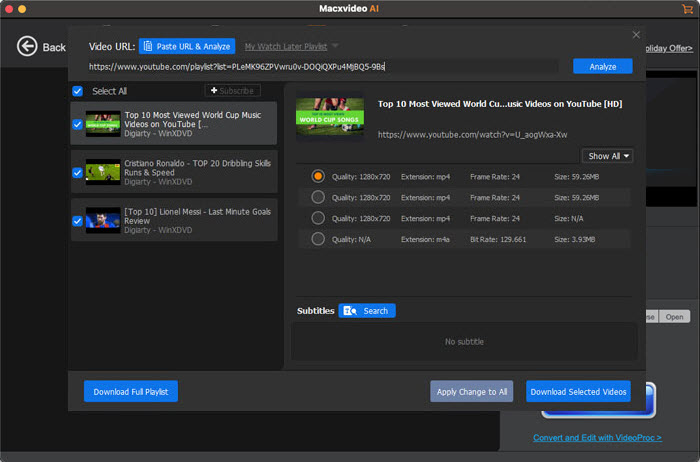
Launch the YouTube video downloader for Mac, click the YouTube icon in the top menu bar, and you should see the YouTube Downloader interface. Open the YouTube video you'd like to save on Mac, copy the URL and paste it in the box next to the Analyze button, then click "analyze". The video will be loaded quickly. The program allows users to save YouTube videos on MacBook Air/Pro or iMac in batch, so you can add multiple YouTube URLs at a time. It has no limits on the video length, or the number of YouTube videos you can download.
Step 2: Select YouTube video settings
After the YouTube video is load, it will bring up a window with all the video info displayed, including video resolution, size, codec, and format. Choose the video parameters you'd like to save, and click OK to make the settings valid. If you have enough free space on Mac, we recommend you to select the highest resolution. As for the video format, you won't go wrong with MP4 with H.264 codec. If you want to change the output format or the available YouTube video format, you can select the option "Auto add to convert list", and the program will help convert YouTube video to MP3, MP4, AAC, or other format you want.
Step 3: Start to save YouTube videos on Mac
Once you've all set, click Download Now button at the bottom of the window to begin to save YouTube videos on desktop Mac. The YouTube downloader for macOS will save videos in ultra-fast speed with low CPU usage. Now, you can save the YouTube video to hard drive, or watch it on desktop, HD TVs offline, or transfer the video from Mac to iPhone, iPad, mobile devices.
Fair Use Disclaimer: It's illegal to save YouTube videos to Mac without the permission of the copyrighted content owners. According to YouTube Terms of Service, you shall not copy, reproduce, distribute, transmit, broadcast, display, sell, license, or otherwise exploit any content for any other purposes without the prior written consent of YouTube or the respective licensors of the content.
 Author: Bertha Miller | Updated on Dec 25, 2020