Top 7 YouTube Applications for MacBook Air/Pro/iMac
I'm looking for YouTube App for MacBook Pro. I checked the App Store but I guess there is no such thing… Does anyone offer something like this?"
"8 out of10 18-49 year-olds watch YouTube in an average month." You'll find no video sharing site more lauded than the popular YouTube. But the fact is that no one loves ads and buffering and it's troublesome to go to the website, sign in, open the video URL, etc. That's why we enlist top 7 free YouTube apps for Mac, with which you can download YouTube videos offline and play YouTube videos in a quicker and more comfortable way.
MacX YouTube Downloader
Size: 22.86MB
Price: Free
Rating: 
Compatibility: Mac OS X 10.5 - macOS High Sierra
 Free download YouTube Offline App for Mac
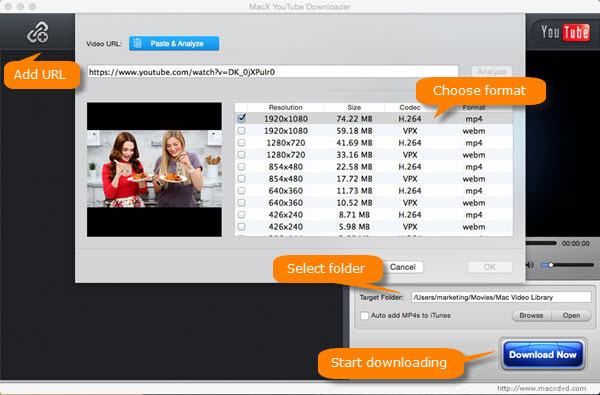
MacX YouTube Downloader is one of the most popular free YouTube download apps for Mac. You can use it to free download HD videos from YouTube on Mac, including 8K, 4K 2160P, 1080P, HD & SD YouTube videos, movies, music, and clips in batches for offline playback on MacBook Air/Pro or iMac without ads. It also allows you to save videos from Facebook, Vimeo, Dailymotion, 300+ video sites on Mac. Its built-in video player enables you to watch YouTube videos while downloading YouTube videos offline. The program is 100% free and clean - no ads, no plugin, no tricks. The free app for Mac supports the latest macOS High Sierra.
Macxvideo AI
Size: 35.8MB
Price: Free Trial
Rating:
Compatibility: Mac OS X 10.5 - macOS High Sierra
Free download YouTube Offline App for Mac
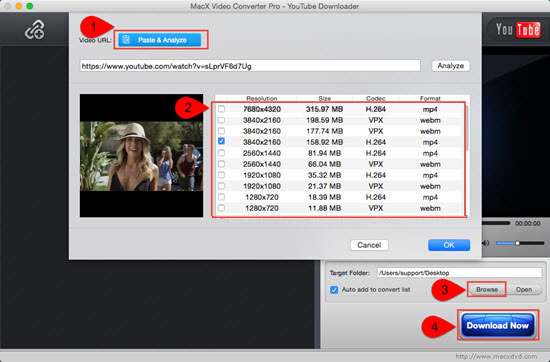
Macxvideo AI is the fastest Mac YouTube download app. It is able to download 4K videos from YouTube, Facebook 300+ sites in 5x faster speed than other freeware for Mac or online tools. The software does more than YouTube video download. It helps convert YouTube video to MP3, MP4, MOV, AVI etc. format, edit videos for YouTube upload, capture screen video, and more. The YouTube app for Mac fully supports 4K UHD and HEVC codec.
YTD for Mac
Size: 10.68 MB
Compatibility: Mac OS X
Rating: 
Price: Free but limited
The YouTube offline app for Mac supports batching downloading videos, including HD videos from YouTube. Though it doesn't have a modern interface design, it's not difficult to figure out how to save YouTube videos offline on Mac, just copy and paste video URL and click the Download button. Keep your eyes open while installing the free YouTube downloader for macOS as the program will ask you to install other extensions. Sometimes it pops up failed (2) code and says the video you have requested is not available. It may stutter when saving 4K videos from YouTube.
Go for YouTube
Size: 2.5MB
Price: Free
Rating:
Compatibility: OS X 10.9 or later
Go for YouTube is a must-have Mac app desktop for YouTube that can improve YouTube video viewing experience on Mac. It offers users a quick access to YouTube from the menu bar on Mac without needing to open a web browser. In addition, the YouTube app for Mac can help remove YouTube video ads and open a video in a different tab. Fullscreen option, Window opacity control, and voiceover support are also provided by the free Mac YouTube app. Sometimes, however, the app runs slow on Mac and scrolling can be lagging (learn how to fix Mac running slow issue). It might not run on the latest macOS High Sierra.
TubeG Pro
Size: 13.5MB
Price: $9.99
Rating:
Compatibility: OS X 10.9 or later
TubeG Pro is a professional YouTube app for Mac, allowing you to quickly open and play YouTube videos, adjust screen size, and watch YouTube videos in a spate window. It plays up to 8K 4320p and UHD 2160p quality. Moreover, the Mac YouTube application supports tons of other websites like Facebook, Vimeo, Dailymotion, Metacafe. Its pro version gives much more advanced options for users. Before you buy its pro version, you can download TubeG Pro Demo to see whether the macOS desktop app for Mac is qualified.
Such viewing app doesn't let you watch YouTube offline. If you want to watch YouTube without internet connection, you still need YouTube offline downloader.
Tubbler
Size: 1.8 MB
Price: Free
Rating: 
Compatibility: OS X 10.6.6 or later
With the free YouTube app for MacBook Air/Pro/iMac, you are free to watch YouTube in fullscreen mode, or in a small floating window. You can add a collection of video titles to the video queue and play them in order without distraction. The app requires no Adobe Flash Player. What's more, it adds support for Apple Remote. The free YouTube desktop app for Mac lacks frequent update. It is not available for macOS Sierra or later.
Other useful Mac programs for YouTube: YouTube video editors for macOS, YouTube converter for Mac.
App for Youtube
Size: 0.4MB
Price: Free but limited
Rating:
Compatibility: OS X 10.7 or later
It is a top-ranked free YouTube app for Mac that is designed to enhance YouTube video viewing experience. The app has all the basic function of a YouTube video app should have, for instance, quick access to watch YouTube videos, comment, and upload videos, optional dock icon, and hotkey activation. Users can only go fullscreen using the paid pro version The desktop YouTube app for Mac free version will keep asking you to update to the pro version for better experience. The Mac YouTube app is available on App Store.
Fair Use Disclaimer: We don't advocate any reproduce, distribute, transmit, broadcast or sell any YouTube copyrighted content for any other purposes without prior written permission of YouTube or the respective licensors of the content. Please download these YouTube apps for Mac for fair use. Different countries have different rules. Using a YouTube video for teaching, researching or criticizing is considered fair use. It's illegal to download YouTube videos using YouTube offline apps for Mac for commercial use without the copyright owner's permission.
 Author: Bertha Miller | Updated on Dec 3, 2018